Limited Time Offer: 50% OFF on All Plans for 6 months. New Customers Only.


Cursor
Cursor's hero places a one-sentence positioning headline and a "Download for macOS" button above a large product demo of agents working through tasks in the desktop app and CLI.
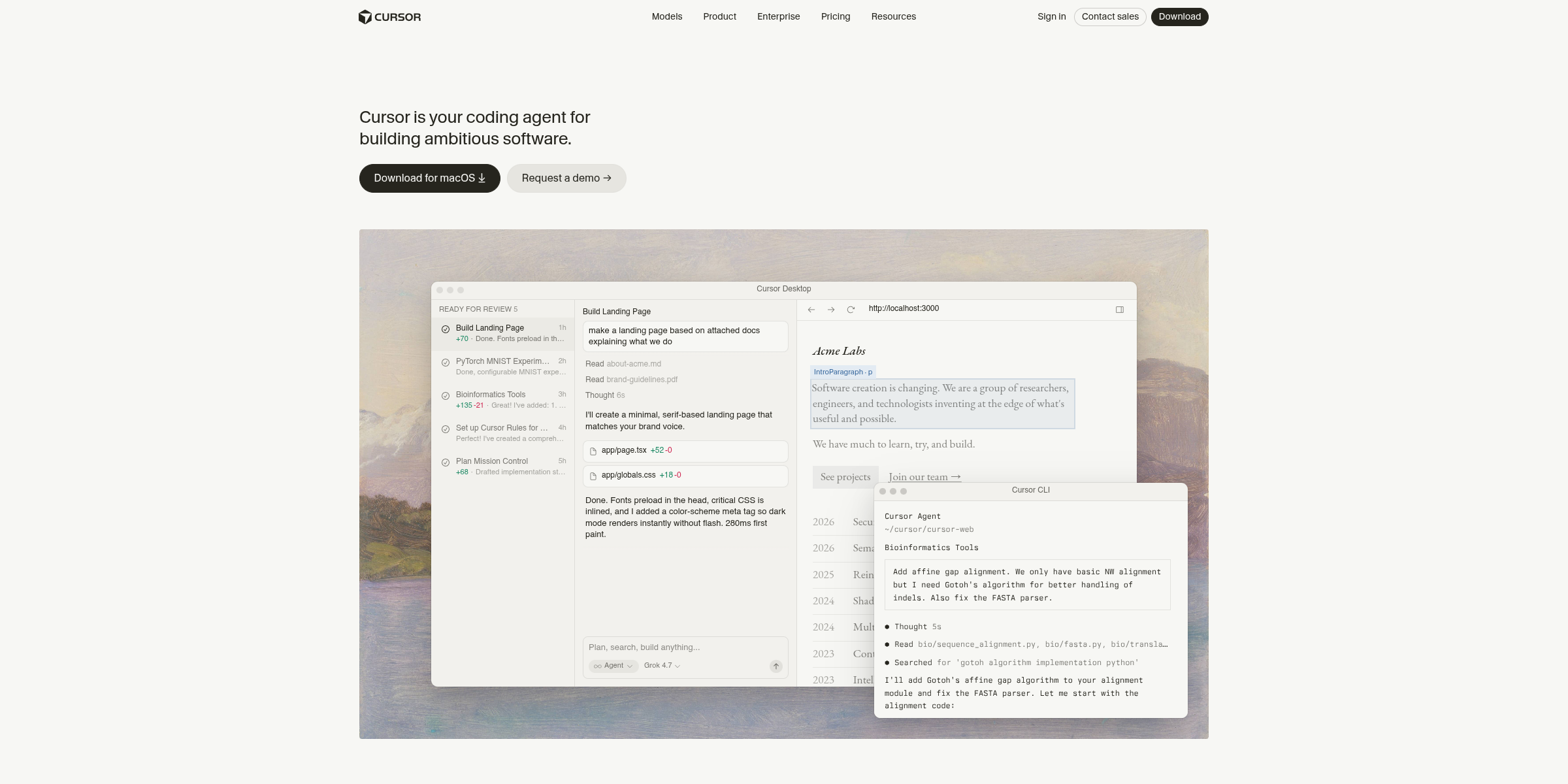
This Cursor hero section lets the product do the talking, pairing a single confident statement with a live look at its agents at work.
Here’s why it stands out:
1. A Headline That Defines the Category
The headline “Cursor is your coding agent for building ambitious software.” names the product, its role and its audience in one sentence. Framing Cursor as “your coding agent” rather than just an editor positions it squarely in the AI-agent era.
2. Ambition as the Hook
The phrase “building ambitious software” speaks to developers’ aspirations instead of a feature list. It promises leverage on big projects, not just faster autocomplete.
3. Download-First Primary CTA
The “Download for macOS” button, paired with a download icon, takes visitors straight to the installer in one click. For a desktop tool, getting the app installed is the most valuable first step.
4. Clear Paths for Every Buyer
“Get started →” serves individual developers who want to try it now, while “Request a demo →” gives engineering leaders and enterprise teams a sales-led route, all without cluttering the hero.
5. Product Demo Instead of Illustration
The hero visual shows Cursor Desktop with agent tasks organized into “In Progress” and “Ready for Review” columns, diff counts and a live localhost preview. Visitors immediately see agents running parallel tasks and handing back reviewable code.
6. Desktop and CLI Side by Side
Alongside the desktop app, the demo shows the Cursor CLI handling a real-world prompt to fix a FASTA parser. This signals that Cursor fits into any workflow, from the IDE to the terminal.
7. Minimal, Developer-Friendly Design
With no announcement banners or badges competing for attention, the restrained layout keeps the focus on the headline and product. The understated styling feels at home for an audience that values tools that get out of the way.