




Samsung just told Galaxy owners that Samsung News ends on December 21, 2026. Months earlier, Samsung Messages gave way to Google Messages. Before that came a chain of content apps that kept changing names.
You can read that as a company cleaning house. You can also see it as a practical lesson in product consolidation: what to combine, what to discontinue, and how to keep customers informed.
You may not manage an entire phone ecosystem, but if your business has launched another product, added a pricing tier, introduced an add-on or acquired a tool, you may eventually need to simplify your product lineup. Here are seven lessons you can apply to your business.
What Samsung actually did (the short version)
- Content apps: The PC Enthusiast describes a series of replacements: Bixby Home gave way to Samsung Daily, which became Samsung Free, which was followed by Samsung News in April 2023. Samsung News now closes on December 21, 2026.
- Messaging: Samsung Messages was discontinued in the US on July 6, 2026, with users moved to Google Messages and history promised to transfer, per Droid Life.
- The alternative for News: Google Discover, which many Galaxy phones already include. Samsung hasn’t named a successor, according to Android Headlines.
Samsung hasn’t published its reasoning for any of this, so we won’t guess at it. We’ll learn from what’s visible.
Lesson 1: Every product needs a reason to exist next to the others
When two products serve the same purpose, customers may struggle to understand which one they should use. Samsung ended up with its own messaging app next to Google’s. Eventually, Samsung had to announce that one of the products would be discontinued.
Ask this about every product, plan and feature: what job does this do that nothing else we sell does? If you can’t explain its purpose in one sentence, it may be time to combine it with another product.
Lesson 2: Don’t rename your way out of a problem
Changing the name of the same app several times can make it difficult for users to recognize and follow. Each new name forces users to learn something new and remember which product replaced the old one.
Customers become familiar with product names over time. A DesignRush roundup of 2026 branding stats notes that a logo can take 5 to 7 impressions to feel familiar (the page doesn’t name the original study, so treat it as a rule of thumb). Changing the name too often means customers have to get familiar with your brand all over again. If a product is struggling, fix the experience first. Rename only when the positioning truly changed.
Lesson 3: Transfer customer data, not just users
Samsung told Messages users their history would transfer. For News, it said personalization data will be deleted after closing. Which one feels safer?
When you combine products, customers care about what they already have in the old one, such as settings, history, projects, and saved items. If you can carry it over, do. If you can’t, say so up front and offer an export.
Lesson 4: Name the destination
“Switch to Google Messages today” is a clear instruction. “We’re closing News” with no named successor leaves users hunting. Even a suggested alternative is more helpful than leaving customers to find one themselves.
For your business, provide a button, a simple guide, and a short comparison of the old and new products.
Lesson 5: Be honest about what’s lost
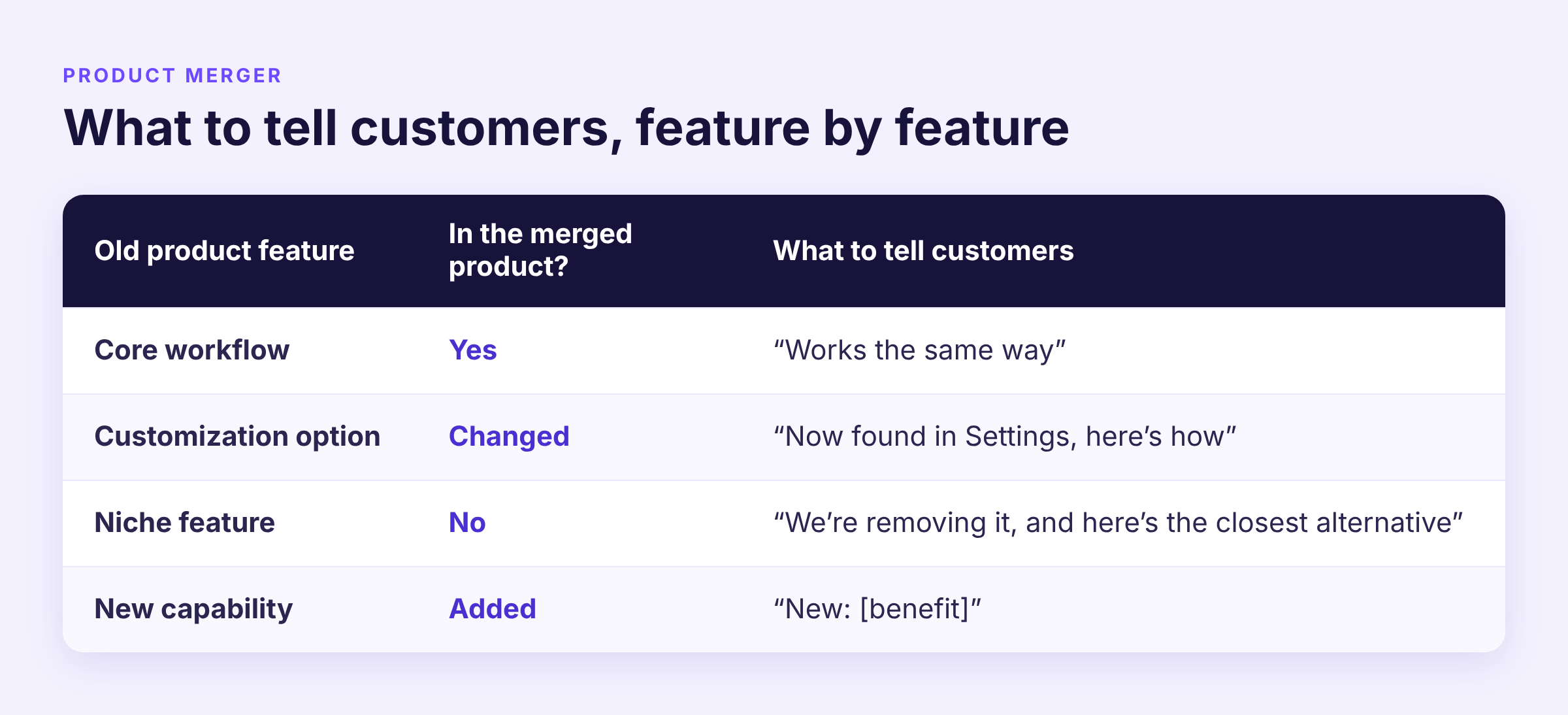
Droid Life notes that Google Messages lacks some Samsung Messages features, such as custom categories. That’s normal. Combining products often means that some features will change or disappear.
Customers are more understanding when a feature is removed than when they’re told nothing will change and later discover otherwise. List what’s gone, what’s different and what’s better. A simple table does it.
Lesson 6: Merge the visual system, not just the code
This is where good design makes a difference. After combining products, the new experience should look and work like one consistent product. Different button styles, mismatched icons, and an outdated help center can make the product look unfinished.
Keeping your brand consistent also makes good business sense. The same DesignRush roundup cites a MARQ survey in which 68% of companies reported that consistent branding contributed 10 to 20% of revenue growth. It’s self-reported, so read it as a signal rather than a guarantee, but the direction matches what most brand teams see.
A quick consolidation design checklist
- One logo lockup and one naming pattern for the merged product
- One color palette, type system and icon set across the app, site and emails
- Updated app-store listings, screenshots and social profiles
- Redirects from old pages to the new one
- A short “what changed” page, designed to match your brand
Need a system for this? Start with our posts on cohesive branding strategies and techniques and integrating brand into all aspects of the company.
Lesson 7: Measure before you cut
Discontinuing a product or feature simply because usage appears low can be risky. Pendo’s 2019 Feature Adoption Report estimated that public cloud software companies had put up to $29.5 billion of R&D into features that went unadopted or underused, per Pendo’s press release. That’s a big reason consolidation happens. But even a product with few users can still be important to certain customers.
Before discontinuing a product, check who depends on it and how difficult it would be for them to move to another option. We cover that process in our guide on how and when to rebrand your business.
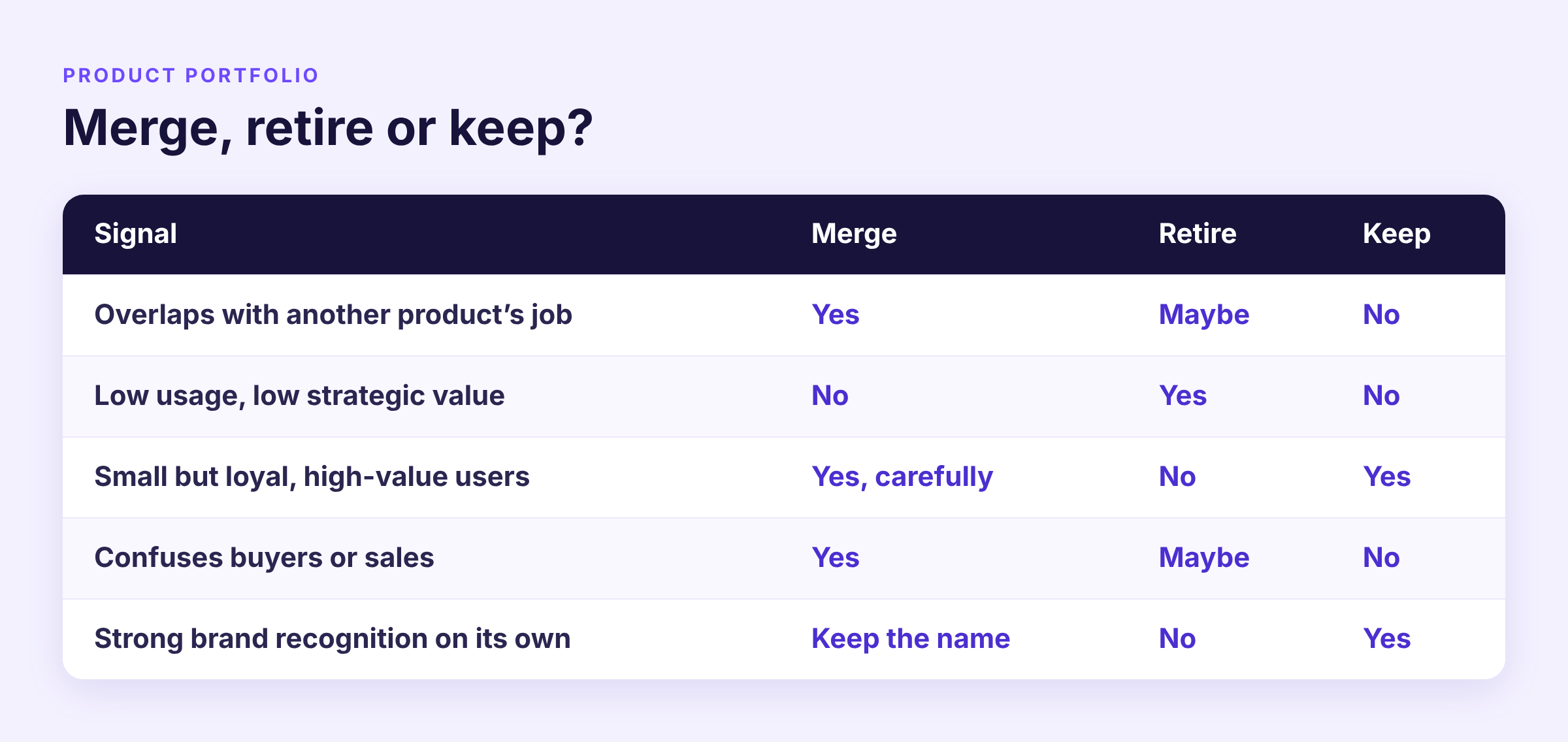
Merge, retire or keep? A decision table
Why trust is the real consolidation metric
Combining products is also a matter of customer trust. Edelman’s 2025 brand trust report, based on 15,000 respondents in 15 countries, found that 80% of people trust the brands they use. Your customers already trust the old product. How you handle the change will either strengthen or damage that trust.
The new, combined product also needs a clear identity so customers can recognize it. We covered that in branding lessons from a crowded release week.
Your 15-minute consolidation audit
- List every product, plan and major feature you sell.
- Write the one-sentence job each one does.
- Circle any that share a job.
- Pull usage and revenue for each circled item.
- Place each one in the decision table above.
- For anything you merge, draft the “what changes” table from Lesson 5.
Make the combined product feel consistent and well designed
Product consolidation works best when every customer-facing element looks consistent and well planned: the new logo lockup, the announcement email, the updated app screens, the landing page, the help-center graphics. That’s a lot of design in a short window.
That’s where a Draftss subscription can help. One team, one brand system, fast turnarounds across design, web and marketing. See what’s out there in our top unlimited graphic design services for 2026, then explore our logo and brand identity service. Get started with Draftss today.
Drop your thoughts in the comments below.
Your email address will not be published. Required fields are marked *