

Miester
MeisterTask is the most intuitive collaboration and task management tool on the web.
Miester Pricing Page Design
$0 - $49 4 Plans
Launch Website
Sign up, invite your team and start working. No training required.
This Miester pricing section is effective for several reasons:
1. Clear Hierarchy and Visual Appeal:
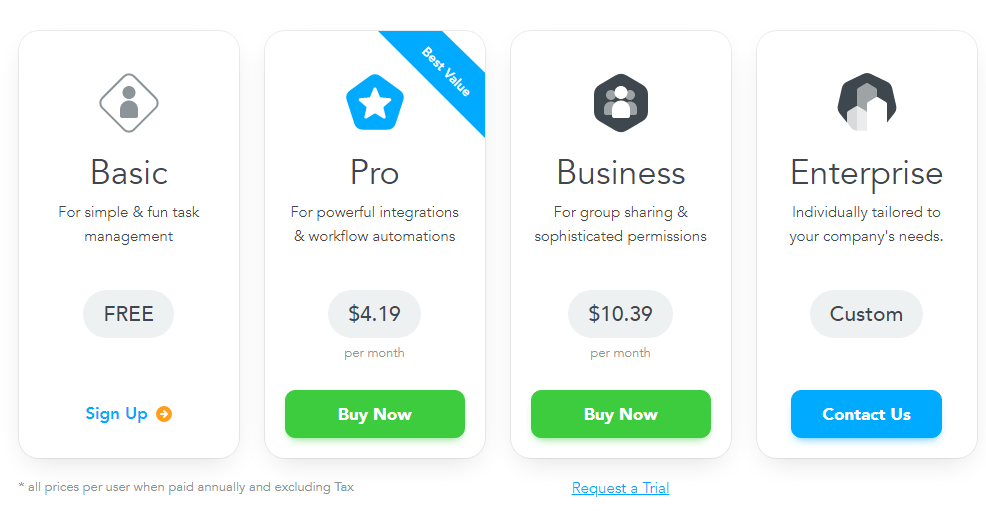
- Distinct Tiers: The “Basic,” “Pro,” “Business,” and “Enterprise” tiers are clearly labeled and visually separated.
- “Best Value” Highlight: The “Pro” tier is clearly marked as “Best Value,” drawing attention and guiding user choice.
- Consistent Layout: Each tier follows a consistent layout with descriptions, pricing (where applicable), and call-to-action buttons.
- Visual Cues: The use of distinct icons for each tier enhances visual appeal and understanding.
- Clear Headings: The headings clearly indicate the purpose and target audience of each tier.
- Pricing Clarity: The monthly prices are prominently displayed for the “Pro” and “Business” tiers, with “FREE” clearly indicated for the “Basic” tier.
- Call to Action Buttons: The “Sign Up,” “Buy Now,” and “Contact Us” buttons are visually distinct and clearly labeled.
- Request a Trial: The “Request a Trial” option is present.
- Pricing Disclaimer: The inclusion of “* all prices per user when paid annually and excluding Tax” provides clear pricing information.
2. Value-Based Differentiation:
- Targeted Descriptions: Each tier has a concise description that clearly identifies the target customer and their needs.
- Feature Progression: The descriptions show a clear progression of features, from basic task management to advanced integrations and permissions.
- Specific Feature Differentiation: The mentions of “integrations & workflow automations” and “group sharing & sophisticated permissions” clearly differentiate the tiers.
- Quantitative Differentiation: The differences in monthly prices provide clear quantitative differences.
- Free Option: The “Basic” tier offers a free option, lowering the barrier to entry.
3. Transparent Pricing:
- Clear Pricing Information: The monthly prices are clearly stated for the “Pro” and “Business” tiers, with the “Basic” tier clearly marked as “FREE.”
- Custom Pricing: The “Enterprise” tier uses “Custom” and “Contact Us,” indicating a tailored solution for larger clients.
- Pricing Disclaimer: The disclaimer clarifies that prices are per user, annual, and exclude taxes.
4. Addressing Different User Needs:
- Simple Task Management: The “Basic” tier caters to users with simple task management needs.
- Advanced Features: The “Pro” and “Business” tiers cater to users needing more advanced features like integrations, automation, and permissions.
- Enterprise Needs: The “Enterprise” tier caters to organizations needing tailored solutions.
5. Strategic Use of Information:
- Benefit-Oriented Descriptions: The descriptions focus on the key benefits of each tier.
- Clear Call to Action: The call-to-action buttons provide clear paths for action.
- Concise Descriptions: The descriptions are brief and to the point, making it easy to understand the purpose of each tier.
- “Best Value” Highlight: The “Best Value” label on the “Pro” tier influences user choice.
- Request a Trial: The “Request a Trial” option is present.