
Zapier
Pricing page design for Zapier, the AI orchestration and workflow automation platform, from the Free plan to the Professional, Team and Enterprise plans.
Zapier Pricing Page Design
$50 - $149 4 Plans
Launch Website
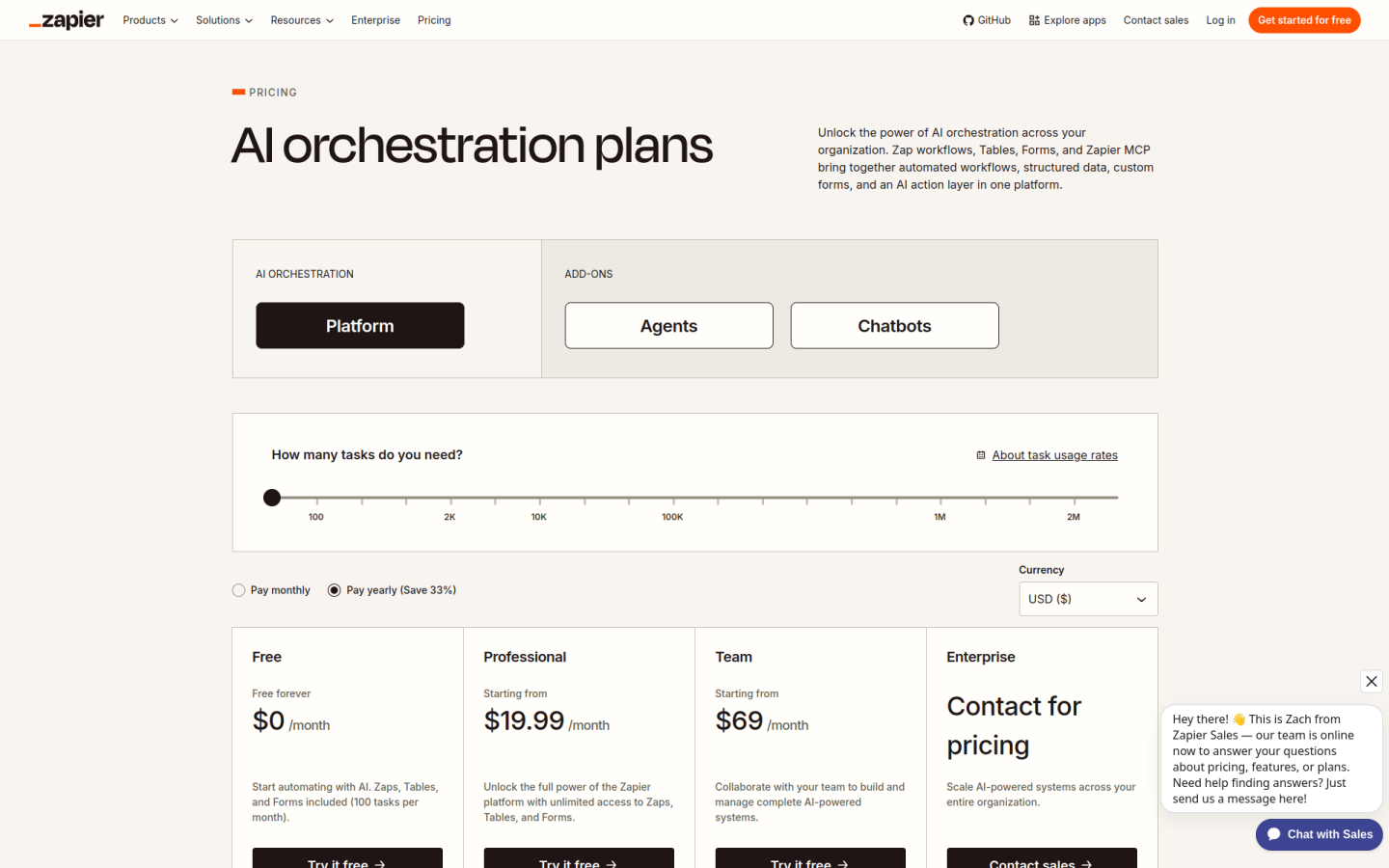
The Zapier pricing page is built to sell automation as a full AI orchestration platform that grows with the number of tasks you run:
1. Clear Hierarchy and Visual Appeal:
- AI-Led Headline: The page opens with “AI orchestration plans that scale with you,” which frames Zapier as more than a simple app connector.
- Four Plans in a Row: Free, Professional, Team and Enterprise sit side by side, moving from a single user to a whole organization.
- Product Tabs: Tabs for AI orchestration, Platform, Add-ons, Agents and Chatbots let buyers explore each product without leaving the page.
- Interactive Controls: A “Pay monthly” and “Pay yearly (Save 33%)” toggle, a task slider from 100 to 2M tasks per month and a currency picker update the prices on the spot.
- Clear Calls to Action: Free, Professional and Team use “Try it free,” Team adds “Contact Sales” and Enterprise uses “Contact sales.”
2. Value-Based Differentiation:
- Free: Includes unlimited Zaps, Tables and Forms, two-step Zaps, Zapier Copilot in beta and 100 tasks per month.
- Professional: Unlocks multi-step Zaps, webhooks, premium apps and AI fields for one person running real automations.
- Team: Adds 25 users, shared Zaps and folders, shared app connections, SAML SSO and priority support.
- Enterprise: Adds unlimited users, advanced admin permissions and app controls, advanced deployment options, annual task limits, observability and a Technical Account Manager.
- One Platform on Every Plan: The page notes that all plans include Zap workflows, Forms and Tables, so buyers pay for scale rather than for core features.
3. Transparent Pricing:
- Annual Prices: Professional starts from $19.99 and Team starts from $69 per month when billed yearly.
- Monthly Prices: On monthly billing, Professional starts from $29.99 and Team starts from $103.50 per month.
- Task-Based Pricing: Prices rise with the task limit picked on the slider, and a banner explains that AI steps, code and the SDK now use the same task-based pricing.
- Custom Enterprise Pricing: Enterprise shows “Contact for pricing,” and buyers need to talk to sales for a quote.
4. Addressing Different User Needs:
- Beginners: The Free plan lets anyone start automating with AI at no cost.
- Solo Power Users: Professional covers people who need multi-step workflows and premium apps.
- Teams: Team focuses on collaboration, with shared Zaps, shared connections and SSO for up to 25 users.
- AI Builders: Separate Agents and Chatbots plans, such as Agents Pro at $400 a year and Chatbots Pro at $160 a year, serve teams building AI assistants.
- Non-Profits: Non-profit organizations get 15% off paid plans.
5. Strategic Use of Limitations and Incentives:
- Task Limits: The 100-task cap and two-step Zaps on the Free plan give growing users a clear reason to upgrade.
- Free Trial: Professional comes with a 14-day free trial with no credit card required, while Team and Enterprise trials are arranged through sales.
- Annual Savings: The “Save 33%” label on the yearly toggle pushes buyers toward an annual commitment.
- Fair Usage Rules: The FAQ explains that only successful actions count as tasks, and that triggers, Filter, Formatter, Paths, Tables and Forms are free.
- Flexible Overage: When a task limit is reached, users can switch on pay-per-task billing or pause their Zaps until the next period.