

Whatagraph
Whatagraph is the most visual reporting tool for marketing analytics and social media reporting.
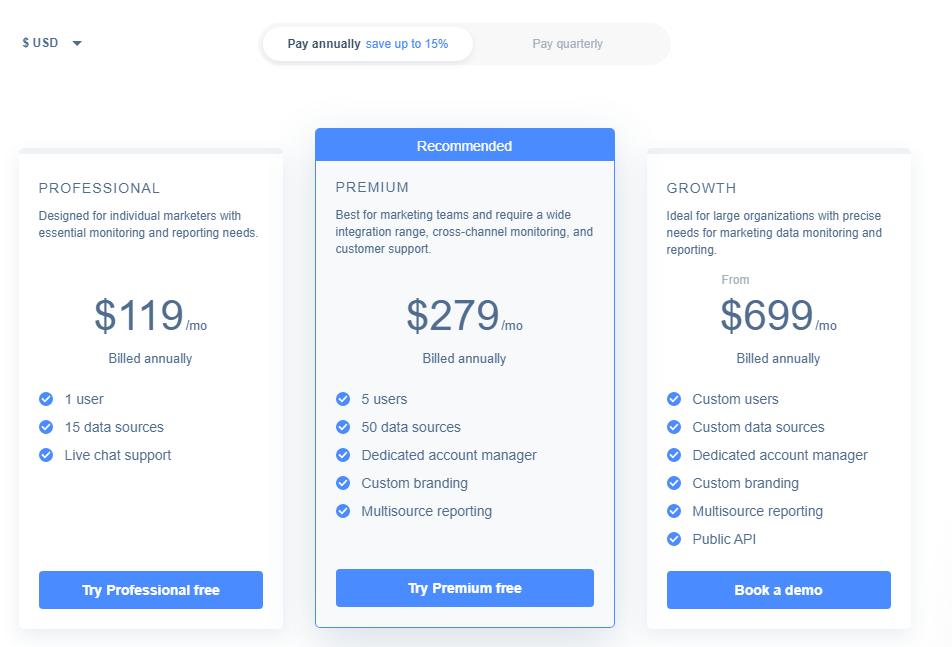
Whatagraph Pricing Page Design
$150 - $499 3 Plans
Launch Website
Start free trial now! No CC required.
This Whatagraph pricing section is effective for several reasons:
1. Clear Hierarchy and Visual Appeal:
- Distinct Tiers: The “PROFESSIONAL,” “PREMIUM,” and “GROWTH” tiers are clearly labeled and visually separated.
- “Recommended” Highlight: The “PREMIUM” tier is clearly marked as “Recommended,” drawing attention and guiding user choice.
- Consistent Layout: Each tier follows a consistent layout with descriptions, pricing, features, and call-to-action buttons.
- Visual Cues: Checkmarks are used to indicate included features, enhancing readability.
- Clear Headings: The headings clearly indicate the purpose and target audience of each tier.
- Pricing Clarity: The monthly prices are prominently displayed.
- Call to Action Buttons: The “Try Professional free,” “Try Premium free,” and “Book a demo” buttons are visually distinct and clearly labeled.
- Billing Options: The “Pay annually save up to 15%” and “Pay quarterly” options are clearly visible.
- Currency: The ability to change currency through the dropdown is present.
2. Value-Based Differentiation:
- Targeted Descriptions: Each tier has a concise description that clearly identifies the target customer and their needs.
- Feature Progression: The feature lists clearly show the increasing capabilities of each tier, specifically with increased users, data sources, and support levels.
- Specific Feature Differentiation: Features like “Dedicated account manager,” “Custom branding,” “Multisource reporting,” and “Public API” differentiate the higher tiers.
- Quantitative Differentiation: The differences in users and data sources provide clear quantitative differences.
- Free Trial: The free trial option for the “PROFESSIONAL” and “PREMIUM” tiers lowers the barrier to entry.
3. Transparent Pricing:
- Clear Pricing Information: The monthly prices are clearly stated for each tier, with the understanding that they are billed annually.
- Custom Pricing: The “Custom users” and “Custom data sources” in the “GROWTH” tier suggest customizable options for larger clients.
- Billing Options: The “Pay annually” and “Pay quarterly” options provide flexibility and transparency.
4. Addressing Different User Needs:
- Individual Marketers: The “PROFESSIONAL” tier caters to individual marketers with basic needs.
- Marketing Teams: The “PREMIUM” tier is designed for marketing teams needing more features and support.
- Large Organizations: The “GROWTH” tier caters to large organizations with complex needs.
5. Strategic Use of Information:
- Benefit-Oriented Features: Features like “Dedicated account manager,” “Custom branding,” and “Public API” highlight the value of each tier.
- Clear Call to Action: The call-to-action buttons provide clear paths for action.
- Feature Lists: The feature lists clearly show the differences between the tiers.
- Concise Descriptions: The descriptions are brief and to the point, making it easy to understand the purpose of each tier.
- “Recommended” Highlight: The “Recommended” label on the “PREMIUM” tier influences user choice.