

Webflow
Pricing page design for Webflow, the AI-native website builder and hosting platform, from the free Starter plan to the Basic, Premium, Team and Enterprise plans.
Webflow Pricing Page Design
$500+ 5+ Plans
Launch Website
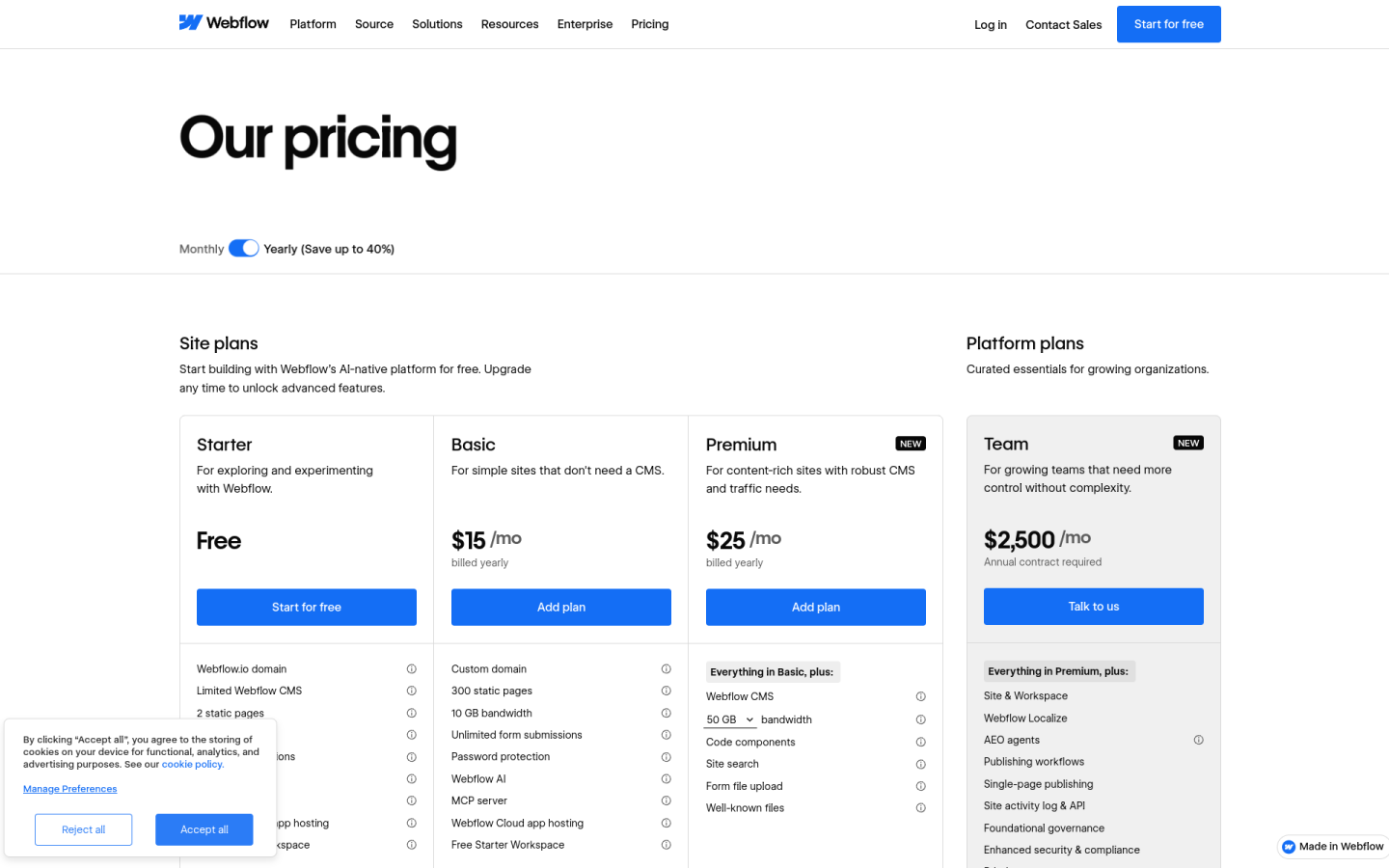
The Webflow pricing page is built to let buyers pay per site first and add team, workspace and growth tools as they scale:
1. Clear Hierarchy and Visual Appeal:
- Simple Headline: The page opens with “Our pricing” and the line “Start building with Webflow’s AI-native platform for free. Upgrade any time to unlock advanced features.”
- Three Site Plans First: Starter, Basic and Premium sit side by side at the top, moving from a test site to a content-rich site with a full CMS.
- Separate Plan Groups: Further down, the page splits Platform plans, Workspace plans, Ecommerce plans and Add-ons into their own sections so each buying decision stays focused.
- Short Plan Taglines: Each plan has a one-line goal, such as “For simple sites that don’t need a CMS” for Basic and “For content-rich sites with robust CMS and traffic needs” for Premium.
- Clear Calls to Action: Starter uses “Start for free,” the paid site plans use “Add plan,” and Team and Enterprise use “Talk to us.”
2. Value-Based Differentiation:
- Starter: Gives a free webflow.io domain, 2 static pages, 50 CMS items, 1 GB bandwidth and 50 form submissions for exploring the product.
- Basic: Adds a custom domain, 300 static pages, 10 GB bandwidth, unlimited form submissions and password protection, but no CMS.
- Premium: Adds the Webflow CMS with 20,000 items and 40 Collections, bandwidth tiers from 50 GB up to 2.5 TB, code components and site search.
- Team: Bundles a site and Workspace with Webflow Localize, AEO agents, publishing workflows, a site activity log and priority support.
- Enterprise: Adds granular permissions, custom roles, advanced governance, SSO and SCIM, a dedicated account manager and enhanced SLAs.
3. Transparent Pricing:
- Annual Prices: Basic costs $15 and Premium costs $25 per site per month when billed yearly, and Starter is free.
- Monthly Prices: On monthly billing, Basic costs $25 and Premium costs $39 per site per month.
- Published Team Price: Team is listed at $2,500 per month with an annual contract, which is unusual for a plan aimed at larger companies.
- Custom Enterprise Pricing: Enterprise shows “Custom,” and buyers need to talk to sales for a quote.
4. Addressing Different User Needs:
- Solo Builders and Teams: Workspace plans for teams run from a free Starter to Core at $19 and Growth at $49 per month, billed yearly.
- Freelancers and Agencies: A separate tab offers Freelancer at $16 and Agency at $35 per month, billed yearly, with free client seats per site.
- Online Stores: Ecommerce plans run from Standard at $29 to Plus at $74 and Advanced at $212 per month, billed yearly, with a 2% transaction fee only on Standard.
- Marketing Teams: Add-ons such as Analyze from $9, Localize from $9 and Optimize from $299 per month let teams pay only for the growth tools they use.
5. Strategic Use of Limitations and Social Proof:
- Clear Upgrade Triggers: Starter caps sites at 2 static pages and 1 GB bandwidth, and Basic has no CMS, which gives growing sites a clear reason to move to Premium.
- Annual Savings: The “Save up to 40%” label on the Yearly toggle pushes buyers toward an annual commitment.
- New Badges: Premium and Team carry a “New” label that draws attention to the latest plans.
- Trusted Brands: Under “Trusted by teams at,” the page shows logos from IDEO, Monday.com, BBDO, The New York Times, TED and Docusign.
- Customer Results: Stats such as a 1,170% year-over-year traffic increase for Docusign and $200M in new pipeline for ABM show real business impact.