

Todoist
Pricing page design for Todoist, the to-do list and task manager for individuals and teams, from the free Beginner plan to the Pro and Business plans.
Todoist Pricing Page Design
$0 - $49 3 Plans
Launch Website
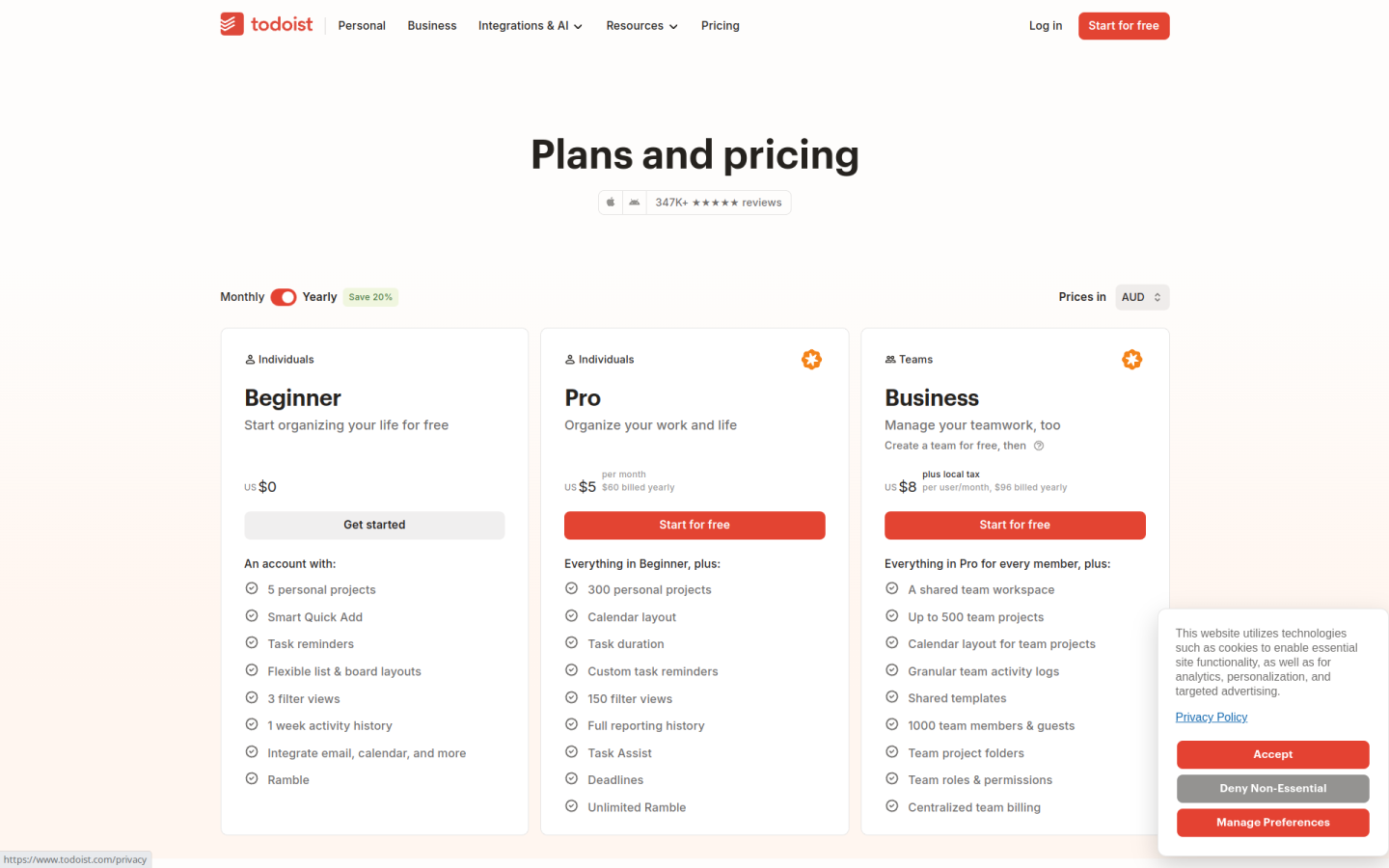
The Todoist pricing page is built to let anyone organize their tasks for free, then pay a small fee as personal or team needs grow:
1. Clear Hierarchy and Visual Appeal:
- Simple Headline: The page opens with “Plans and pricing” and the promise to “Start for free, then find the plan that’s right for you.”
- Three Plans in a Row: Beginner, Pro and Business sit side by side, with Beginner and Pro aimed at individuals and Business aimed at teams.
- Short Plan Taglines: Each plan has a one-line goal, from “Start organizing your life for free” on Beginner to “Organize your work and life” on Pro and “Manage your teamwork, too” on Business.
- Stacked Feature Lists: Pro starts with “everything in Beginner” and Business with “everything in Pro,” so buyers only read what each plan adds.
- Clear Calls to Action: The buttons read “Get started” on Beginner and “Start for free” on Pro and Business, with a “Manage subscription” link for existing users.
2. Value-Based Differentiation:
- Beginner: Gives 5 personal projects, Smart Quick Add, task reminders, list and board layouts, 3 filter views, 1 week of activity history and email and calendar integrations.
- Pro: Adds 300 personal projects, a calendar layout, task duration, custom reminders, 150 filter views, full activity history, deadlines, Task Assist and unlimited Ramble.
- Business: Adds a shared team workspace with up to 500 team projects, shared templates, team folders, roles and permissions, activity logs and central billing.
3. Transparent Pricing:
- Annual Prices: Pro costs $5 per month ($60 a year) and Business costs $8 per user per month ($96 a year) on yearly billing, and Beginner is free.
- Monthly Prices: On monthly billing, Pro costs $7 per month and Business costs $10 per user per month.
- Billing Cycle Toggle: A “Billed Yearly” and “Billed Monthly” switch lets buyers compare both options before they sign up.
- Tax Note: Business prices are shown “plus local tax,” so teams know the final bill may be a little higher.
4. Addressing Different User Needs:
- Casual Users: The free Beginner plan covers simple personal to-do lists with no time limit.
- Busy Professionals: Pro adds a calendar view, deadlines and more filters for people who plan both work and life in one place.
- Teams: Business supports up to 1,000 team members and guests in a shared workspace, and teams can be created for free.
- Security-Minded Companies: Business shows a SOC2 Type II badge and links to a trust center for compliance details.
5. Strategic Use of Limitations and Social Proof:
- Clear Upgrade Triggers: Beginner is capped at 5 personal projects, 3 filter views and 1 week of activity history, which gives active users a clear reason to move to Pro.
- Low-Risk Start: Every paid plan uses a “Start for free” button, which lowers the barrier to trying it.
- Large User Base: The page invites visitors to “Join 50 million+ people who rely on Todoist,” plus tens of thousands of teams.
- Reviews and Awards: A 347K+ five-star reviews line and awards such as “App of the day” and “Best To-Do List App” build trust.