

Squarespace
Squarespace’s pricing page links each of its four plans to lower selling fees, so the jump from Basic to Advanced is framed around what businesses keep.
Squarespace Pricing Page Design
$50 - $149 4 Plans
Launch Website
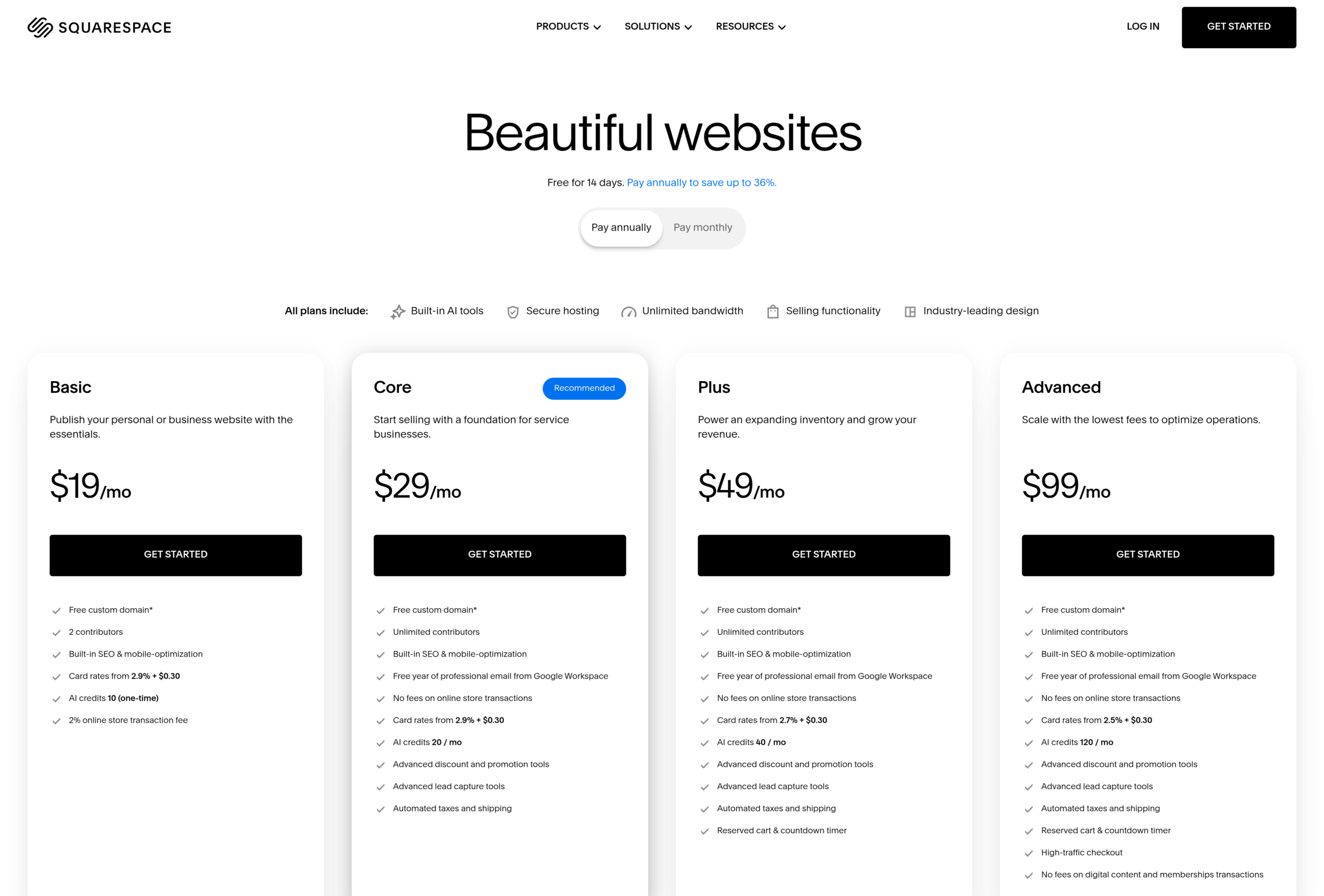
The Squarespace pricing page is built around four website plans that grow from a simple site to a full online store, with fees that drop as you move up:
1. Clear Hierarchy and Visual Appeal:
- Short Headline: The page opens with “Beautiful websites” and the line “Free for 14 days. Pay annually to save up to 36%.”
- Four Plans in a Row: Basic, Core, Plus and Advanced sit side by side, each with a one-line pitch that explains who it is for.
- One Simple Call to Action: Every plan uses the same “Get started” button, so the choice comes down to features rather than wording.
- Shared Basics Up Front: A note lists what all plans include: built-in AI tools, secure hosting, unlimited bandwidth, selling tools and industry-leading design.
2. Value-Based Differentiation:
- Basic: Pitched as a way to “Publish your personal or business website with the essentials,” with 2 contributors and 30 minutes of video hosting.
- Core: Pitched as “a foundation for service businesses,” with unlimited contributors, 0% online store transaction fees, advanced lead capture, automated taxes and shipping, and a free year of Google Workspace email.
- Plus: Pitched to “Power an expanding inventory and grow your revenue,” with a lower 2.7% card rate, 50 hours of video and a reserved cart with countdown timer.
- Advanced: Pitched to “Scale with the lowest fees,” with a 2.5% card rate, no fees on digital content and memberships, unlimited video and high-traffic checkout.
3. Transparent Pricing:
- Annual Prices: On annual billing, Basic costs $19, Core $29, Plus $49 and Advanced $99 per month.
- Monthly Prices: On monthly billing, Basic costs $25, Core $39, Plus $65 and Advanced $139 per month.
- Billing Toggle: A “Pay annually” and “Pay monthly” switch sits above the plans, and annual plans include a free custom domain for the first year.
- Fees in the Open: A comparison table lists card rates, ACH rates, currency conversion fees and transaction fees for every plan, so the full cost of selling is clear.
- No Free Plan: The FAQ confirms there is no free plan, but a 14-day free trial needs no credit card.
4. Addressing Different User Needs:
- Personal Sites and Portfolios: Basic covers people who need a clean website with the essentials.
- Service Businesses: Core adds lead capture, payment plans, Mailchimp and Zapier integrations and ecommerce analytics.
- Growing Online Stores: Plus adds lower card rates and more AI credits, with 40 per month.
- High-Volume Sellers and Creators: Advanced removes fees on digital content and memberships and gives 120 AI credits per month.
- Extra Needs: Add-ons such as Squarespace Extensions, premium integrations, Printful, extra domains and Hire an Expert cover needs beyond the core plans.
5. Strategic Use of Limitations and Incentives:
- Fees as Upgrade Triggers: Basic charges a 2% online store transaction fee and a 7% fee on digital content, which drops to 5% on Core, 1% on Plus and 0% on Advanced.
- Recommended Badge: A “Recommended” label on Core steers buyers toward the first plan built for selling.
- Annual Billing Rewards: Lower annual prices and a free domain for the first year push buyers toward a yearly commitment.
- Risk-Free Start: The closing line “No credit card required. Cancel anytime.” lowers the barrier to trying the product.
- Trust Signals: The page notes that Squarespace is an ICANN accredited registrar, that data traffic is protected by SSL encryption, and that its customer care is award-winning.