

Searchsprings
Convert browsers into buyers and buyers into lifelong fans with eCommerce site search, merchandising, navigation, and product recommendations.
Searchsprings Pricing Page Design
$500+ 3 Plans
Launch Website
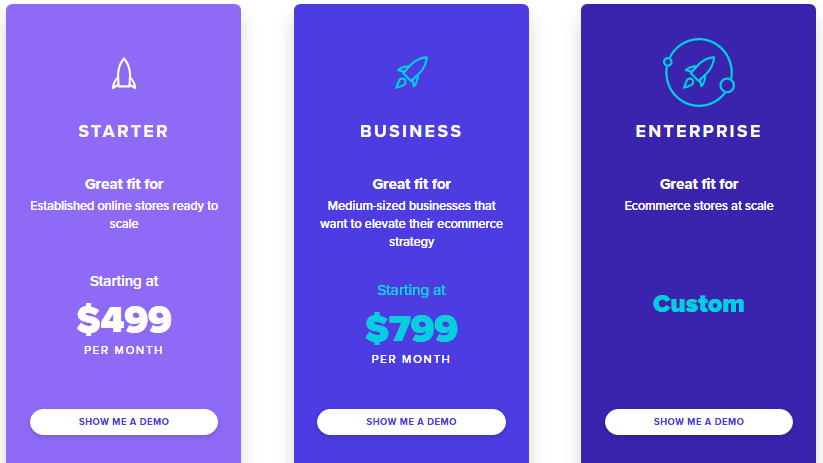
This Searchsprings pricing section is effective for several reasons:
1. Clear Hierarchy and Visual Appeal:
- Distinct Tiers: The “STARTER,” “BUSINESS,” and “ENTERPRISE” tiers are clearly labeled and visually separated with distinct color schemes and icons.
- Consistent Layout: Each tier follows a consistent layout with descriptions, pricing (where applicable), and call-to-action buttons.
- Visual Cues: The use of rocket ship icons reinforces the theme of growth and scaling.
- Clear Headings: The headings clearly indicate the purpose and target audience of each tier.
- Pricing Clarity: The monthly prices are prominently displayed for the “STARTER” and “BUSINESS” tiers.
- Call to Action Buttons: The “SHOW ME A DEMO” buttons are visually distinct and clearly labeled.
- Color Coding: The color coding helps to distinguish the different tiers and makes the section visually appealing.
2. Value-Based Differentiation:
- Targeted Descriptions: Each tier has a concise description that clearly identifies the target customer and their needs based on business size and growth stage.
- Tier Names: The tier names are intuitive and suggest a progression in features and capabilities.
- Quantitative Differentiation: The differences in monthly prices provide clear quantitative differences.
- Custom Pricing: The “Custom” pricing for the “ENTERPRISE” tier indicates a tailored solution for larger clients.
3. Transparent Pricing:
- Clear Pricing Information: The monthly prices are clearly stated for the “STARTER” and “BUSINESS” tiers.
- Custom Pricing: The “ENTERPRISE” tier uses “Custom,” indicating a tailored solution for larger clients.
4. Addressing Different User Needs:
- Established Online Stores: The “STARTER” tier caters to established online stores ready to scale.
- Medium-Sized Businesses: The “BUSINESS” tier is designed for medium-sized businesses looking to elevate their ecommerce strategy.
- Ecommerce Stores at Scale: The “ENTERPRISE” tier caters to large ecommerce stores at scale.
5. Strategic Use of Information:
- Benefit-Oriented Descriptions: The descriptions highlight the key benefits of each tier.
- Clear Call to Action: The “SHOW ME A DEMO” buttons provide clear paths for action.
- Concise Descriptions: The descriptions are brief and to the point, making it easy to understand the purpose of each tier.
- Visual Appeal: The icons and color coding enhance the overall visual appeal.