

Topproducer
The real estate CRM with insights that set you apart.
Topproducer Pricing Page Design
$50 - $149 3 Plans
Launch Website
Capture leads with unmatched detail, optimize your follow up and manage transactions
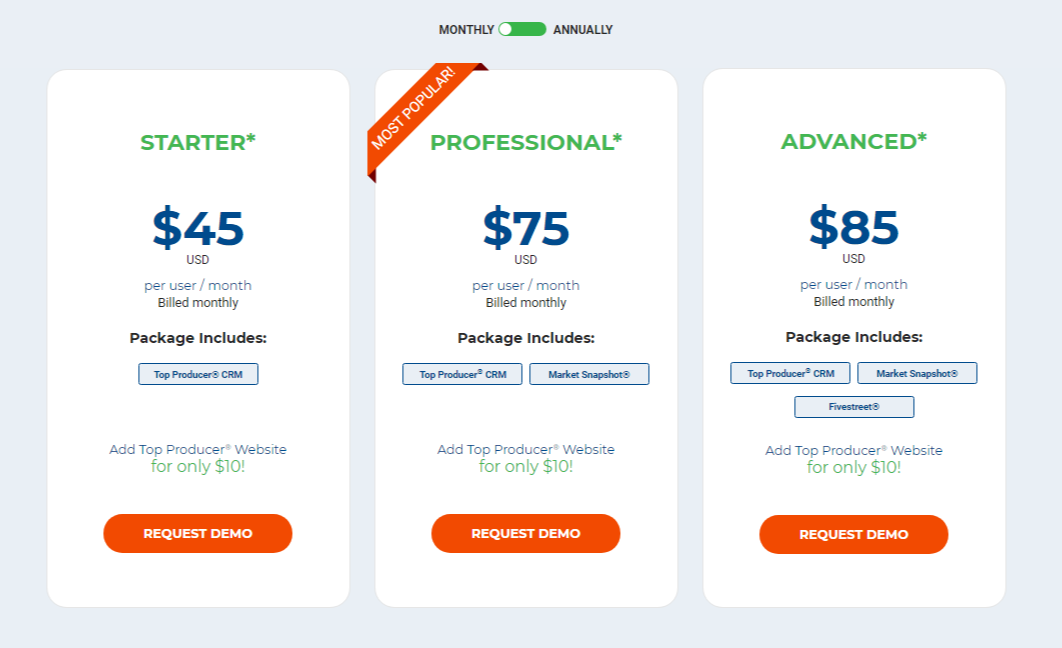
The Topproducer pricing section is effective for several reasons:
1. Clear Hierarchy and Visual Appeal:
- Distinct Tiers: The “STARTER,” “PROFESSIONAL,” and “ADVANCED” tiers are clearly labeled and visually separated.
- “MOST POPULAR” Label: The “PROFESSIONAL” tier is highlighted as “MOST POPULAR,” guiding user choice.
- Consistent Layout: Each tier follows a consistent layout with pricing, descriptions, and call-to-action buttons.
- Visual Cues: The use of distinct color for the “MOST POPULAR” label and call-to-action buttons enhances visual clarity.
- Clear Headings: The headings clearly indicate the purpose and target audience of each tier.
- Pricing Clarity: The monthly per-user prices are prominently displayed.
- Call to Action Buttons: The “REQUEST DEMO” buttons are visually distinct and clearly labeled.
- Billing Options: The “MONTHLY/ANNUALLY” toggle allows users to easily compare billing options.
2. Value-Based Differentiation:
- Targeted Descriptions: Each tier has a concise description that clearly identifies the core features included.
- Feature Progression: The “Market Snapshot” and “Fivestreet” additions in higher tiers clearly highlight the added value.
- Add-on Clarity: The “Add Top Producer Website for only $10!” message provides a clear and affordable add-on option.
- Quantitative Differentiation: The differences in monthly prices provide clear quantitative differences.
3. Transparent Pricing:
- Clear Pricing Information: The monthly per-user prices are clearly stated for each tier.
- Add-on Price: The price of the add-on website is clearly stated.
- Billing Options: The toggle for monthly and annual billing provides clarity.
4. Addressing Different User Needs:
- Basic CRM: The “STARTER” tier caters to users needing basic CRM functionality.
- Market Insights: The “PROFESSIONAL” tier is designed for users needing market insights.
- Advanced Features: The “ADVANCED” tier caters to users needing advanced features like “Fivestreet.”
5. Strategic Use of Information:
- Benefit-Oriented Features: The included features like “Top Producer CRM,” “Market Snapshot,” and “Fivestreet” highlight the value of each tier.
- Clear Call to Action: The “REQUEST DEMO” buttons provide a clear path for action.
- “MOST POPULAR” Highlight: The “MOST POPULAR” label on the “PROFESSIONAL” tier influences user choice.
- Add-on Offer: The affordable add-on offer incentivizes users to add more features.
- Concise Descriptions: The descriptions are brief and to the point, making it easy to understand the purpose of each tier.