
Riverside
Riverside’s pricing page spreads five creator plans across one row, badges Grow as Best Value and adds a 60-second plan finder quiz for undecided buyers.
Riverside Pricing Page Design
$50 - $149 5+ Plans
Launch Website
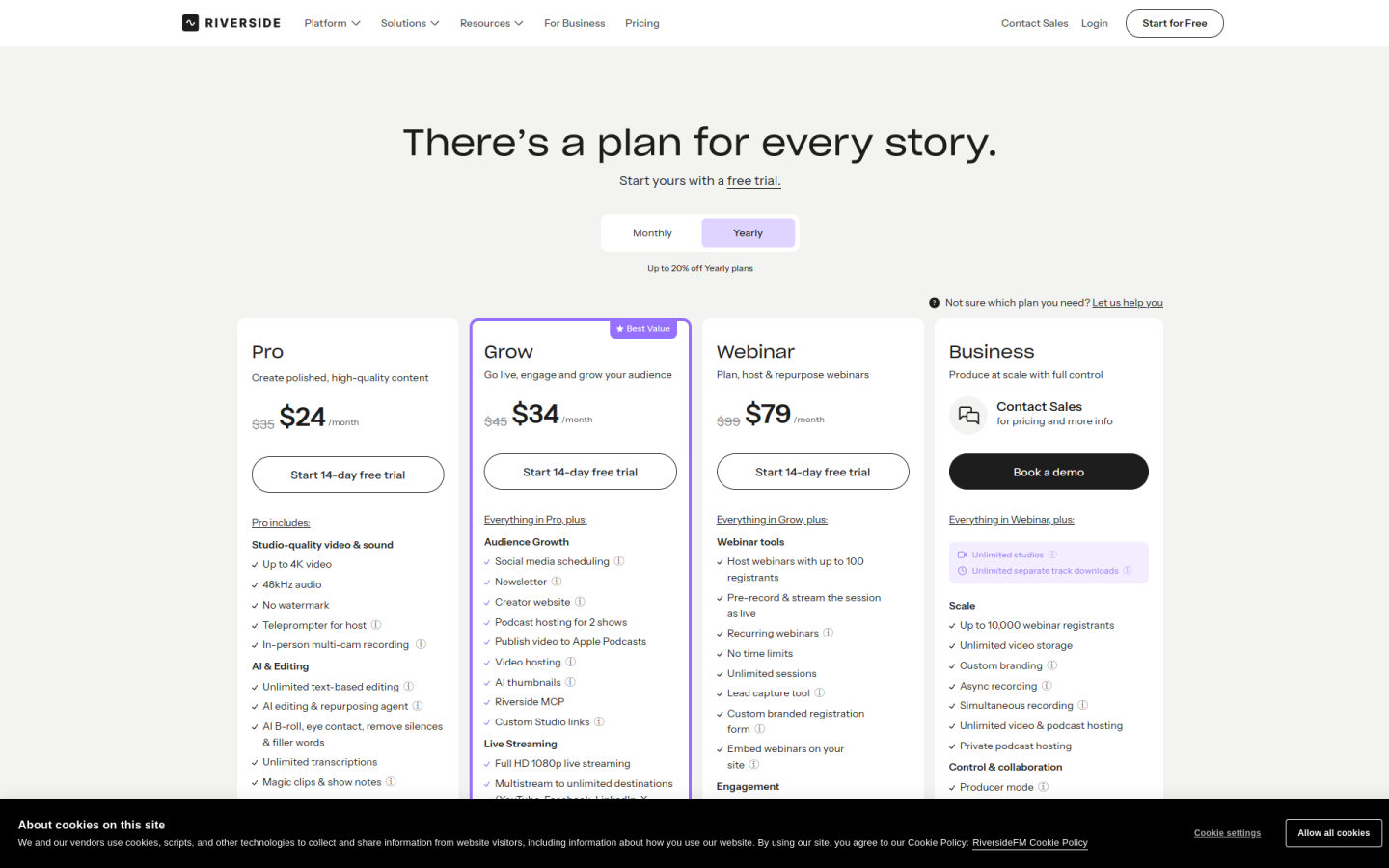
The Riverside pricing page is built for creators and growing teams, with five plans that move from simple recording to full-scale production and webinars:
1. Clear Hierarchy and Visual Appeal:
- Story-Led Headline: The page opens with “There’s a plan for every story.” and the line “Start yours with a free trial,” which ties the plans to what creators want to make.
- Five Plan Cards: Free, Pro, Grow, Webinar and Business sit side by side, each with a short tagline such as “Create polished, high-quality content” or “Go live, engage and grow your audience.”
- Billing Switch: A Monthly and Yearly toggle sits above the cards with the badge “Up to 20% off Yearly plans.”
- Highlighted Plan: Grow carries a “Best Value” badge, which steers creators who want to publish and stream toward the middle of the range.
2. Value-Based Differentiation:
- Free: Includes 2 hours of one-off multi-track recording up to 720p, unlimited single-track recording and editing, Magic Clips and unlimited call length, with a Riverside watermark.
- Pro: Adds recording up to 4K, 48kHz audio, no watermark, a host teleprompter, unlimited transcriptions and text-based editing, an AI editing agent, podcast hosting and 15 hours of separate-track downloads.
- Grow: Adds 2 studios, 20 hours of downloads, social scheduling, a newsletter, a creator website, video hosting, Full HD live streaming and multistreaming to unlimited destinations.
- Webinar: Adds up to 100 registrants, recurring webinars, lead capture, custom registration forms, branded email reminders, Q&A, polls and webinar analytics.
- Business: Adds unlimited studios, downloads and storage, up to 10,000 webinar registrants, producer mode, collaborative editing, custom roles, API access, SSO and a dedicated CSM.
3. Transparent Pricing:
- Yearly Prices: On yearly billing, Pro costs $24 per month, Grow costs $34 per month and Webinar costs $79 per month.
- Monthly Prices: On monthly billing, Pro costs $29 per month, Grow costs $39 per month and Webinar costs $99 per month.
- Annual Totals: The cards show the yearly charge, such as “Billed $288 annually” for Pro and “Billed $408 annually” for Grow.
- Free Entry Point: The Free plan costs $0, so creators can record and edit before they pay.
- Custom Business: Business has custom pricing with “Contact Sales” and “Book a demo” buttons.
4. Addressing Different User Needs:
- Solo Creators: Pro suits podcasters and video creators who need studio-quality recordings and quick editing.
- Growing Audiences: Grow brings publishing, live streaming and audience tools into one plan for creators building a following.
- Marketing Teams: Webinar adds registration, lead capture and a HubSpot integration for teams running events, and the FAQ answers “Do I need Webinar to run a webinar, or is Grow enough?”
- Production Teams: Business is aimed at media teams and B2B companies running production at scale, with Salesforce and Marketo integrations, SOC2 and ISO27001.
- Plan Finder: A “Find my plan” quiz promises to help visitors “Find your right plan in 60 seconds,” next to a “Chat with us” option.
5. Strategic Use of Limitations and Social Proof:
- Quality and Watermark Limits: Free is capped at 720p with a watermark, which gives serious creators a clear reason to move to Pro.
- Download and Studio Caps: Separate-track download hours grow from 15 to 20 to 25 hours and studios grow from 1 to 3, with unlimited use only on Business.
- Free Trial: Pro, Grow and Webinar all use a “Start 14-day free trial” button, which lowers the risk of trying a paid plan.
- AI Credits: Pro users start with 2,000 free AI credits and Business starts with 12,000, for features such as AI Translation, AI B-Roll and Animated Clips.
- Trust Signals: A logo wall features brands such as Microsoft, Spotify, Marvel and OpenAI, followed by creator testimonials under the heading “Don’t just take our word for it…”