

Retool
Pricing page design for Retool, the AI app builder for internal tools and agents, from the Free plan to the Team, Business and Enterprise plans.
Retool Pricing Page Design
$50 - $149 4 Plans
Launch Website
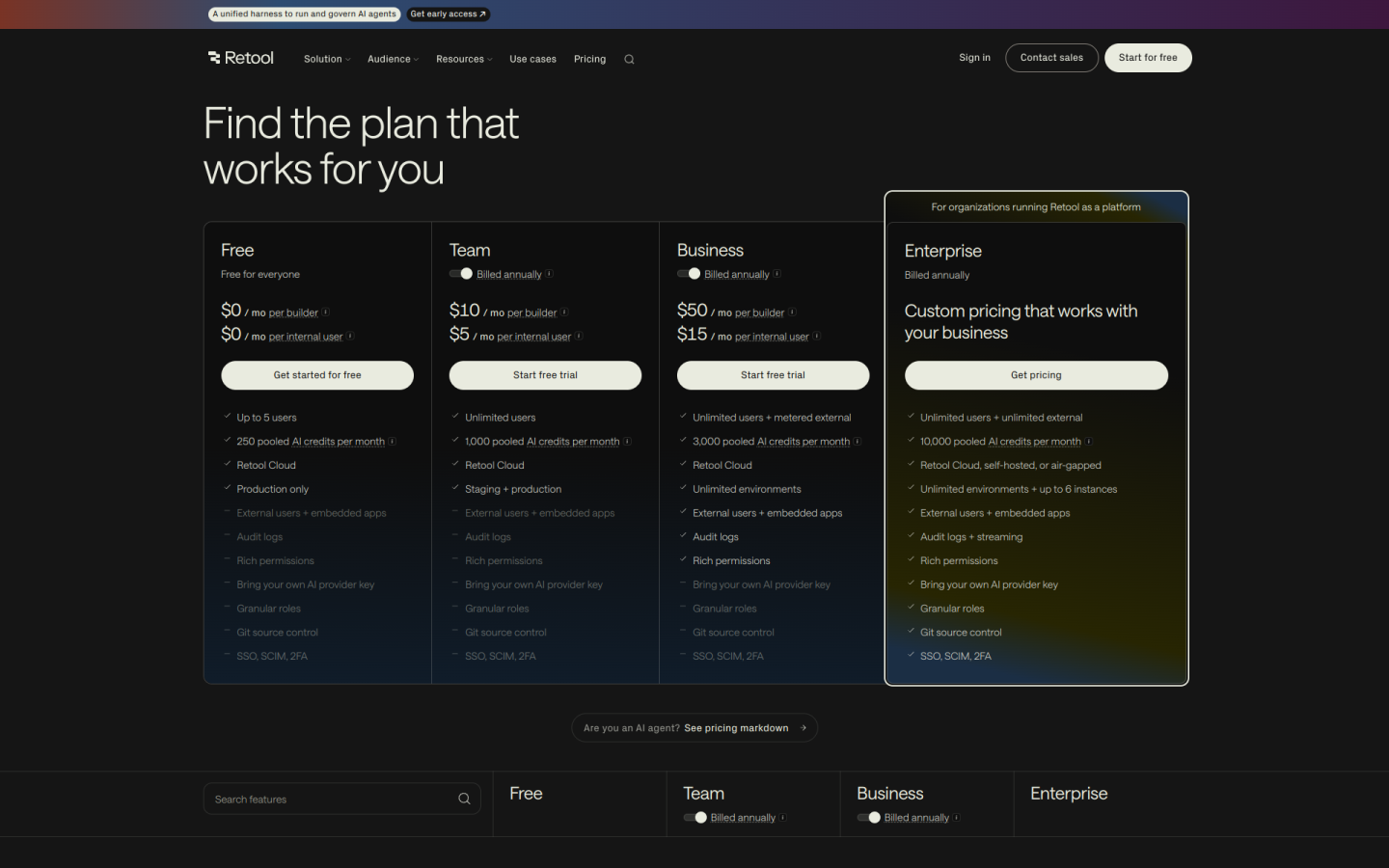
The Retool pricing page is built to let teams start building internal apps for free and pay by user type as their use grows:
1. Clear Hierarchy and Visual Appeal:
- Simple Headline: The page opens with “Find the plan that works for you,” which keeps the focus on choosing a plan.
- Four Plans in a Row: Free, Team, Business and Enterprise sit side by side, moving from small teams to companies that run Retool as a platform.
- Two Prices per Plan: Each card shows a price per builder and a price per internal user, so buyers can see how the cost splits between app makers and app users.
- Clear Calls to Action: The buttons read “Get started for free” on Free, “Start free trial” on Team and Business and “Get pricing” on Enterprise.
- Checklists with Gaps: Each card lists what is and is not included, such as audit logs, Git source control and SSO, so the differences are easy to scan.
2. Value-Based Differentiation:
- Free: Covers up to 5 users, 250 pooled AI credits a month and 500 workflow runs a month on Retool Cloud, in production only.
- Team: Adds unlimited users, 1,000 pooled AI credits a month, 5,000 workflow runs a month and a staging environment.
- Business: Adds external users and embedded apps, audit logs, rich permissions, 3,000 AI credits a month and unlimited environments.
- Enterprise: Adds self-hosted or air-gapped deployment, Git source control, granular roles, your own AI provider key, SSO, SCIM and 10,000 AI credits a month.
3. Transparent Pricing:
- Annual Prices: Team costs $10 per builder and $5 per internal user per month, and Business costs $50 per builder and $15 per internal user per month, billed yearly.
- Monthly Prices: On monthly billing, Team costs about $12 per builder and $7 per internal user, and Business costs $65 per builder and $18 per internal user.
- Annual Savings Note: A “Save 20% with annual billing” note pushes buyers toward a yearly plan.
- Clear Usage Rates: Extra workflow runs cost $75 per 5,000 runs a month, and external users on Business are free up to 50, then $8, $6 or $4 a month as volume grows.
- Custom Enterprise Pricing: Enterprise shows “Custom pricing that works with your business,” and buyers need to ask for a quote.
4. Addressing Different User Needs:
- Small Teams: The Free plan lets up to 5 people build and use internal apps at no cost.
- Growing Companies: Team removes the user cap and adds staging, at a low price for internal users who only use apps.
- Customer-Facing Apps: Business supports external users and embedded apps, with metered pricing for outside users.
- Regulated Companies: Enterprise offers self-hosted and air-gapped deployment, audit log streaming and up to 6 instances.
- Schools and Nonprofits: The FAQ says students and educators can apply for a free Business account, and nonprofits can apply for 25 free seats.
5. Strategic Use of Limitations and Social Proof:
- Clear Upgrade Triggers: Free caps teams at 5 users and production only, and Team has no external users or audit logs, which gives growing teams a clear reason to move up.
- Agent Hours: AI agents are billed by the hour, with up to 20 free hours a month on Free, and the FAQ explains that agents pause when free hours run out.
- Free Trials: Team and Business both offer a free trial, which lowers the risk of trying a paid plan.
- Trusted Brands: The page says Retool is “Trusted by 10,000+ teams” and shows logos from Warner Music, OpenAI, Amazon and Ramp.
- Security Badges: CCPA, GDPR, ISO 27001 and SOC 2 badges show that Retool meets common security standards.