
Raycast
Raycast’s pricing page fits personal and team plans into one comparison table, nesting Plus and Max AI tiers inside Pro and showing monthly and annual prices together.
Raycast Pricing Page Design
$50 - $149 5+ Plans
Launch Website
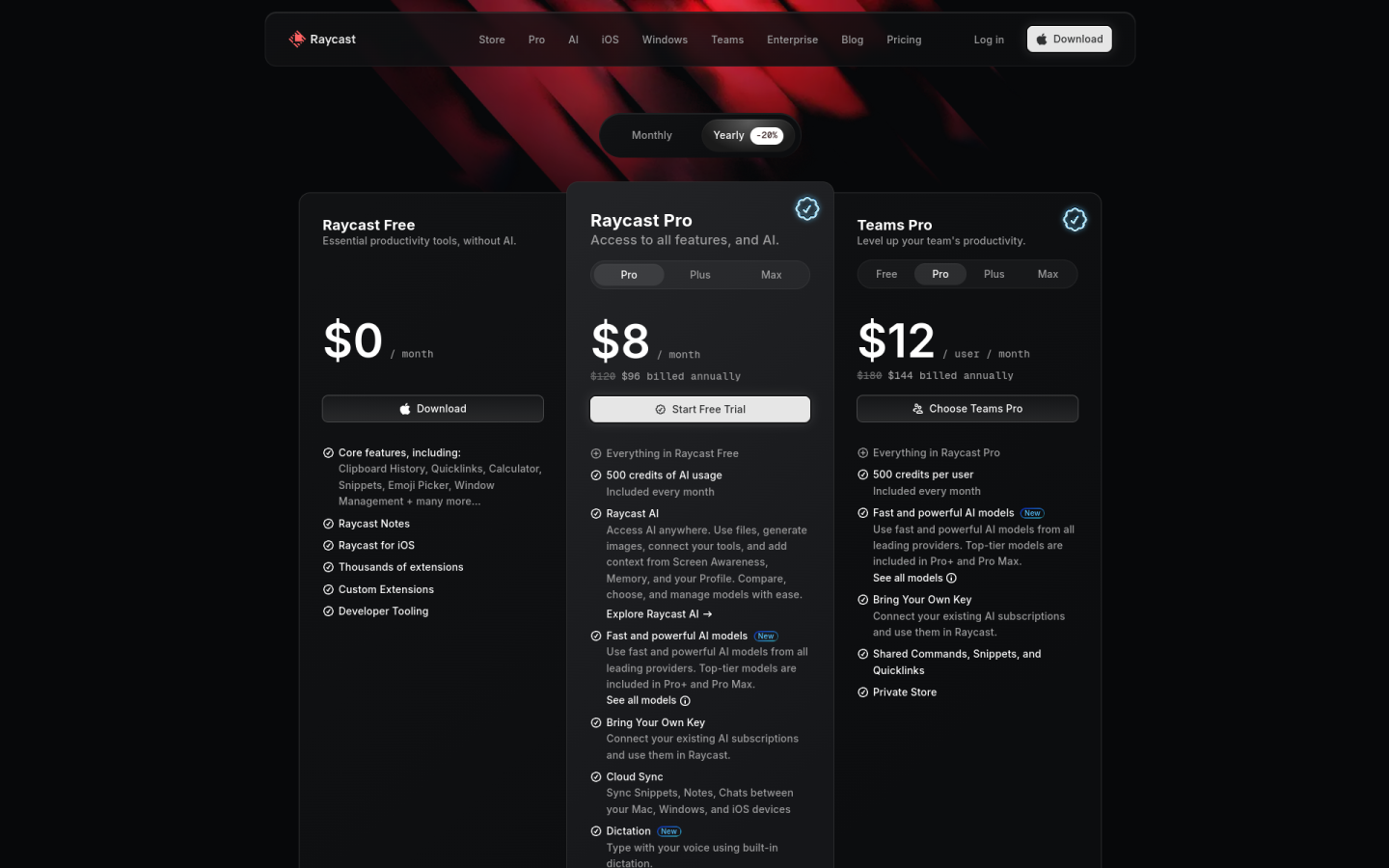
The Raycast pricing page is a single comparison table that lays out personal and team plans side by side, with AI credits as the main thing that changes between tiers:
1. Clear Hierarchy and Visual Appeal:
- One Comparison Table: Free, Pro, Teams Free, Teams Pro and Enterprise sit in columns across one table, so visitors can compare every plan without switching pages.
- Nested AI Tiers: Pro and Teams Pro each hold Plus and Max options inside the same column, which keeps the table compact while still showing three levels of AI use.
- Grouped Feature Rows: Rows are grouped by feature, with sub-headings such as “AI Control Center, including:” and “Organization Admin Controls, including:” for the enterprise features.
- Prices at the Bottom: The table ends with separate monthly and annual subscription rows, so both prices are visible at once instead of behind a toggle.
2. Value-Based Differentiation:
- Free: Includes core features such as Clipboard History, Quicklinks, Calculator, Snippets and Window Management, plus thousands of extensions, but keeps clipboard history for 3 months and allows 5 notes.
- Pro: Adds Raycast AI with 500 AI credits, Cloud Sync, Dictation, Custom Themes, Translator, Bring Your Own Key and unlimited clipboard history and notes.
- Plus and Max: Add top-tier AI models, with 3,000 AI credits on Plus and 7,500 AI credits on Max.
- Teams Plans: Teams Free includes a Private Store and up to 5 shared commands and 30 shared quicklinks and snippets, while Teams Pro and above make sharing unlimited.
- Enterprise: Adds the AI Control Center with an AI provider allow-list and custom AI provider, plus SAML and SCIM, domain capture, 2FA enforcement and IP allow-lists.
3. Transparent Pricing:
- Personal Monthly Prices: Pro costs $10 per month, Plus costs $20 per month and Max costs $50 per month.
- Personal Annual Prices: Pro costs $96 per year, Plus costs $192 per year and Max costs $480 per year, which works out to $8, $16 and $40 per month.
- Teams Monthly Prices: Teams Pro costs $15 per user per month, Teams Plus costs $25 per user per month and Teams Max costs $65 per user per month.
- Teams Annual Prices: Teams Pro costs $144, Teams Plus $240 and Teams Max $624 per user per year, which works out to $12, $20 and $52 per user per month.
- Free Options: Free and Teams Free both cost $0, and Enterprise uses custom pricing and custom credits.
4. Addressing Different User Needs:
- Individuals: The FAQ says personal use is free, and the Free plan covers built-in extensions and public community extensions.
- Heavy AI Users: Plus and Max give more AI credits and access to top-tier models for people who rely on Raycast AI every day.
- Teams of Any Size: Teams plans have no minimum or maximum seat count and are billed per user, so a small team can start with just a few seats.
- Large Organizations: Enterprise gives admins control over which AI providers are allowed and adds SSO, SCIM and security policies.
- Students: Verified students get a 50% discount on the Pro plan through an application form.
5. Strategic Use of Limitations and Incentives:
- Free Limits: The 3-month clipboard history and 5-note cap on Free give users a clear reason to upgrade once Raycast becomes part of their daily work.
- Credit-Based AI: AI credits grow from 500 to 3,000 to 7,500, and each model spends credits at its own rate, which ties the price directly to AI use.
- Credit Rollover: Monthly credits roll over for one extra billing cycle, and top-up packages last 12 months, which makes paid plans feel less wasteful.
- Annual Savings: The annual prices are 20% lower than paying monthly, for example $96 per year for Pro instead of $120.
- Free Pro Trial: Eligible new accounts can start a free Pro trial with access to Pro models, and Teams Free “doesn’t expire, and isn’t a trial.”