

Netlify
Pricing page design for Netlify, the platform to build, deploy and scale web apps, from the Free plan to the Personal, Pro and Enterprise plans.
Netlify Pricing Page Design
$50 - $149 4 Plans
Launch Website
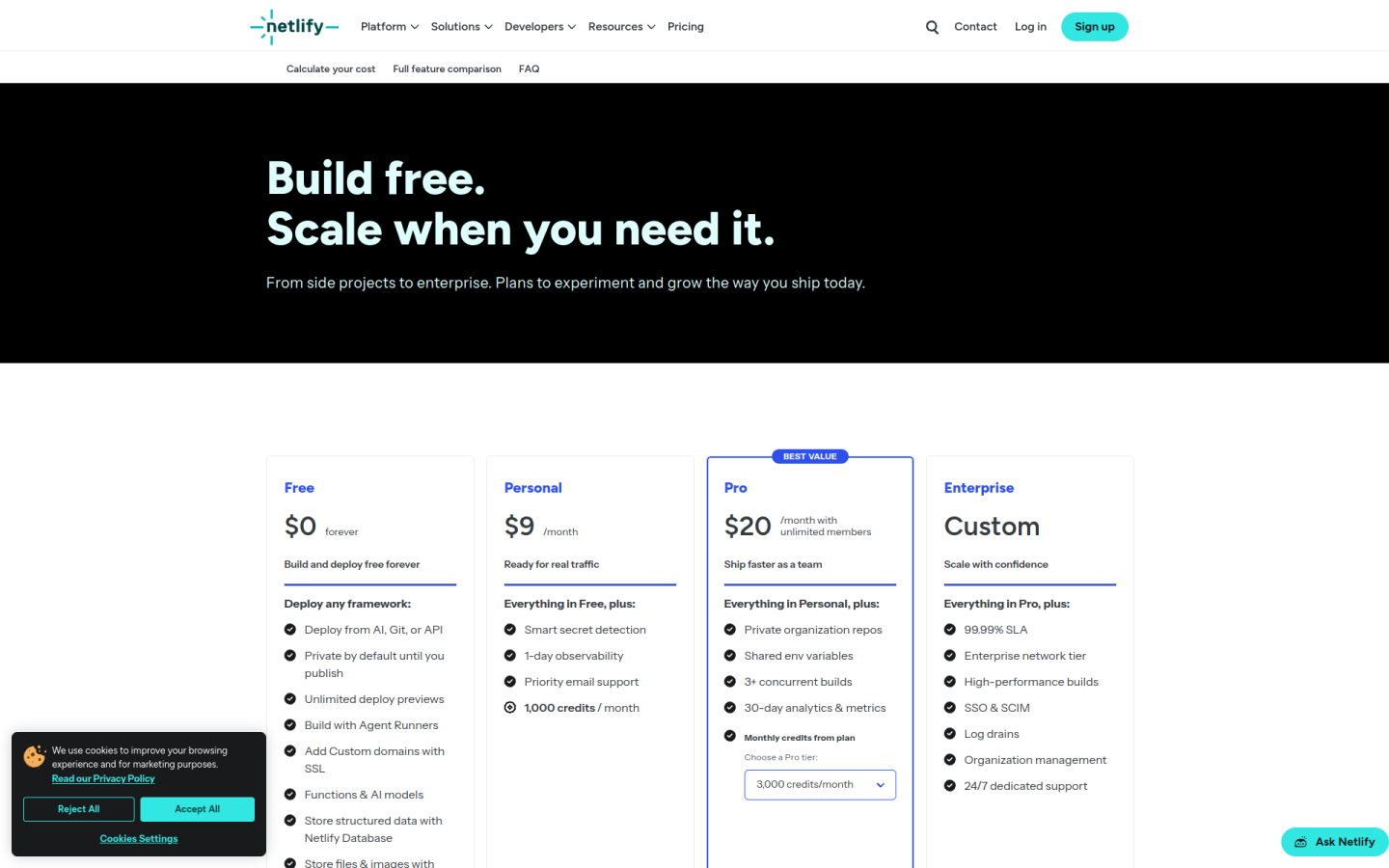
The Netlify pricing page is built around a free-forever start and usage credits, so developers can ship for free and only pay more as their traffic and team grow:
1. Clear Hierarchy and Visual Appeal:
- Confident Headline: The page opens with “Build free. Scale when you need it.” and promises plans “From side projects to enterprise.”
- Four Plans in a Row: Free, Personal, Pro and Enterprise sit side by side, moving from solo projects to large companies.
- Short Plan Taglines: Each plan has a one-line goal, from “Build and deploy free forever” on Free to “Ready for real traffic” on Personal, “Ship faster as a team” on Pro and “Scale with confidence” on Enterprise.
- Grouped Comparison Table: A full table splits features into Usage credits, Build and deploy, Collaboration and observability, Members and roles, Security and compliance, and Get support.
- Clear Calls to Action: The buttons read “Start for free,” “Get started,” “Create a team” and “Request a demo,” so each plan has its own next step.
2. Value-Based Differentiation:
- Free: Gives 300 credits a month, unlimited deploy previews, custom domains with SSL, functions, AI models, Netlify Database, Blob storage and a global CDN for 1 member.
- Personal: Raises the limit to 1,000 credits a month and adds smart secret detection, 7-day log retention and priority email support.
- Pro: Adds private organization repos, shared environment variables, 3 or more concurrent builds, 30-day analytics, audit logs and 10 concurrent agent runs.
- Enterprise: Adds a 99.99% SLA, an enterprise network tier, high-performance builds, SSO and SCIM, log drains and 24/7 dedicated support.
3. Transparent Pricing:
- Monthly Prices: Free costs $0 forever, Personal costs $9 a month and Pro starts at $20 a month with unlimited members.
- Pro Credit Tiers: Pro teams choose 3,000, 5,000, 10,000, 15,000 or 20,000 credits a month, each for a single flat monthly price that Netlify lists from $20 up to $126 a month.
- No Annual Toggle: The page shows monthly prices only, with no yearly billing option or annual discount.
- Published Credit Rates: The page explains what uses credits, such as 15 credits per production deploy, 20 credits per GB of bandwidth, 10 credits per GB-hour of compute and 2 credits per 10,000 web requests.
- Clear Add-On Prices: Extra credits cost $5 per 500 on Personal and $10 per 1,500 on Pro, extra builds cost $40 each and extra Preview Servers cost $15 each.
4. Addressing Different User Needs:
- Hobby Builders: The Free plan has hard monthly limits that cannot be exceeded, so side projects never create a surprise bill.
- Solo Developers: Personal is aimed at live sites that need more credits and better support for one paid member.
- Growing Teams: Pro has no per-seat charge, so teams can add as many members as they need without raising the price.
- Large Companies: Enterprise offers add-ons such as private connectivity, HIPAA and “Fortified bandwidth,” and accepts ACH or wire payment.
- Open Source Projects: A separate Open Source plan gives qualifying projects generous monthly credits, free production deploys and unlimited team members.
5. Strategic Use of Limitations and Incentives:
- Credit Limits as Upgrade Triggers: Monthly credits jump from 300 on Free to 1,000 on Personal and up to 20,000 on Pro, which gives growing sites a clear reason to move up.
- Seat Limits: Free and Personal cannot add extra team seats, which pushes teams toward Pro.
- Best Value Badge: A “Best value” label on Pro, together with unlimited members, makes it the plan most teams are steered toward.
- Credit Rollover: Pro tiers above 3,000 credits roll over unused credits for one extra billing cycle, which rewards buyers who pick a bigger tier.
- Spend Controls: Auto recharge is off by default and alerts arrive at 50%, 75% and 100% of usage, which helps buyers trust that costs will not run away.