
n8n
n8n’s pricing page charges per workflow execution, not per user, with hosting badges on each of four plans and a clear promise that failed runs are never billed.
n8n Pricing Page Design
$500+ 4 Plans
Launch Website
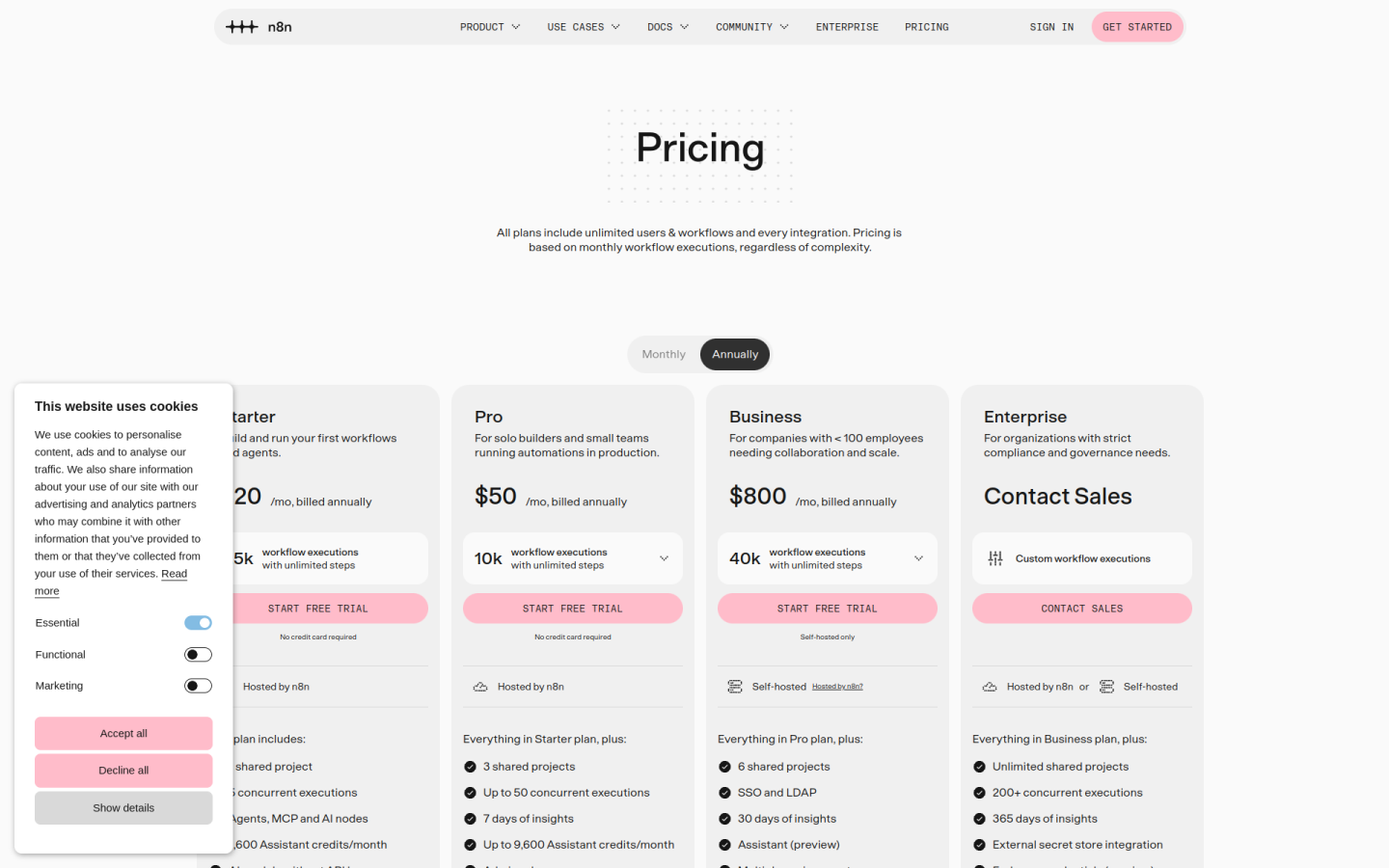
The n8n pricing page is built around workflow executions rather than seats, with four plans that grow from a first automation to company-wide, compliance-ready deployments:
1. Clear Hierarchy and Visual Appeal:
- Simple Headline: The page opens with “Pricing” and the line “All plans include unlimited users & workflows and every integration,” which answers the most common question up front.
- Four Plan Cards: Starter, Pro, Business and Enterprise sit side by side, each with a short tagline such as “Build and run your first workflows and agents.”
- Billing Switch: A Monthly and Annually toggle sits above the cards, with the label “Save 17%” on annual billing.
- Hosting Badges: Each card shows where it runs, such as “Hosted by n8n” on Starter and Pro, “Self-hosted only” on Business and “Hosted by n8n or Self-hosted” on Enterprise.
2. Value-Based Differentiation:
- Starter: Includes 2.5K workflow executions with unlimited steps, 1 shared project, 5 concurrent executions, agents, MCP and AI nodes, and 1,600 Assistant credits per month.
- Pro: Adds 10K executions, 3 shared projects, up to 50 concurrent executions, 7 days of insights, up to 9,600 Assistant credits, admin roles, evaluations and workflow history.
- Business: Adds 40K executions, 6 shared projects, SSO and LDAP, 30 days of insights, multiple environments, queue mode for scaling and version control using Git.
- Enterprise: Adds unlimited shared projects, 200+ concurrent executions, 365 days of insights, external secret stores, log streaming, extended data retention and dedicated support with an SLA.
3. Transparent Pricing:
- Annual Prices: On annual billing, Starter costs €20 per month, Pro costs €50 per month and Business costs €667 per month.
- Monthly Prices: On monthly billing, Starter costs €24 per month, Pro costs €60 per month and Business costs €800 per month.
- Execution-Based Model: Each price is tied to a monthly execution allowance, and the page stresses that pricing does not depend on how complex a workflow is.
- Custom Enterprise: Enterprise has custom executions and pricing with a “Contact sales” button.
4. Addressing Different User Needs:
- First-Time Builders: Starter suits people building and running their first workflows and agents, with AI models that work without API keys.
- Solo Builders and Small Teams: Pro is aimed at “solo builders and small teams running automations in production.”
- Growing Companies: Business is for “companies with < 100 employees needing collaboration and scale,” and a Startup plan offers 50% off Business for companies under 20 employees.
- Regulated Organizations: Enterprise targets teams with “strict compliance and governance needs,” with invoice billing and sales-assisted procurement.
- Self-Hosters: A free Community Edition on GitHub, shown with over 200,000 stars, serves developers who want to run n8n themselves.
5. Strategic Use of Limitations and Social Proof:
- Clear Value Promise: The section “If it doesn’t run, you don’t pay” explains that n8n only charges for full workflow runs, not per step or per user.
- Feature Gating: SSO, Git version control and multiple environments start at Business, while log streaming, audit logging and custom roles are kept for Enterprise.
- Free Trial: Starter and Pro use a “Start free trial” button with the note “No credit card required,” and the FAQ says cloud trials include 1,000 executions and 800 Assistant credits.
- Trust Signals: A logo row under “Trusted by teams building smarter workflows” shows Microsoft, Mistral AI, Meta and Deutsche Telekom.
- Community Proof: The page points to a community forum of “over 170,000” AI and automation enthusiasts and a long FAQ that answers 20 pricing questions.