

Mixpanel
Mixpanel’s pricing page charges by tracked events with unlimited seats, using a calculator slider that shows the exact monthly price for 1M to 20M events.
Mixpanel Pricing Page Design
$500+ 3 Plans
Launch Website
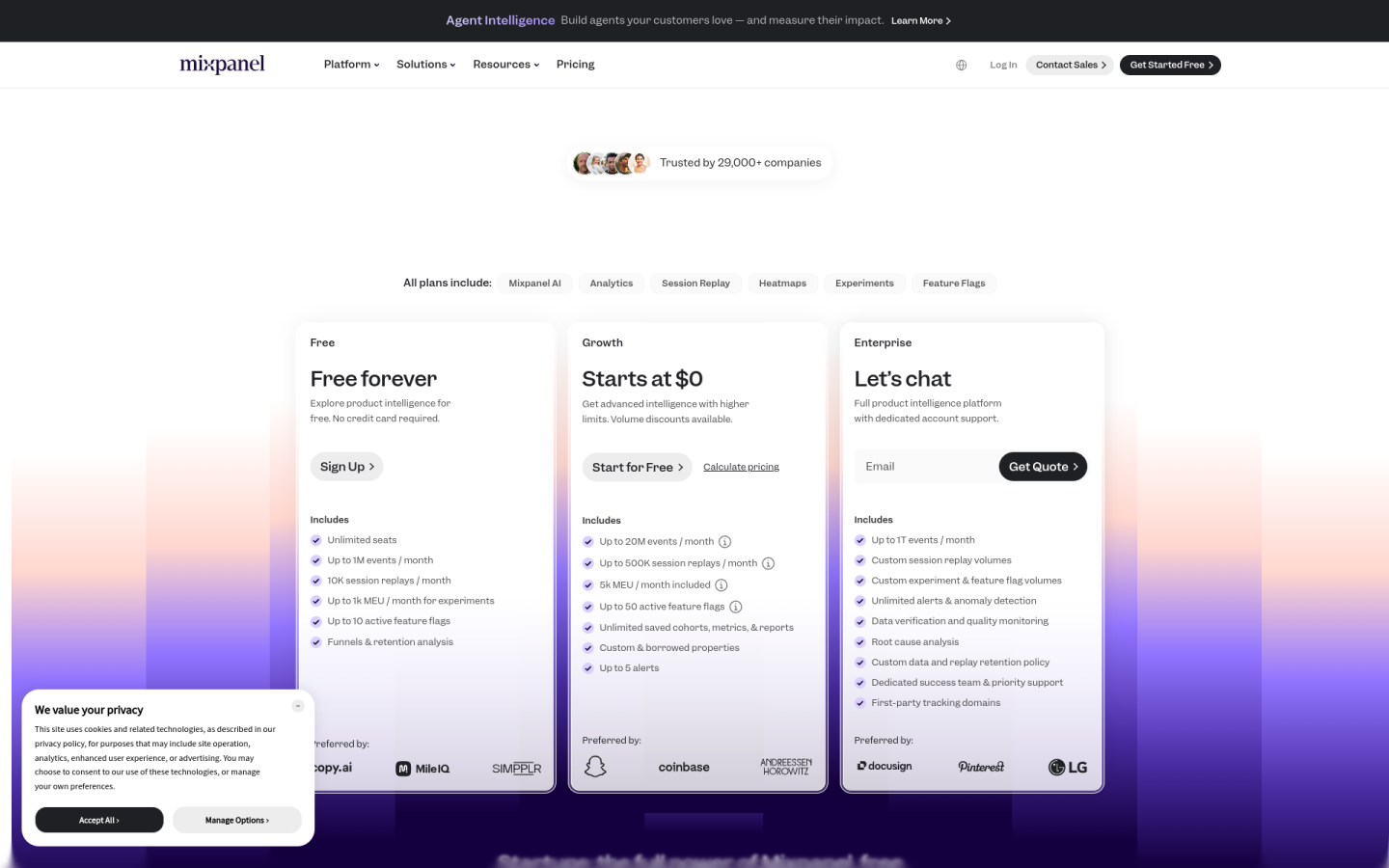
The Mixpanel pricing page is built around usage-based pricing with unlimited seats, so teams pay for the events they track rather than the number of people using the product:
1. Clear Hierarchy and Visual Appeal:
- Growth-Focused Headline: The page opens with a large “Plans that grow with you” headline, which frames the plans as steps a company moves through as it scales.
- Three Plans in a Row: Free, Growth and Enterprise sit side by side, each with a one-line pitch, such as “Get advanced intelligence with higher limits” on Growth.
- Shared Features Up Front: A line above the plans states that AI Analytics, Session Replay, Heatmaps, Experiments and Feature Flags are included in all plans.
- Clear Calls to Action: Free uses “Sign Up,” Growth uses “Start for Free” and “Calculate pricing,” and Enterprise uses “Let’s chat” and “Get Quote.”
- Detailed Comparison Table: A long table below the cards is grouped into Usage, Analysis, Data Management, Session Replay, Experiments, Feature Flags, Governance and Security, and Support.
2. Value-Based Differentiation:
- Free: Gives up to 1M events a month, 10K session replays, up to 10 active feature flags and funnel and retention analysis, with no credit card required.
- Growth: Raises the limits to up to 20M events and 500K session replays a month and adds unlimited saved reports and cohorts, custom properties, alerts and data warehouse connectors.
- Enterprise: Adds up to 1T events a month, anomaly detection, root cause analysis, data quality monitoring, HIPAA tools and a dedicated success team.
- Paid Add-Ons: Group Analytics, Data Pipelines and Metric Trees are sold as add-ons, so teams only pay for the extras they need.
3. Transparent Pricing:
- Event-Based Calculator: A slider lets buyers pick their monthly event volume from 1M to 20M, and the first 1M events a month stay free on Growth.
- Annual Prices: On yearly billing, Growth costs $100 a month for 1.5M events, $438 a month for 5M events and $1,635 a month for 20M events.
- Monthly Prices: On monthly billing, the same plan costs $140 a month for 1.5M events and $2,289 a month for 20M events.
- Billing Toggle: A “Yearly” and “Monthly” switch sits on the calculator, with a badge such as “Save $480/yr with annual billing” that updates with the chosen volume.
- Custom Enterprise Pricing: Enterprise and usage above 20M events a month do not show a price, and buyers contact sales for a quote.
4. Addressing Different User Needs:
- Early-Stage Teams: The Free plan is described as “Free forever” and lets small products explore analytics without paying.
- Growing Product Teams: Growth suits teams that need higher limits and saved reports, with volume discounts as event counts rise.
- Large and Regulated Companies: Enterprise adds HIPAA compliance tools, custom data retention, 24/7 email support and a dedicated account manager.
- Startups: A Startup Program gives eligible companies, founded less than 5 years ago with up to $8M in funding, their first year free.
- Whole-Company Access: Every plan includes unlimited seats, so anyone in the company can use the product without raising the bill.
5. Strategic Use of Limitations and Social Proof:
- Limits as Upgrade Triggers: Free caps saved reports at 5 per seat and does not let users save cohorts or custom properties, which gives growing teams a clear reason to move to Growth.
- Enterprise-Only Tools: Anomaly detection, root cause analysis and 2-year audit log retention are kept for Enterprise to pull larger accounts toward a sales conversation.
- Annual Savings Message: The calculator shows the dollar amount saved with annual billing, such as $7,848 a year at 20M events, which makes the yearly plan more appealing.
- Customer Proof: The line “Trusted by 29,000+ companies” appears on the page, and each plan lists brands that prefer it, such as Snapchat and Coinbase for Growth and Docusign and Pinterest for Enterprise.
- Security Signals: The comparison table lists GDPR, CCPA and SOC 2 Type II compliance and US or EU data residency on all plans.