
Loom
See pricing page design for Loom, the async video messaging and screen recording tool, from the free Starter plan to the Business, Business + AI and Enterprise plans.
Loom Pricing Page Design
$0 - $49 4 Plans
Launch Website
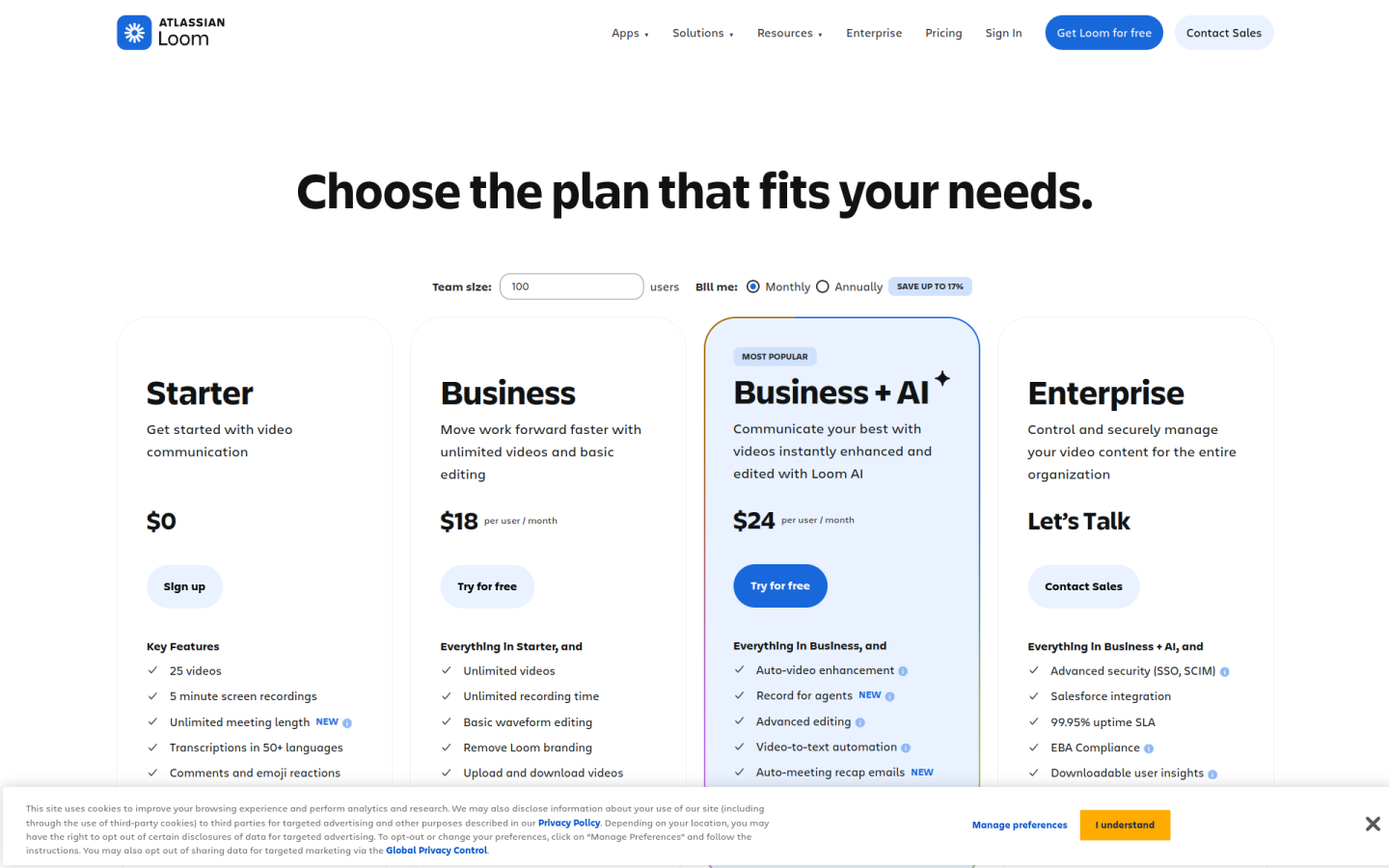
The Loom pricing page is built to move users from free screen recordings to AI-powered video for the whole company:
1. Clear Hierarchy and Visual Appeal:
- Simple Headline: The page opens with “Choose the plan that fits your needs,” which keeps the focus on picking the right fit rather than on price.
- Four Plans in a Row: Starter, Business, Business + AI and Enterprise sit side by side, moving from a free plan to a fully managed company plan.
- Interactive Controls: A “Bill me” toggle switches between Monthly and Annually, and a team size selector lets buyers set how many users they need.
- Short Plan Taglines: Each plan has a one-line goal, such as “Get started with video communication” for Starter and “Move work forward faster with unlimited videos and basic editing” for Business.
- Clear Calls to Action: Starter uses “Sign up,” the two Business plans use “Try for free” and Enterprise uses “Contact Sales.”
2. Value-Based Differentiation:
- Starter: A free plan for up to 50 members, with 25 videos per person, 5-minute screen recordings, 720p quality and transcriptions in 50+ languages.
- Business: Removes the main limits with unlimited videos and recording length, up to 4K quality, basic editing, no Loom branding and password-protected videos.
- Business + AI: Adds Loom AI, with auto titles, summaries and chapters, filler word and silence removal, edit by transcript, AI workflows and auto meeting notes.
- Enterprise: Adds SSO (SAML), SCIM provisioning, Atlassian Guard Standard, advanced privacy controls, custom data retention, a 99.95% uptime SLA and a dedicated account manager.
3. Transparent Pricing:
- Monthly Prices: Business costs $18 and Business + AI costs $24 per user per month on monthly billing.
- Annual Prices: On annual billing, Business drops to $15 and Business + AI drops to $20 per user per month.
- Clear Savings Message: The billing toggle carries a “Save up to 17%” badge, which pushes buyers toward an annual commitment.
- Custom Enterprise Pricing: Enterprise shows “Let’s Talk” instead of a price, and buyers need to contact sales for a quote.
4. Addressing Different User Needs:
- Individuals and Small Teams: Starter lets up to 50 people record and share videos at no cost.
- Growing Teams: Business covers teams that need unlimited recording, branding controls and engagement insights.
- AI-Focused Teams: Business + AI serves teams that want Loom to write titles, summaries and meeting notes for them.
- Large Companies: Enterprise focuses on security, admin control and content ownership, with payment by ACH available through sales.
- Students and Teachers: The page links to a discounted education plan through Atlassian.
5. Strategic Use of Limitations and Social Proof:
- Starter Limits: The 25-video cap, 5-minute recording limit and 720p quality give regular users a clear reason to upgrade.
- Most Popular Badge: Business + AI carries a “Most Popular” label that steers buyers toward the AI tier.
- Free Trials: Business + AI comes with a 14-day free trial, and Enterprise offers a 14-day trial through sales.
- Social Proof: The line “More than 25 million people across 400,000 companies choose Loom” sits next to logos from HubSpot, Atlassian, Juniper, Lacoste, LaunchDarkly and Greenhouse.