

Hotjar
See how visitors are really using your website, collect user feedback and turn more visitors into customers.
Hotjar Pricing Page Design
$50 - $149 4 Plans
Launch Website
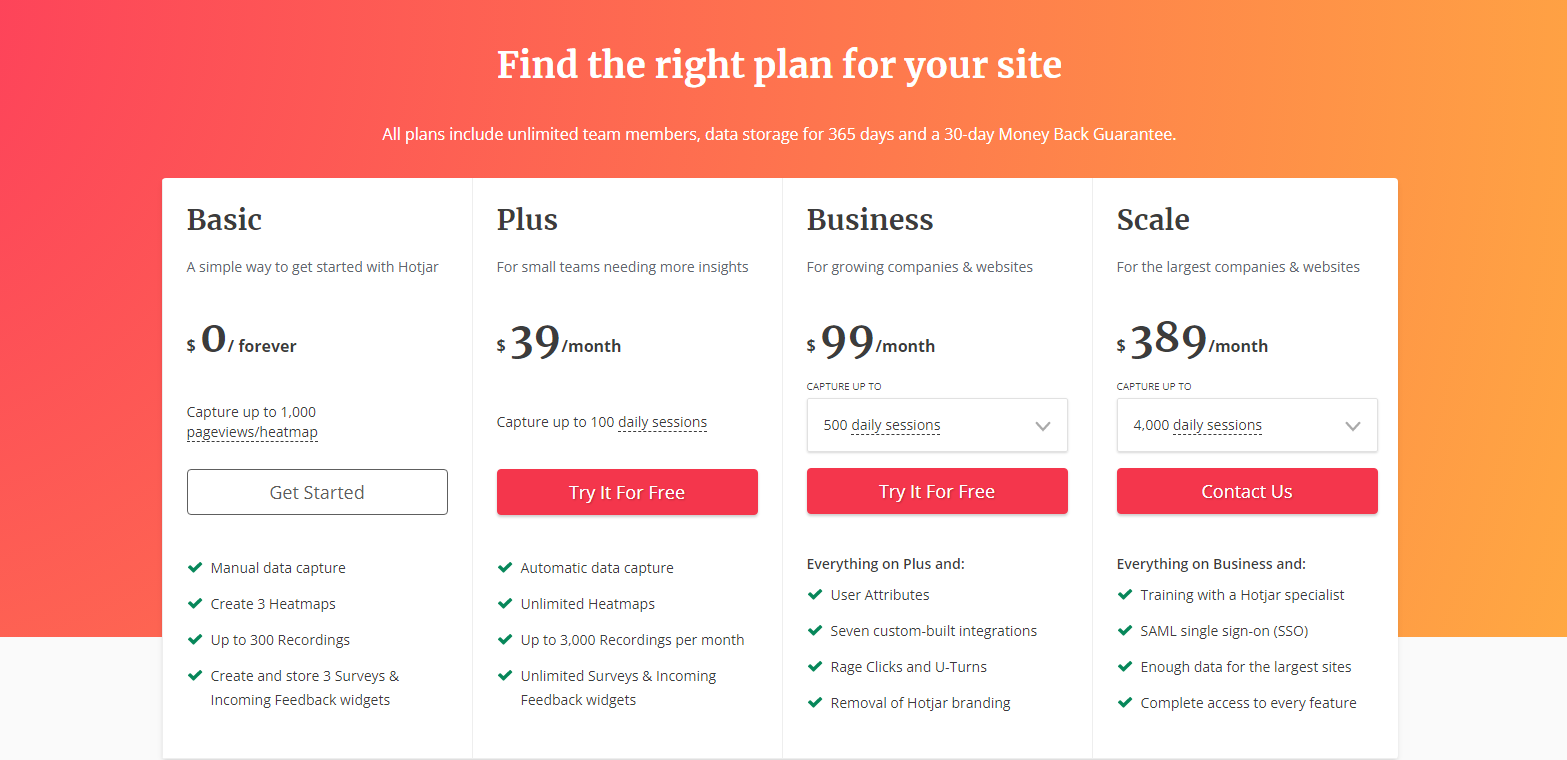
The Hotjar pricing section is effective for several reasons:
1. Clear Hierarchy and Visual Appeal:
- Distinct Tiers: The “Basic,” “Plus,” “Business,” and “Scale” tiers are clearly labeled and visually separated.
- Progressive Pricing: The pricing clearly increases with each tier, reflecting added features and capabilities.
- Consistent Layout: Each tier follows a consistent layout with descriptions, pricing, features, and call-to-action buttons.
- Visual Cues: Checkmarks are used to indicate included features, enhancing readability.
- Clear Headings: The headings clearly indicate the purpose and target audience of each tier.
- Pricing Clarity: The monthly prices are prominently displayed.
- Call to Action Buttons: The “Get Started,” “Try It For Free,” and “Contact Us” buttons are visually distinct and clearly labeled.
- Informative Headline: “Find the right plan for your site” directly addresses user needs.
- Guarantees: The mention of “unlimited team members, data storage for 365 days and a 30-day Money Back Guarantee” builds trust.
2. Value-Based Differentiation:
- Targeted Descriptions: Each tier has a concise description that clearly identifies the target customer and their needs.
- Feature Progression: The “Everything on [Previous Tier] and:” structure clearly highlights the added value of higher tiers.
- Specific Feature Differentiation: Features like “User Attributes,” “Training with a Hotjar specialist,” and “SAML single sign-on (SSO)” differentiate the higher tiers.
- Quantitative Differentiation: The differences in capture limits provide clear quantitative differences.
- Free Option: The “Basic” tier offers a free option, lowering the barrier to entry.
3. Transparent Pricing:
- Clear Pricing Information: The monthly prices are clearly stated for each tier, and the “Basic” tier is clearly marked as “Free.”
- Free Trial Offer: The “Try It For Free” option for the “Plus” and “Business” tiers reduces the barrier to entry.
4. Addressing Different User Needs:
- Getting Started: The “Basic” tier caters to users just getting started.
- Small Teams: The “Plus” tier is designed for small teams needing more insights.
- Growing Companies: The “Business” tier caters to growing companies and websites.
- Large Organizations: The “Scale” tier caters to the largest companies and websites.
5. Strategic Use of Information:
- Benefit-Oriented Features: Features like “Unlimited Heatmaps,” “Rage Clicks and U-Turns,” and “SAML single sign-on (SSO)” highlight the value of each tier.
- Clear Call to Action: The call-to-action buttons provide clear paths for action.
- Feature Lists: The feature lists clearly show the differences between the tiers.
- Concise Descriptions: The descriptions are brief and to the point, making it easy to understand the purpose of each tier.