

Help Scout
Help Scout’s pricing page pairs three per-user plans with a pay-per-resolution AI agent, plus an ROI calculator and spending caps that keep AI costs predictable.
Help Scout Pricing Page Design
$50 - $149 4 Plans
Launch Website
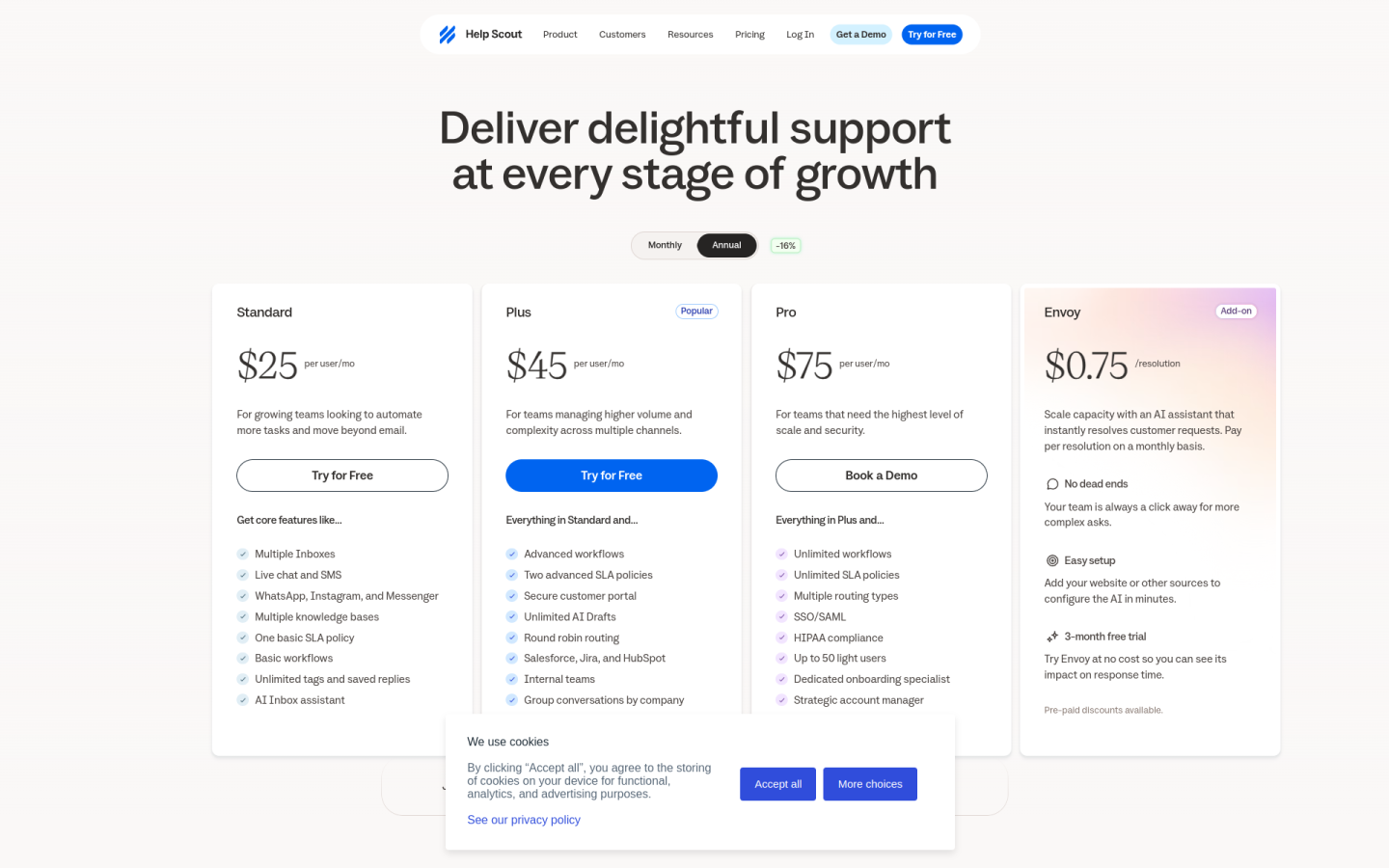
The Help Scout pricing page is built around simple per-user plans and a pay-per-resolution AI add-on, so growing support teams can start free and add channels, automation and AI as they scale:
1. Clear Hierarchy and Visual Appeal:
- Growth-Focused Headline: The page opens with “Deliver delightful support at every stage of growth,” which frames the plans as steps a team moves through as it grows.
- Three Paid Plans in a Row: Standard, Plus and Pro sit side by side, each with a one-line pitch, such as “For teams managing higher volume and complexity across multiple channels” on Plus.
- Free Plan Option: A Free plan is offered with its own “Start with Free” button for teams that are not ready to pay yet.
- Clear Calls to Action: Standard and Plus use “Try for Free,” while Pro uses “Book a Demo,” which signals that the top plan is a sales-led purchase.
2. Value-Based Differentiation:
- Free: Gives up to 5 users, 1 Inbox, 1 Docs site and 100 contacts a month, enough for a small team to try the help desk.
- Standard: Adds multiple Inboxes, live chat and SMS, WhatsApp, Instagram and Messenger, multiple knowledge bases, basic workflows and the AI Inbox assistant.
- Plus: Adds advanced workflows, two advanced SLA policies, a secure customer portal, unlimited AI Drafts, round robin routing and Salesforce, Jira and HubSpot integrations.
- Pro: Adds unlimited workflows and SLA policies, SSO/SAML, HIPAA compliance, a dedicated onboarding specialist and a strategic account manager.
3. Transparent Pricing:
- Annual Prices: On annual billing, Standard costs $25, Plus costs $45 and Pro costs $75 per user per month.
- Billing Toggle: A “Monthly” and “Annual” switch sits above the plans, with a “-16%” badge showing the saving for paying yearly.
- Usage-Based AI Pricing: The Envoy AI agent costs $0.75 per resolution, billed monthly, and the FAQ explains that a resolution only counts when AI answers without human help.
- Add-On Prices Listed: Extra Inboxes cost $10 a month paid annually or $12 monthly, and extra Docs sites cost $20 a month paid annually or $24 monthly.
- Spending Caps: Teams can set a monthly cap on AI resolutions, which keeps usage costs predictable.
4. Addressing Different User Needs:
- Small Teams: The Free plan covers up to 5 users with no payment method needed.
- Growing Teams: Standard supports up to 25 users and is pitched at teams “looking to automate more tasks and move beyond email.”
- High-Volume Teams: Plus supports up to 50 users and adds routing, SLAs and CRM integrations for busier queues.
- Regulated and Larger Companies: Pro has unlimited users with a 10-user minimum, and adds HIPAA compliance, SSO/SAML and higher API limits of 800 calls a minute.
- Startups and Nonprofits: A startup plan and the Help Scout for Good program offer discounts for early-stage companies, nonprofits and B Corps.
5. Strategic Use of Limitations and Social Proof:
- Limits as Upgrade Triggers: Inboxes rise from 1 on Free to 2, 5 and 10, and Docs sites from 1 to 2, 3 and 5, which gives growing teams a clear reason to move up.
- Popular Badge: A “Popular” label on Plus steers buyers toward the middle plan.
- Risk-Free Trials: Standard and Plus come with a 15-day free trial with no credit card, and Envoy has a 3-month free trial.
- ROI Calculator: An Envoy calculator shows sample savings, such as $132,933 in year one and a 455% ROI, to justify the AI add-on.
- Customer Logos and Retention: Logos from Gusto, Buffer, Vimeo, Litmus and Mixmax appear on the page, alongside the claim that “80% of customers stay for 4+ years.”