

Front
Front’s pricing page shows seat caps on each of its three plans, marks Enterprise as most popular and backs the offer with ROI and response-time stats.
Front Pricing Page Design
$50 - $149 3 Plans
Launch Website
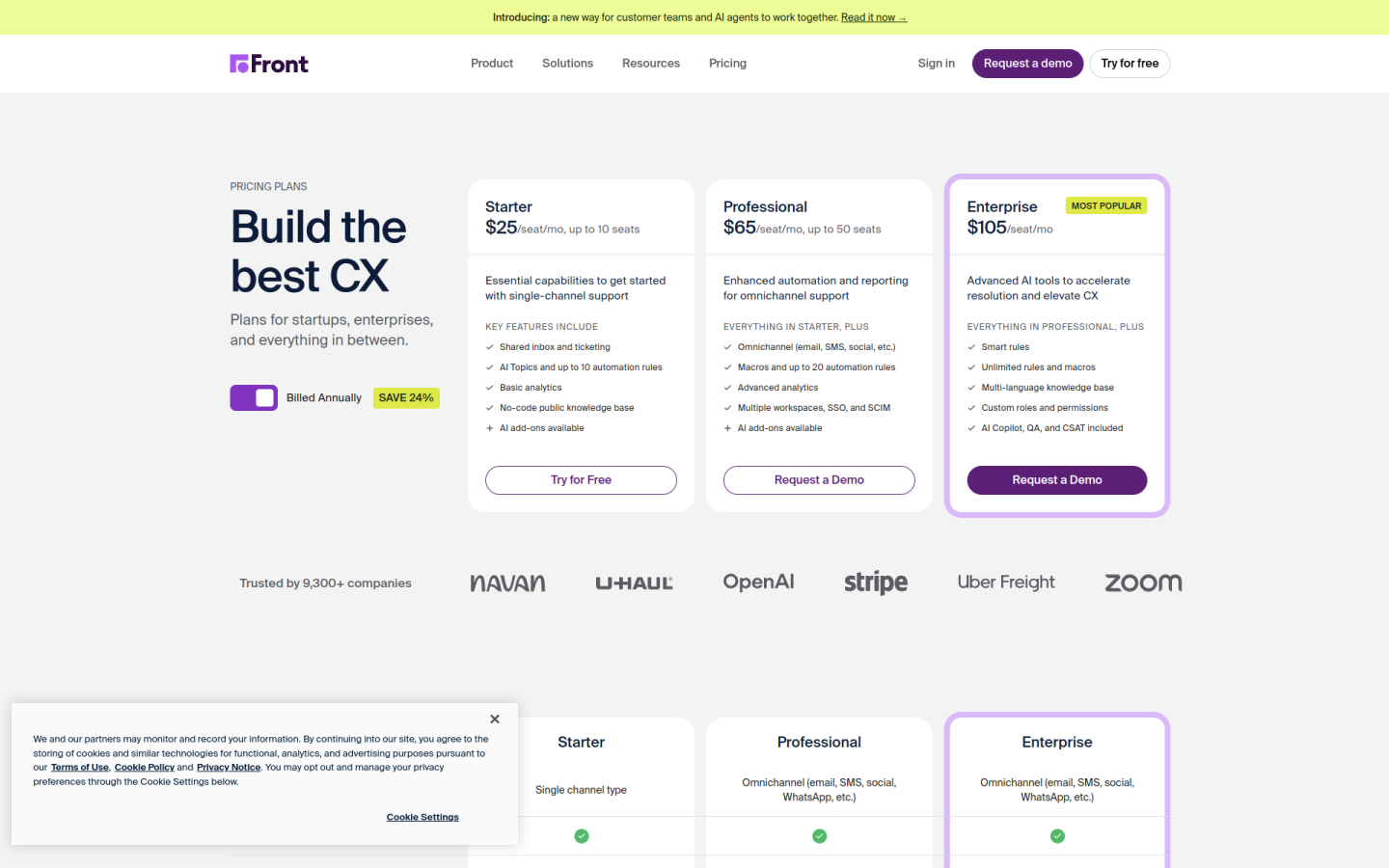
The Front pricing page is built for support teams of every size, with three seat-based plans that grow from a simple shared inbox to a full AI-powered help desk:
1. Clear Hierarchy and Visual Appeal:
- Bold Headline: The page opens with “Build the best CX” and the line “Plans for startups, enterprises, and everything in between.”
- Three Plan Cards: Starter, Professional and Enterprise sit side by side, so visitors can compare them at a glance.
- Seat Limits Up Front: Each card shows its seat cap, with Starter for up to 10 seats and Professional for up to 50 seats.
- Most Popular Tag: Enterprise carries a “most popular” label, which draws the eye to the top plan.
2. Value-Based Differentiation:
- Starter: Includes single-channel support, a shared inbox, ticketing, up to 10 automation rules, basic analytics and a no-code public knowledge base.
- Professional: Adds omnichannel support across email, SMS and social, macros, up to 20 automation rules, advanced analytics, multiple workspaces, SSO and SCIM.
- Enterprise: Adds smart rules, unlimited rules and macros, a multi-language knowledge base, custom roles and permissions, and AI Copilot, QA and CSAT included.
- Channel Limits: The FAQ explains that each license supports up to 10 channels on Starter, 30 on Professional and 50 on Enterprise.
3. Transparent Pricing:
- Annual Prices: On annual billing, Starter costs $25 per seat per month, Professional costs $65 per seat per month and Enterprise costs $105 per seat per month.
- Monthly Prices: On monthly billing, Starter costs $35 per seat per month and Professional costs $85 per seat per month, while Enterprise is offered on annual billing only.
- Billing Toggle: A “Billed Annually” option sits above the plans with a “Save 24%” label.
- Add-On Prices: Autopilot starts at $0.05 per conversation, Copilot costs $20 per seat per month on Starter and Professional, and an API rate limit increase costs $200 per 100 requests per minute each month.
4. Addressing Different User Needs:
- Small Teams: Starter suits teams of up to 10 people who handle support through one channel.
- Growing Support Teams: Professional covers teams of up to 50 that need to answer customers across email, SMS and social in one place.
- Large Organizations: Enterprise has no listed seat limit and adds custom roles and a multi-language knowledge base for global teams.
- WhatsApp Support: Professional and Enterprise teams can add a native WhatsApp channel, billed at Meta’s costs plus a 20% admin fee.
- Guided Onboarding: Onboarding and Success Services packages are available, and onboarding is required for contracts over $25k.
5. Strategic Use of Limitations and Social Proof:
- Stepped Limits: Automation rules grow from 10 to 20 to unlimited, and seats from 10 to 50 to no listed cap, which makes the reasons to upgrade easy to see.
- Free Trial: Starter uses a “Try for Free” button for a 14-day trial with all Professional features and no credit card needed.
- Demo-Led Upper Plans: Professional and Enterprise use a “Request a Demo” button, steering larger buyers toward a sales conversation.
- Proof in Numbers: The page says Front is “Trusted by 9,300+ companies” and lists a 428% average ROI, 97% customer satisfaction and 7x faster response time.
- Trust Signals: Logos from Y Combinator, Culture Amp and Branch appear alongside G2 badges such as Leader (Enterprise) and Quality of Support.