

Framer
Pricing page design for Framer, the AI-powered website builder and hosting platform for designers, from the Free plan to the Basic, Pro and Enterprise plans.
Framer Pricing Page Design
$0 - $49 4 Plans
Launch Website
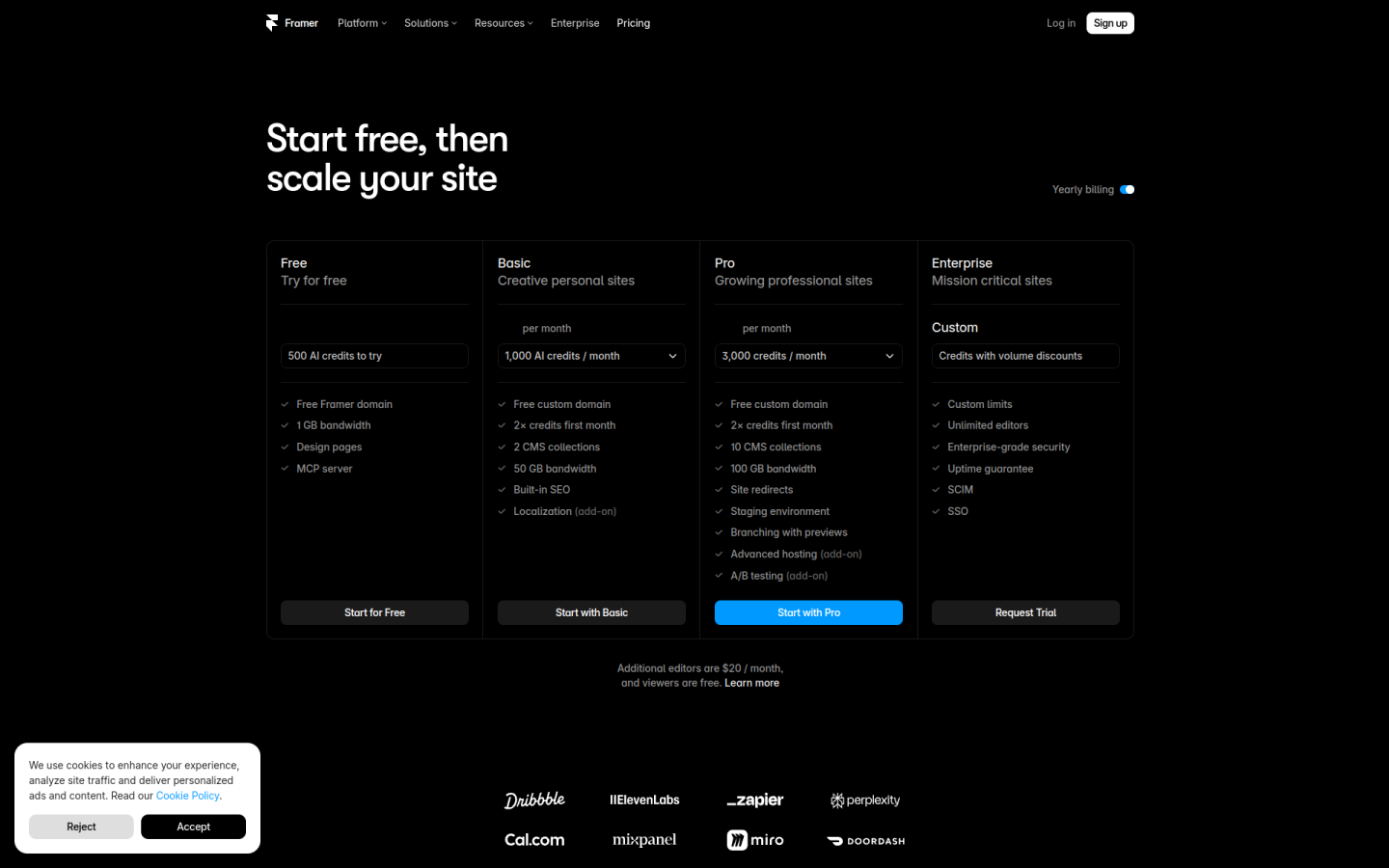
The Framer pricing page is built to let people start a site for free and pay more only as the site, the team and the AI usage grow:
1. Clear Hierarchy and Visual Appeal:
- Short Headline: The page opens with “Start free, then scale your site,” which sums up the whole pricing model in one line.
- Four Plans in a Row: Free, Basic, Pro and Enterprise sit side by side, moving from a test site to mission-critical company sites.
- Short Plan Taglines: Each plan has a one-line goal, such as “Creative personal sites” for Basic, “Growing professional sites” for Pro and “Mission critical sites” for Enterprise.
- Detailed Sections Below: Separate sections for limits, Agents and credits, live collaboration and add-ons keep the plan cards simple while the full detail sits further down.
- Clear Calls to Action: The buttons read “Start for Free,” “Start with Basic,” “Start with Pro” and “Request Trial.”
2. Value-Based Differentiation:
- Free: Gives 500 AI credits to try, a free Framer domain, 1 GB bandwidth, design pages and the MCP Server.
- Basic: Adds a free custom domain, 30 site pages, 2 CMS collections, 1,000 CMS items, 50 GB bandwidth, built-in SEO and 1,000 credits a month.
- Pro: Adds 150 site pages, 10 CMS collections, 2,500 CMS items, 100 GB bandwidth, site redirects, a staging environment, branching with previews and 3,000 credits a month.
- Enterprise: Adds custom limits, unlimited editors, enterprise-grade security, an uptime guarantee, SSO, SCIM and credits with volume discounts.
3. Transparent Pricing:
- Annual Prices: Basic costs $10 and Pro costs $30 per site per month on yearly billing, and the Free plan costs $0.
- Monthly Prices: On monthly billing, Basic costs $15 and Pro costs $45 per site per month.
- Clear Overage Prices: Pro users can buy more room, such as $20 per 100 extra pages, $40 per 10 extra CMS collections and $40 per 100 GB of extra bandwidth.
- Custom Enterprise Pricing: Enterprise shows “Custom” instead of a price, with custom billing by credit card or bank transfer.
4. Addressing Different User Needs:
- Hobby Projects: The FAQ says the Free plan is for non-commercial use, so anyone can design and test a site at no cost.
- Students and Freelancers: Basic is aimed at students, freelancers and small studios that need a custom domain and a simple CMS.
- Agencies and Startups: Pro serves agencies, startups and scale-ups with staging, branching, longer analytics history and more hosting locations.
- Growing Teams: Extra editors cost $20 per editor per month, content editors cost $10 and viewers are free, with up to 10 seats on Basic and Pro.
- Large Companies: Enterprise covers teams that need unlimited editors, custom limits and dedicated support.
5. Strategic Use of Limitations and Incentives:
- Clear Upgrade Triggers: Basic caps sites at 30 pages and 2 CMS collections and has no staging or branching, which gives growing sites a clear reason to move to Pro.
- AI Credit Tiers: Credits rise from 1,000 a month on Basic to 3,000 on Pro, with higher credit tiers of up to 15,000 on Basic and 100,000 on Pro.
- First-Month Bonus: Basic and Pro both offer “2× credits first month,” and yearly plans include a free domain.
- Paid Add-Ons: Translation locales cost $20 per locale, Convert A/B testing costs $50 per 500,000 events and Advanced hosting costs $200, which raises the value of each account.
- Fair Limit Rules: The FAQ explains that sites can go over the bandwidth limit for one month with an email notice before an upgrade is needed.