

Formassembly
FormAssembly provides an easy to use online form builder for businesses.
Formassembly Pricing Page Design
$150 - $499 4 Plans
Launch Website
Integrate with Salesforce with our seamless web to anything solution. Start today.
The Formassembly pricing section is effective for several reasons:
1. Clear Hierarchy and Visual Appeal:
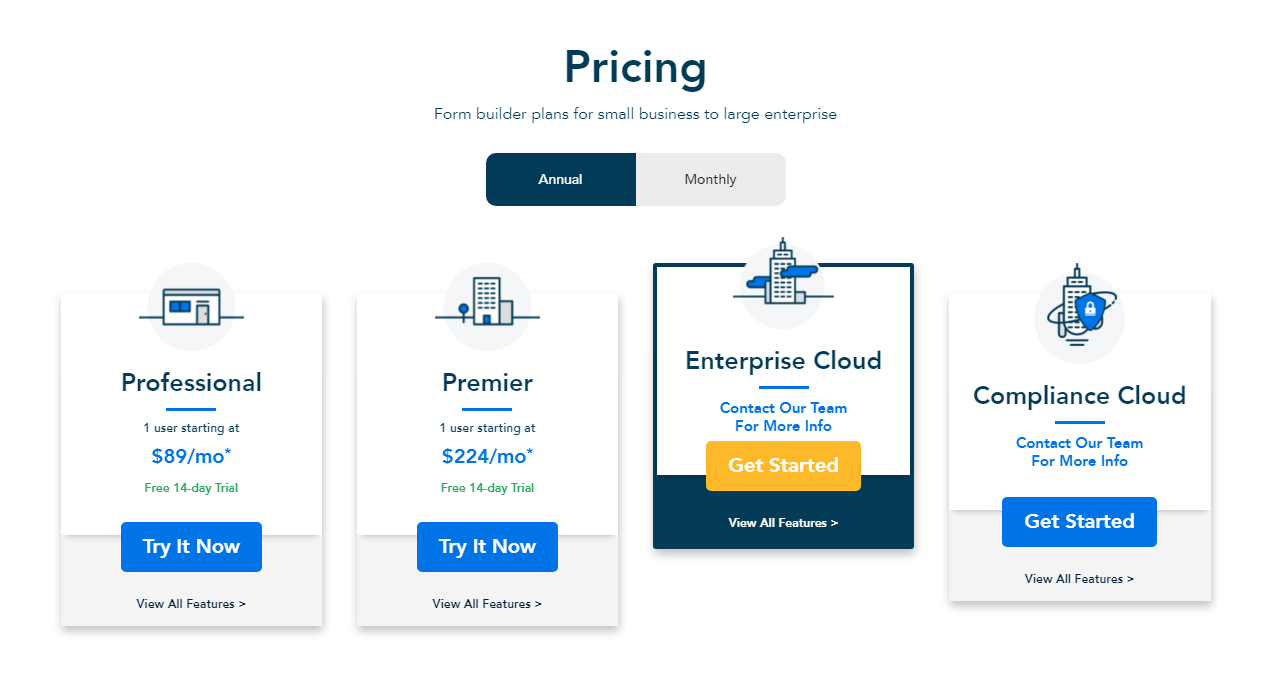
- Distinct Tiers: The “Professional,” “Premier,” “Enterprise Cloud,” and “Compliance Cloud” tiers are clearly labeled and visually separated.
- Consistent Layout: Each tier follows a consistent layout with pricing (where applicable), descriptions, and call-to-action buttons.
- Visual Cues: Icons are used to represent each tier, enhancing visual appeal.
- Clear Headings: The headings clearly indicate the purpose and target audience of each tier.
- Billing Options: The “Annual/Monthly” toggle allows users to easily compare billing options.
- Informative Title: “Pricing” and “Form builder plans for small business to large enterprise” clearly state the purpose and target audience.
2. Value-Based Differentiation:
- Targeted Descriptions: The tier names themselves suggest a progression in features and capabilities.
- Specific Feature Differentiation: The “Enterprise Cloud” and “Compliance Cloud” tiers indicate specialized solutions for larger and compliance-focused organizations.
- Quantitative Differentiation: The differences in monthly prices for “Professional” and “Premier” are clear.
- Free Trial: The 14-day free trial for “Professional” and “Premier” tiers lowers the barrier to entry.
3. Transparent Pricing:
- Clear Pricing Information: The monthly prices are clearly stated for the “Professional” and “Premier” tiers.
- Contact for Information: The “Enterprise Cloud” and “Compliance Cloud” tiers use “Contact Our Team For More Info,” indicating a tailored solution for larger clients.
4. Addressing Different User Needs:
- Individual Users/Small Teams: The “Professional” and “Premier” tiers cater to individual users and small teams.
- Enterprise Needs: The “Enterprise Cloud” tier caters to organizations needing advanced features.
- Compliance Needs: The “Compliance Cloud” tier caters to organizations with specific compliance requirements.
5. Strategic Use of Information:
- Clear Call to Action: The “Try It Now” and “Get Started” buttons provide clear paths for action.
- “View All Features” Links: The links encourage users to explore further details.
- Concise Descriptions: The descriptions are brief and to the point, making it easy to understand the purpose of each tier.