

Fireflies.ai
Fireflies.ai’s pricing page sets a free-forever plan beside three per-seat tiers, shows monthly and annual prices on the same card and badges Business as most popular.
Fireflies.ai Pricing Page Design
$0 - $49 4 Plans
Launch Website
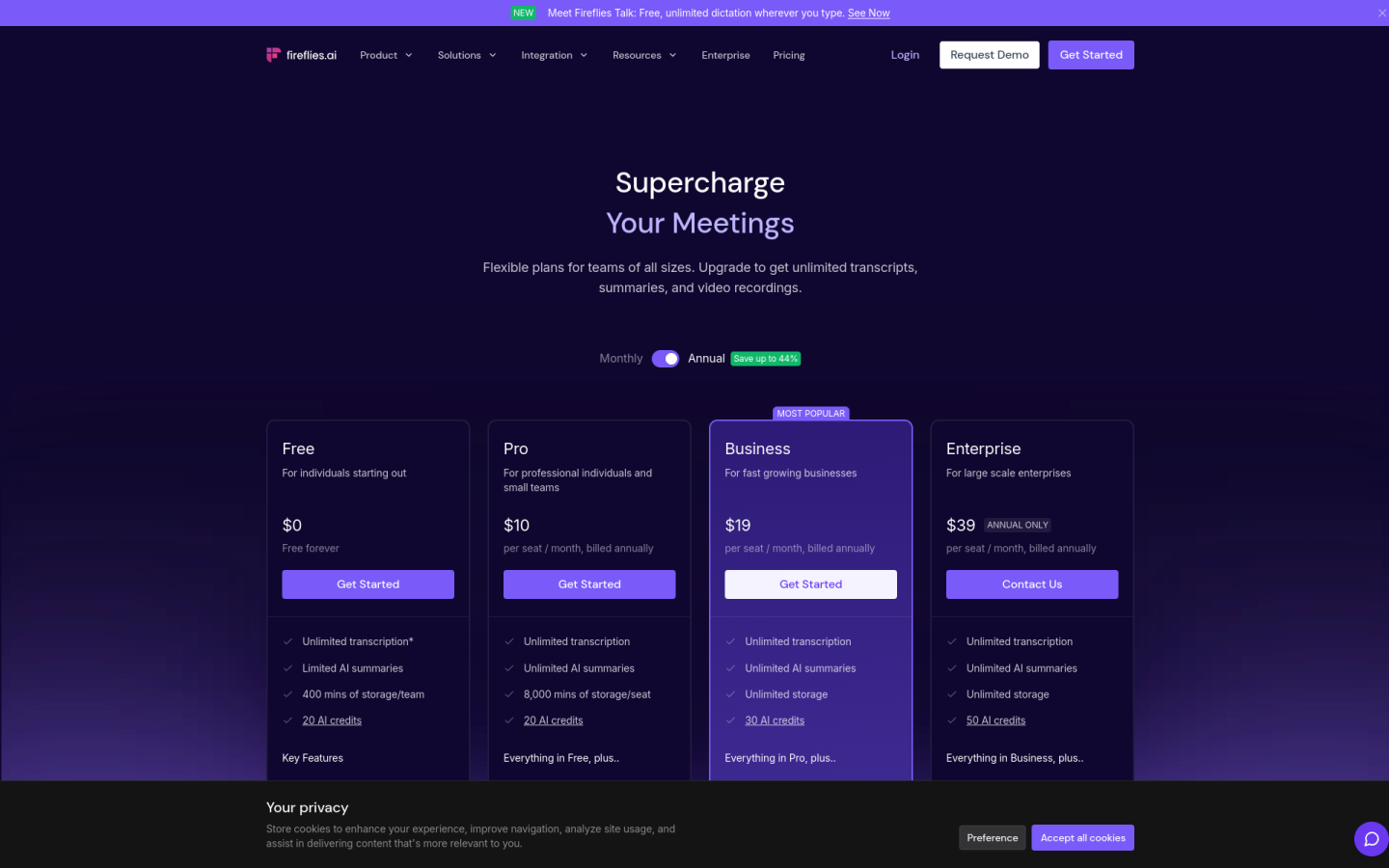
The Fireflies.ai pricing page is built around a free-forever plan and per-seat paid tiers, with storage, AI summaries and admin tools that grow clearly from one plan to the next:
1. Clear Hierarchy and Visual Appeal:
- Bold Headline: The page opens with “Supercharge Your Meetings,” followed by a line about flexible plans for teams of every size.
- Four Plans in a Row: Free, Pro, Business and Enterprise sit side by side, each with a short pitch, such as “For professional individuals and small teams” on Pro and “For fast growing businesses” on Business.
- Simple Calls to Action: Free, Pro and Business all use “Get Started,” while Enterprise uses “Contact Us,” which separates self-serve plans from the sales-led one.
- Detailed Comparison Table: A table below the cards compares recording length, video quality, storage, AI credits and API limits across all four plans.
2. Value-Based Differentiation:
- Free: Gives unlimited transcription, limited AI summaries, 400 minutes of storage per team, 20 AI credits and integrations with Zoom, Google Meet and Teams.
- Pro: Adds unlimited AI summaries, 8,000 minutes of storage per seat, video recording, downloads, AI Skills and unlimited integrations.
- Business: Adds unlimited storage, 30 AI credits, Multi-language Mode, conversation intelligence, team analytics for admins and user groups.
- Enterprise: Adds a rules engine, SSO and SCIM, HIPAA compliance, private storage, custom data retention and a dedicated account manager.
3. Transparent Pricing:
- Annual Prices: On annual billing, Pro costs $10, Business costs $19 and Enterprise costs $39 per seat per month.
- Monthly Prices: On monthly billing, Pro costs $18 and Business costs $29 per seat per month, and these prices also appear next to the annual ones on the plan cards.
- Billing Toggle: A “Monthly” and “Annual” switch sits above the plans, with a “Save up to 44%” badge on annual billing.
- Free Forever Plan: The Free plan is listed at $0 and marked “Free forever,” so teams can start without paying.
- Annual-Only Enterprise: Enterprise shows a public price but carries an “Annual Only” badge, so it cannot be paid month to month.
4. Addressing Different User Needs:
- Individuals Starting Out: Free is pitched “For individuals starting out,” with transcription in 100+ languages, AskFred and desktop, mobile and Chrome apps.
- Professionals and Small Teams: Pro suits people who need recordings and downloads, with a 2-hour recording limit and 720p video.
- Growing Businesses: Business raises the recording limit to 3 hours and video to 1080p, and adds analytics for team leads.
- Large and Regulated Companies: Enterprise supports a 4-hour recording limit, pooled API access and compliance needs such as HIPAA and audit logs.
5. Strategic Use of Limitations and Social Proof:
- Limits as Upgrade Triggers: Storage rises from 400 minutes per team on Free to 8,000 minutes per seat on Pro and unlimited on Business, which gives growing teams a clear reason to move up.
- Most Popular Badge: A “Most Popular” label on Business steers teams toward the higher self-serve plan.
- Visible Savings: Showing the higher monthly price next to the lower annual price on Pro and Business makes the yearly discount easy to see.
- Security Badges: The page lists SOC 2 Type II, ISO 42001, HIPAA and FERPA, GDPR and Zero Data Retention to reassure larger buyers.
- Customer Proof: A “Used across 1 million+ companies” line appears with logos such as Assembly AI, Emaar, Leonardo AI and Penn, plus testimonials from founders and CEOs.