
Docusign
Docusign’s pricing page defaults to annual billing and uses envelope limits to move buyers from a 5-envelope Personal plan up to team and enterprise tiers.
Docusign Pricing Page Design
$0 - $49 4 Plans
Launch Website
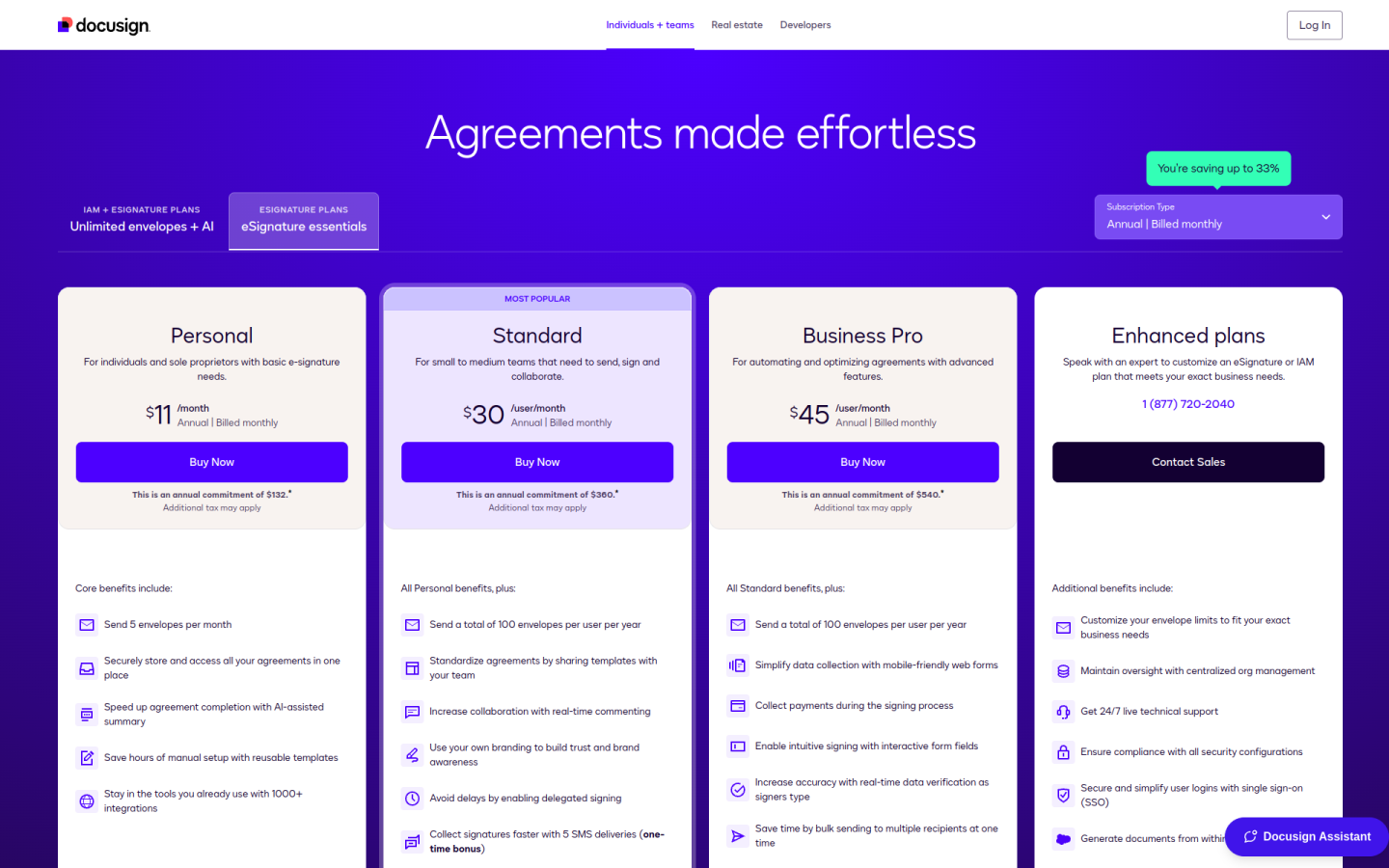
The Docusign pricing page is built around a short ladder of eSignature plans, with an annual billing default and envelope limits that guide buyers from solo use to team workflows:
1. Clear Hierarchy and Visual Appeal:
- Simple Headline: The page opens with “Agreements made effortless,” which keeps the focus on the outcome rather than the price.
- Four Plans in a Row: Personal, Standard, Business Pro and Enhanced plans sit side by side, moving from one signer to large organizations.
- One-Line Taglines: Each plan states who it is for, such as “For individuals and sole proprietors with basic e-signature needs” on Personal.
- Clear Calls to Action: The self-serve plans use “Buy Now,” while the Enhanced plans use “Contact Sales” with a phone number beside it.
- Detailed Comparison Table: A long feature table below the cards is grouped into themes such as signing experiences, access and permissions, workflows, security and integrations.
2. Value-Based Differentiation:
- Personal: Gives one user 5 envelopes a month, with secure storage, an AI-assisted summary, reusable templates and 1000+ integrations.
- Standard: Adds team features such as shared templates, real-time commenting, custom branding and delegated signing.
- Business Pro: Adds automation tools such as web forms, payment collection, interactive form fields, data verification and bulk sending.
- Enhanced Plans: Add centralized org management, 24/7 live support, SSO, compliance and security settings and Salesforce document generation.
3. Transparent Pricing:
- Annual Prices: On the default annual plan, Personal costs $11 a month ($132 a year), Standard costs $30 per user a month ($360 a year) and Business Pro costs $45 per user a month ($540 a year).
- Monthly Prices: On month-to-month billing, Personal costs $15 a month, Standard $45 per user a month and Business Pro $65 per user a month.
- Billing Toggle: An “Annual | Billed monthly” switch comes with a “You’re saving up to 33%” message, so the yearly saving is easy to see.
- Add-On Prices: SMS delivery starts at $0.36 per delivery and identity verification starts at $2.40 per attempt, both for Standard and Business Pro.
- Custom Enterprise Pricing: The Enhanced plans have custom envelope limits and pricing, and buyers speak with an expert to build a plan.
4. Addressing Different User Needs:
- Individuals: The Personal plan is aimed at individuals and sole proprietors who send a few agreements each month.
- Small and Medium Teams: Standard is pitched at teams that “need to send, sign and collaborate,” with support for up to 50 users.
- Operations Teams: Business Pro suits teams that want to automate agreements with forms, payments and bulk sends.
- Large and Regulated Companies: The Enhanced plans cover SSO, data residency and compliance needs, with the comparison table listing standards such as HIPAA, FedRAMP and 21 CFR Part 11.
- Developers and Larger Programs: Links to developer resources and Intelligent Agreement Management (IAM) plans give buyers a path beyond basic eSignature.
5. Strategic Use of Limitations and Social Proof:
- Envelope Limits as Upgrade Triggers: Personal is capped at 5 envelopes a month and the team plans at 100 envelopes per user per year, which pushes heavy senders toward custom Enhanced plans.
- Feature Gates: Bulk sending, payments and web forms are held back for Business Pro, so growing teams have a clear reason to move up.
- Most Popular Badge: A “MOST POPULAR” label on Standard steers buyers toward the middle plan.
- Trust Signals: The page highlights that Docusign is used in 180+ countries and lists ISO 27001, SOC 2 Type II, eIDAS and GDPR compliance.
- Risk Reducers: A free trial is offered, and the FAQ notes a 30-day money-back guarantee on annual plans and that recipients do not need an account to sign.