

Cursor
Cursor’s pricing page splits Individual and Teams tabs and sells each plan as a multiple of Plus usage, from 4x on Premium to 50x on Ultra.
Cursor Pricing Page Design
$150 - $499 5+ Plans
Launch Website
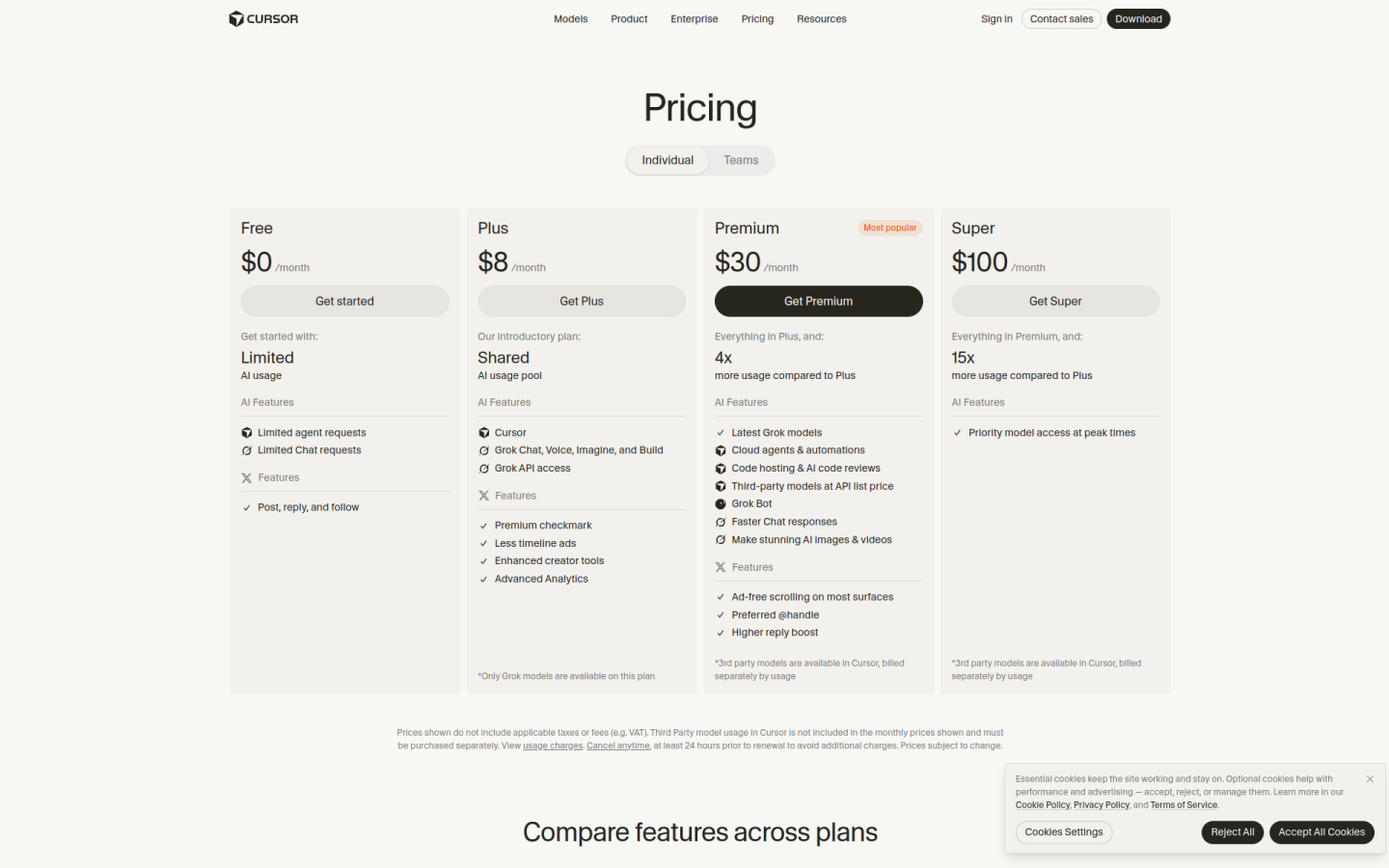
The Cursor pricing page is simple and usage-led, with a ladder of individual plans that scale by how much AI usage a developer needs:
1. Clear Hierarchy and Visual Appeal:
- Short Headline: The page opens with “Pricing” and the line “Choose the plan that’s right for you,” which keeps the focus on the plans.
- Two Tabs: An Individual tab and a Teams tab separate personal plans from team and company plans.
- Five Individual Cards: Free, Plus, Premium, Super and Ultra sit side by side, each building on the one before with lines such as “Everything in Premium, and:”.
- Highlighted Middle Plan: Premium carries a “Most popular” badge, which draws the eye to the plan Cursor wants most people to choose.
2. Value-Based Differentiation:
- Free: Includes limited agent and chat requests, so anyone can try Cursor before paying.
- Plus: Called “Our introductory plan,” it adds a shared AI usage pool across Cursor and Grok, with Grok models only.
- Premium: Adds 4x Plus usage, the latest Grok models, cloud agents and automations, AI code reviews and third-party models at API list price.
- Super and Ultra: Super adds 15x Plus usage and priority model access at peak times, while Ultra adds 50x Plus usage and the earliest access to new products and models.
- Enterprise: Adds invoice and PO billing, SCIM seat management, granular spend controls, model and MCP access controls, audit logs and priority support.
3. Transparent Pricing:
- Monthly Prices: On monthly billing, Plus costs $8, Premium costs $30, Super costs $100 and Ultra costs $200 per month.
- Annual Prices: Annual billing is $80, $300, $1,000 and $2,000 per year for Plus, Premium, Super and Ultra, or about $6.67, $25, $83.33 and $166.67 per month.
- Teams Pricing: Teams starts at $30 per user per month, and teams can mix seat types.
- Clear Fine Print: The page notes that prices exclude taxes and that third-party models are billed separately by usage.
- Custom Enterprise: Enterprise has custom pricing with a “Contact Sales” button.
4. Addressing Different User Needs:
- Plan Guidance: The FAQ recommends “Premium for new AI users, Super for daily agent users, and Ultra for power users.”
- Light Users: Plus is recommended for social creators with limited AI usage.
- Collaborating Teams: Teams adds team management, centralized billing, usage analytics, team-wide privacy settings and SAML/OIDC SSO.
- Large Organizations: Enterprise is suggested for companies that need invoicing, pooled usage or advanced security.
5. Strategic Use of Limitations and Incentives:
- Usage Multipliers: Each plan is described as a multiple of Plus usage, from 4x to 50x, which makes the value of upgrading easy to compare.
- Weekly Refresh: The FAQ explains that usage refreshes weekly, “so one heavy day never wipes out your whole month,” and that users can buy top-offs.
- Model Gating: Plus is limited to Grok models, while third-party models start at Premium, giving developers a clear reason to upgrade.
- Security Proof: A compliance line lists SOC 2, ISO 27001, ISO 42001 and AIUC-1 certifications to build trust with business buyers.
- Clear CTAs: Each plan has a direct button such as “Get started,” “Get Premium” or “Get Teams,” with a closing “Get started with Cursor” section offering Download and Contact Sales.