

Clockify
Clockify’s pricing page lays out six plans in one row, each with a theme label, and shows the annual and monthly per-seat price side by side.
Clockify Pricing Page Design
$0 - $49 5+ Plans
Launch Website
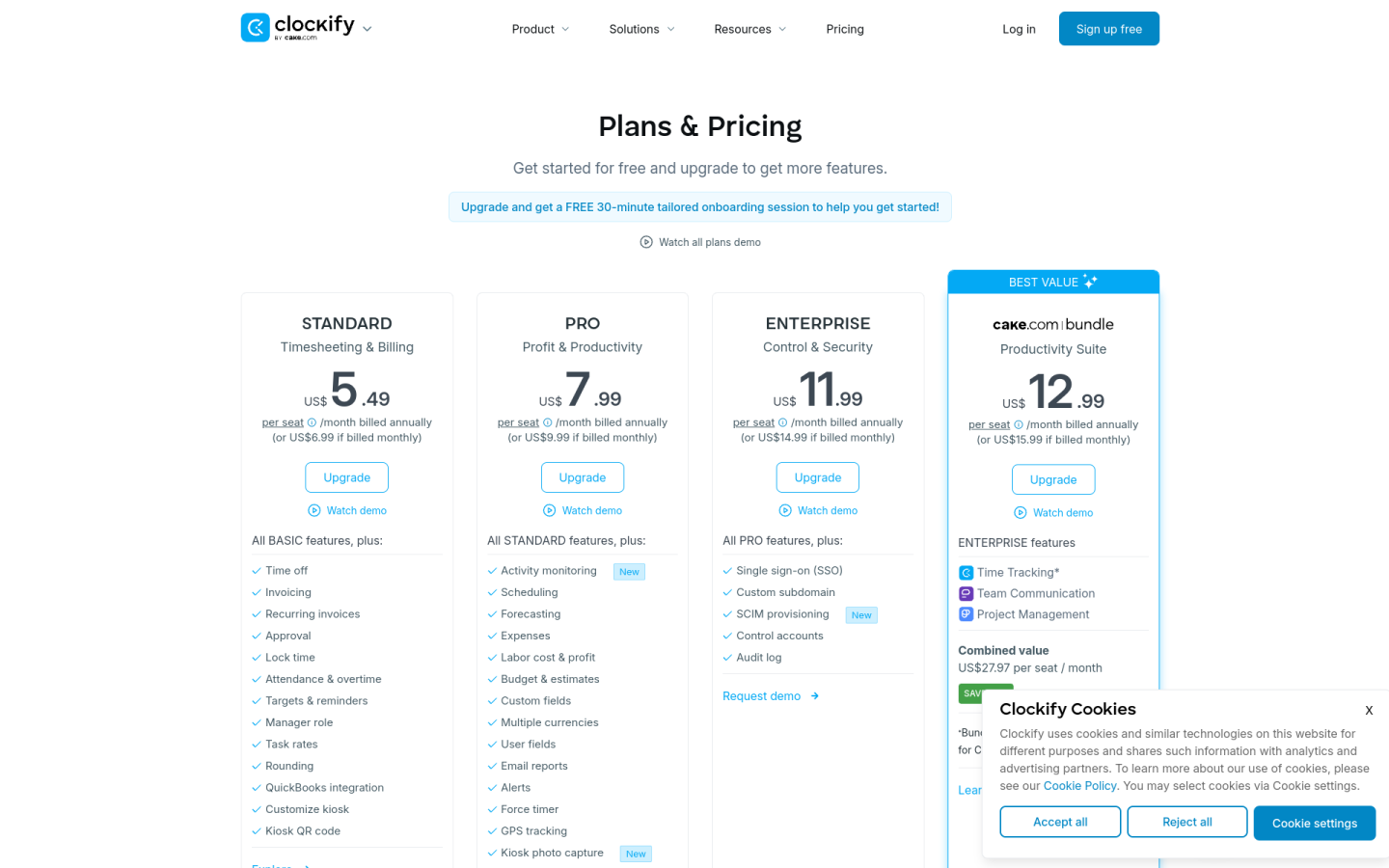
The Clockify pricing page is built around a free plan for small teams and low per-seat paid tiers, with features that build up clearly from administration to billing, profitability and security:
1. Clear Hierarchy and Visual Appeal:
- Simple Headline: The page opens with “Plans & Pricing” and the line “Get started for free and upgrade to get more features.”
- Six Plans in a Row: Free, Basic, Standard, Pro, Enterprise and the CAKE.com Bundle sit side by side, each with a short label such as “Administration,” “Timesheeting & Billing” or “Profit & Productivity.”
- Clear Calls to Action: Free uses “Try now,” the paid self-serve plans use “Upgrade,” and Enterprise uses “Request demo.”
- Stacked Feature Lists: Each plan adds to the one before it, so buyers can see exactly what new features each step unlocks.
2. Value-Based Differentiation:
- Free: Gives unlimited time tracking for up to 5 users, with reports limited to 1 month of data.
- Basic: Adds admin tools such as adding time for others, required fields, bulk edit, kiosk, time audit, project templates and billable rates.
- Standard: Adds time off, invoicing, recurring invoices, approvals, time locking, attendance and overtime, a manager role and a QuickBooks integration.
- Pro: Adds scheduling, forecasting, expenses, labor cost and profit, budgets and estimates, GPS tracking, activity monitoring and data region choice.
- Enterprise: Adds single sign-on, a custom subdomain, SCIM provisioning, control accounts and an audit log.
3. Transparent Pricing:
- Annual Prices: On annual billing, Basic costs $3.99, Standard $5.49, Pro $7.99, Enterprise $11.99 and the Bundle $12.99 per seat per month.
- Monthly Prices: On monthly billing, Basic costs $4.99, Standard $6.99, Pro $9.99, Enterprise $14.99 and the Bundle $15.99 per seat per month.
- Both Prices Shown: The page leads with the annual price and shows the monthly price next to it, so buyers can compare both without switching views.
- Clear Seat Rules: The page explains that every active or invited user, including Owners, Admins, Managers and Members, takes one paid seat, while deactivated users do not.
- Low-Cost Kiosk Seats: Kiosk-only limited seats cost from $0.79 to $2.39 per month on annual billing, depending on the plan.
4. Addressing Different User Needs:
- Small Teams: Free suits teams of up to 5 people who only need to track time.
- Agencies and Freelancers: Standard covers invoicing, billable rates and approvals for teams that bill clients for their time.
- Project-Driven Businesses: Pro adds budgets, forecasting and profit reporting for teams that manage costs closely.
- Large Organizations: Enterprise adds SSO, SCIM and audit logs for companies with security and IT needs.
- Teams Wanting More Tools: The CAKE.com Bundle adds Pumble chat and Plaky project management to Clockify Enterprise features in one price.
5. Strategic Use of Limitations and Social Proof:
- Limits as Upgrade Triggers: The Free plan caps teams at 5 users and reports at 1 month of data, which gives growing teams a clear reason to upgrade.
- Best Value Bundle: The CAKE.com Bundle carries a “BEST VALUE” badge and a “Save 53%” label, framed against a combined value of $27.97 per seat per month.
- Onboarding Incentive: Paid upgrades include a free 30-minute tailored onboarding session, and larger teams can qualify for a dedicated success representative.
- Ratings and Review Badges: The page shows “4.8 Rating, 9,000+ Reviews, 95% Customer Satisfaction” with logos from Capterra, G2, GetApp, Software Advice and TrustRadius.
- Customer Testimonials: Quotes from users such as Alex Beadon of Together We Launch add real-world proof.