
ClickUp
See pricing for ClickUp, the all-in-one work and project management platform with built-in AI, from the Free Forever plan to the Core, Business, Enterprise and Max plans.
ClickUp Pricing Page Design
$50 - $149 5+ Plans
Launch Website
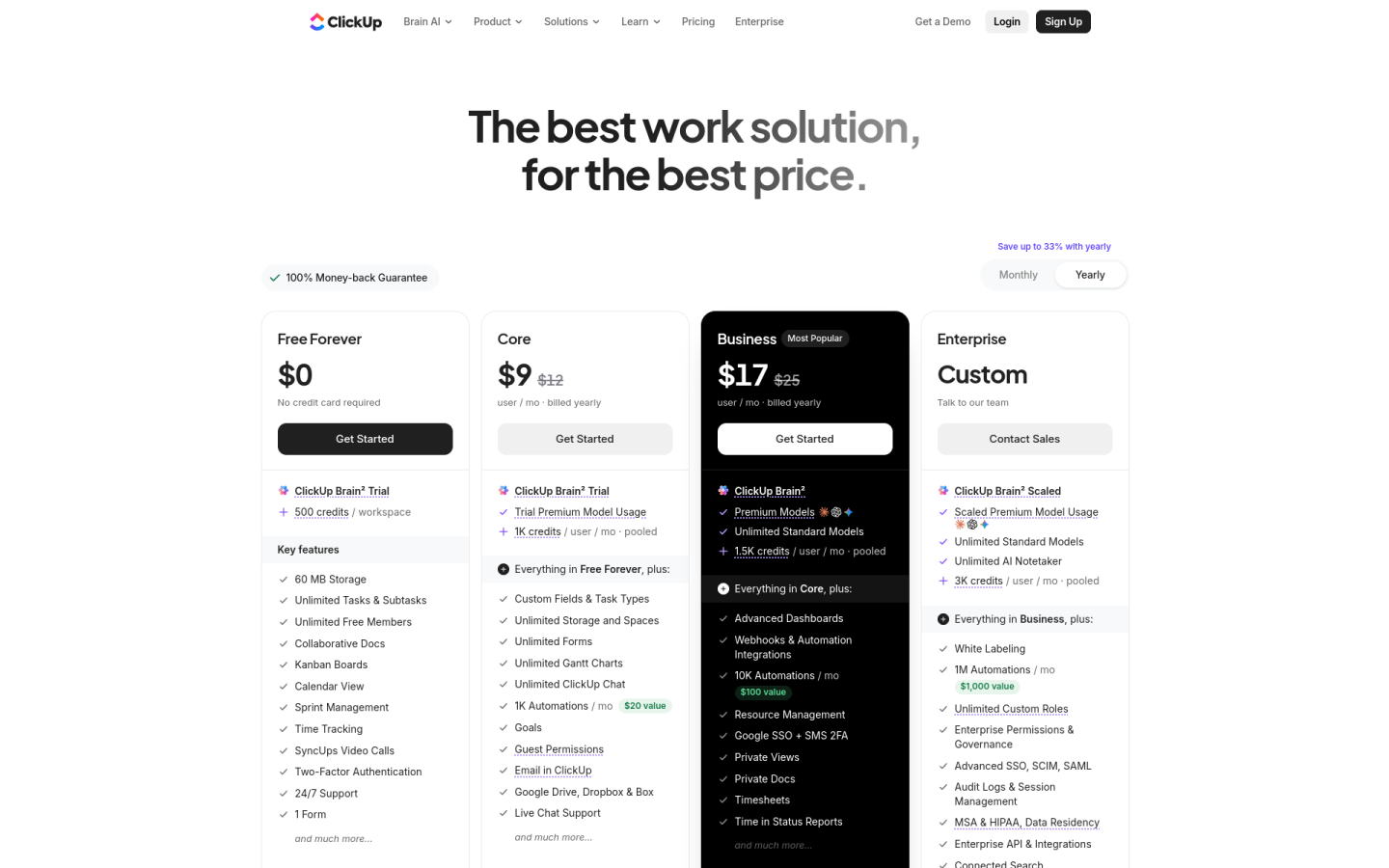
The ClickUp pricing page is built to move teams from a free workspace to plans with more AI, automation and control:
1. Clear Hierarchy and Visual Appeal:
- Confident Headline: The page opens with “The best work solution, for the best price,” paired with a “100% Money-back Guarantee” badge right below it.
- Five Plans in One View: Free Forever, Core, Business and Enterprise sit side by side, with the Max plan set apart under its own banner, “ONE PLAN. EVERYTHING MAXED.”
- Building-Block Descriptions: Each plan starts with “Everything in” the plan before it, so visitors can quickly see what they gain by moving up a tier.
- Clear Calls to Action: Self-serve plans use “Get Started,” while Enterprise uses “Contact Sales” and “Talk to our team” to mark the sales-led option.
2. Value-Based Differentiation:
- Free Forever: Lets teams start at no cost, with no credit card required and 500 AI credits shared across the workspace.
- Core: Adds unlimited storage, Spaces, Forms, Gantt charts and ClickUp Chat, plus custom fields, Goals, 1,000 automations a month and live chat support.
- Business: Adds ClickUp Brain² with premium AI models, advanced dashboards, webhooks, resource management, timesheets, private views and docs, and 10,000 automations a month.
- Enterprise: Adds white labeling, unlimited custom roles, advanced SSO, SCIM and SAML, audit logs, HIPAA support, data residency and 1 million automations a month.
- Max: Combines every Enterprise control with ClickUp’s top AI tier, including unlimited AI fields, Notetaker, image generation and Autopilot Agents, plus MCP connections.
3. Transparent Pricing:
- Annual Prices: Core costs $9, Business costs $17 and Max costs $100 per user per month when billed yearly.
- Monthly Prices: Each card shows a “Regular price” for monthly billing: $12 for Core, $25 for Business and $120 for Max per user per month.
- Clear Savings Message: The billing toggle says “Save up to 33% with yearly,” which pushes buyers toward an annual commitment.
- Custom Enterprise Pricing: Enterprise shows “Custom” instead of a price, and buyers need to talk to sales for a quote.
4. Addressing Different User Needs:
- Individuals and Small Teams: The Free Forever plan lets people try ClickUp with no credit card before they upgrade.
- Growing Teams: Core covers teams that need unlimited projects, forms and Gantt charts at a low per-user price.
- Managers and Departments: Business adds reporting, resource management and time tracking tools such as timesheets and time in status reports.
- Large and AI-Heavy Companies: Enterprise focuses on security and governance, while Max serves teams that want the most AI usage with enterprise-grade controls.
5. Strategic Use of Limitations and Incentives:
- AI Credit Tiers: Pooled AI credits rise with each plan, from 1,000 per user a month on Core to 1,500 on Business, 3,000 on Enterprise and 10,000 on Max.
- Automation Value Labels: Automation limits come with a dollar value, such as “$20 value” on Core and “$100 value” on Business, which makes upgrades feel worth more.
- Most Popular Badge: Business carries a “Most Popular” label that steers buyers toward the middle tier.
- Trust Signals: A “Trusted by the best” logo section and badges for SOC 2, ISO 27001, GDPR and HIPAA help reduce risk for larger buyers.
- Whole-Workspace Upgrades: The FAQ explains that upgrading applies to every member of the workspace, so plans grow with the full team.