
ClickTime
The easiest way to track, manage, and report on employee time.
ClickTime Pricing Page Design
$0 - $49
Launch Website
Simple timesheets and powerful reports reduce costs & improve performance. Get started for free!
This ClickTime pricing section is effective for several reasons:
- Clear Tiered Structure and Targeting:
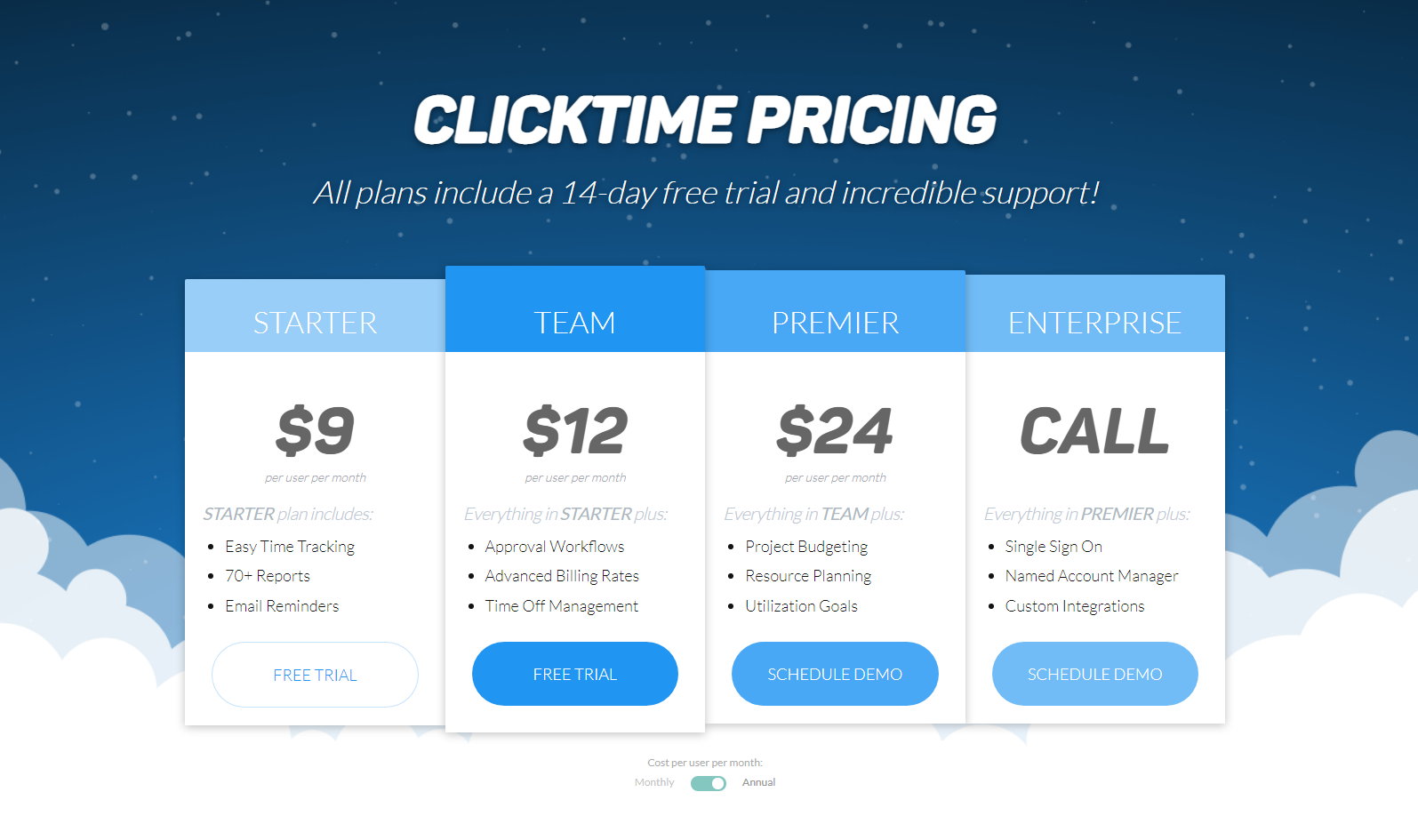
- Distinct Tiers: The “STARTER,” “TEAM,” “PREMIER,” and “ENTERPRISE” tiers are clearly defined and visually separated, making it easy to compare options.
- Target Audience Descriptions (Implied): The tier names suggest different levels of service and commitment, catering to different user needs (e.g., “STARTER” for basic use, “ENTERPRISE” for larger organizations).
- Transparent Pricing:
- Clear Price Points: The prices are prominently displayed for the first three tiers, with the “ENTERPRISE” tier offering custom pricing (“CALL”).
- Per User/Month Pricing: The pricing structure is clearly indicated as “per user per month,” making it easy to estimate costs.
- Emphasis on Feature Differentiation:
- Feature Lists: Concise feature lists for each tier allow users to quickly compare functionalities and understand the added value of higher-tier plans.
- “Everything in [Previous Tier] plus…” Structure: This clearly indicates the progression of features and benefits across the tiers.
- Strategic Use of Calls to Action:
- “FREE TRIAL” and “SCHEDULE DEMO” Buttons: Clear and prominent buttons encourage users to take action based on their needs.
- Visual Clarity and Organization:
- Clean Layout: The layout is clean and organized, making it easy to read and understand the information.
- Consistent Formatting: Consistent formatting across tiers enhances readability and makes comparisons easier.
- Risk-Free Trial:
- “All plans include a 14-day free trial” Message: This message lowers the barrier to entry and encourages users to try the service.
- Emphasis on Support:
- “Incredible support” Message: This message highlights the platform’s commitment to customer support.
- Annual/Monthly Toggle (Implied):
- “Monthly/Annual” Text: The small text at the bottom suggests the availability of both monthly and annual billing options, though the toggle is not visible in the image.