

Chartio
Chartio’s cloud-based business intelligence and analytics solution enables everyone to analyze their data from their business applications.
Chartio Pricing Page Design
$50 - $149 3 Plans
Launch Website
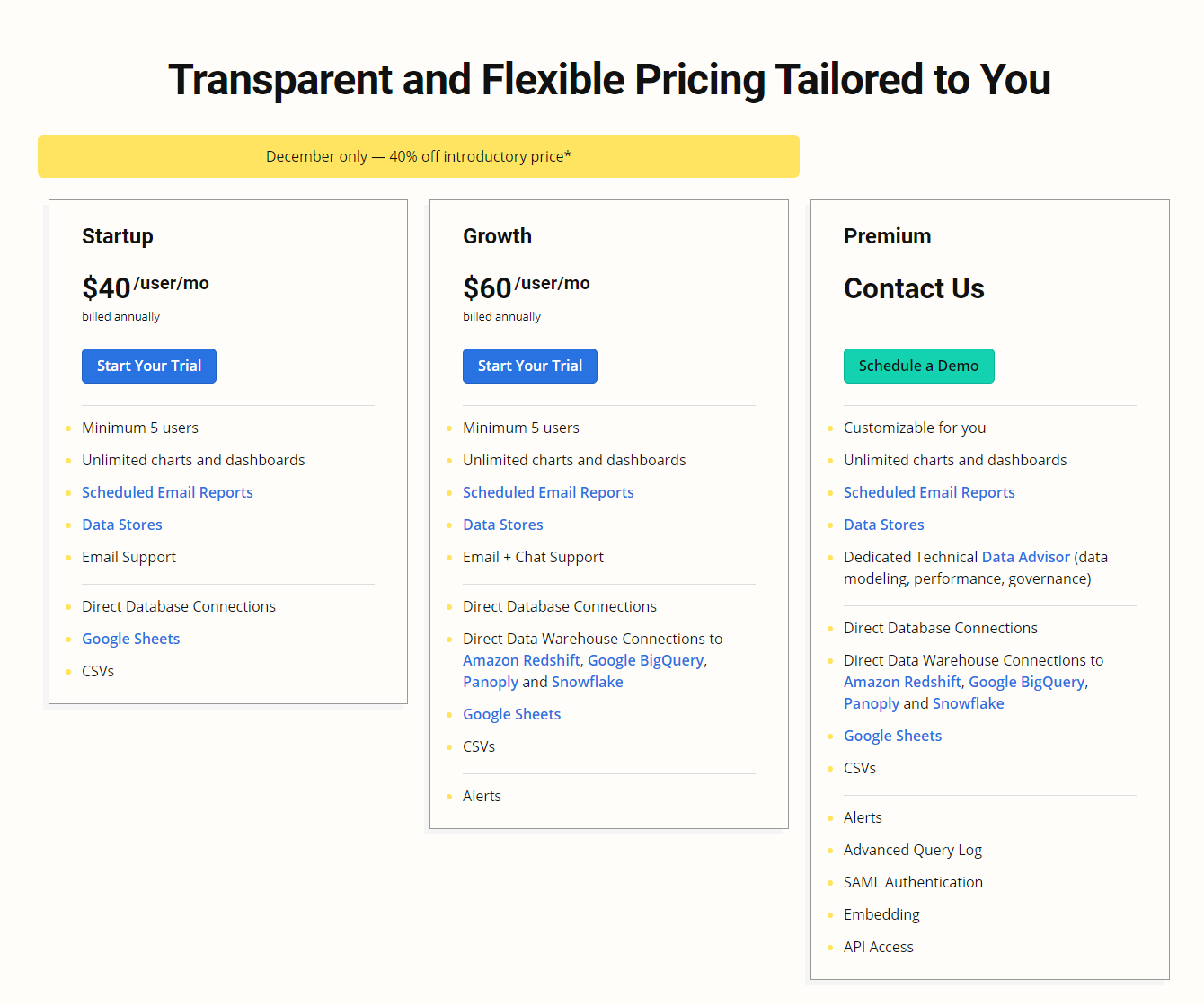
The Chartio pricing section is effective for its:
1. Clear Hierarchy and Visual Appeal:
- Headline Focus: “Transparent and Flexible Pricing Tailored to You” clearly communicates the value proposition.
- Tiered Structure: “Startup,” “Growth,” and “Premium” neatly categorize the plans.
- Concise Information: Each tier highlights key features and benefits, avoiding clutter.
- Visual Distinction: While subtle, the use of color and spacing differentiates the tiers.
- Prominent CTAs: “Start Your Trial” and “Schedule a Demo” buttons are clear and actionable.
- Limited-Time Offer: The “December only” discount adds a sense of urgency.
2. Value-Based Differentiation:
- Benefit-Oriented Language: Descriptions emphasize what the user gains (e.g., “Unlimited charts,” “Dedicated Technical Data Advisor”).
- Feature Comparison: Checkmarks and clear descriptions show the added value of each tier.
- Targeted Messaging: Each tier caters to specific needs:
- Startup: Basic features for smaller teams.
- Growth: Enhanced support and integrations for scaling businesses.
- Premium: Customizable solutions and dedicated support for enterprise-level needs.
- Progressive Value: Features are structured to show a clear progression of value as you move from Startup to Premium.
3. Transparent Pricing (with Caveats):
- Clear Startup & Growth Prices: The per-user/month pricing for these tiers is prominently displayed.
- Annual Billing Emphasis: Highlighting “billed annually” clarifies the commitment.
- Premium Pricing: “Contact Us” for Premium pricing is common for enterprise software, but it sacrifices some transparency for a personalized approach.
4. Addressing Different User Needs:
- Startups: The “Startup” tier caters to budget-conscious users with essential needs.
- Scaling Businesses: The “Growth” tier offers enhanced features and support for growing companies.
- Large Enterprises: The “Premium” tier provides customizable solutions and dedicated support for complex needs.
5. Strategic Use of Information:
- Minimum User Count: Specifying “Minimum 5 users” sets expectations for team size.
- Feature Lists: Clearly outlining features within each tier allows for easy comparison.
- Trial Offers: “Start Your Trial” encourages users to experience the product firsthand.