
Cal.com
Pricing page design for Cal.com, the open scheduling platform for booking meetings, from the free Individuals plan to the Teams, Organizations and Enterprise plans.
Cal.com Pricing Page Design
$0 - $49 4 Plans
Launch Website
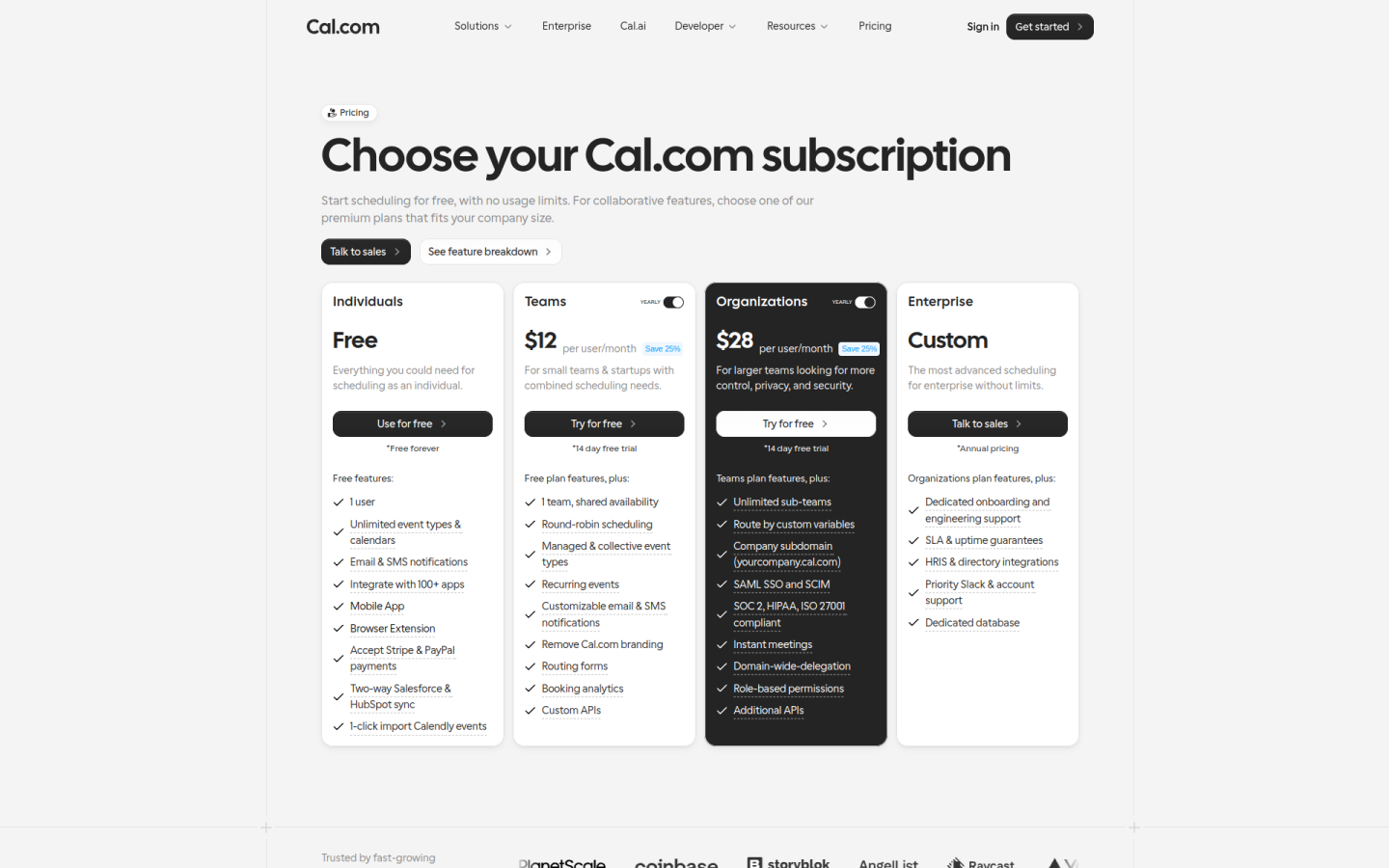
The Cal.com pricing page is built to let anyone schedule for free with no usage limits, then pay per user as teams need more control and security:
1. Clear Hierarchy and Visual Appeal:
- Direct Headline: The page opens with “Choose your Cal.com subscription,” which keeps the focus on picking a plan.
- Four Plans in a Row: Individuals, Teams, Organizations and Enterprise sit side by side, moving from one person to large companies.
- Short Plan Taglines: Each plan has a one-line goal, such as “For small teams and startups” on Teams and “The most advanced scheduling for enterprise without limits” on Enterprise.
- Stacked Feature Lists: Each paid plan starts from the plan before it and then lists what it adds, so buyers only read the differences.
- Clear Calls to Action: The buttons read “Use for free” on Individuals, “Try for free” on Teams and Organizations and “Talk to sales” on Enterprise.
2. Value-Based Differentiation:
- Individuals: Gives 1 user unlimited event types and calendars, email and SMS notifications, 100+ app integrations, Stripe and PayPal payments and two-way Salesforce and HubSpot sync.
- Teams: Adds shared team availability, round-robin scheduling, managed and collective events, routing forms, booking analytics and removal of Cal.com branding.
- Organizations: Adds unlimited sub-teams, a company subdomain, SAML SSO and SCIM, role-based permissions, instant meetings and SOC 2, HIPAA and ISO 27001 compliance.
- Enterprise: Adds dedicated onboarding and engineering support, SLA and uptime guarantees, HRIS and directory integrations, priority Slack support and a dedicated database.
3. Transparent Pricing:
- Annual Prices: Teams costs $12 per user per month and Organizations costs $28 per user per month on yearly billing, and Individuals is “Free forever.”
- Monthly Prices: On monthly billing, Teams costs $15 per user per month and Organizations costs $37 per user per month.
- Annual Savings Badge: A yearly toggle with a “Save 25%” badge on the paid plans pushes buyers toward annual billing.
- Custom Enterprise Pricing: Enterprise shows custom annual pricing, and buyers need to talk to sales for a quote.
4. Addressing Different User Needs:
- Solo Professionals: The free Individuals plan covers one person with no usage limits, plus a mobile app and browser extension.
- Calendly Switchers: The free plan includes a one-click import of Calendly events, which makes moving over easy.
- Small Teams and Startups: Teams adds round-robin and collective events for groups that share scheduling work.
- Regulated Companies: Organizations offers HIPAA, SOC 2 and ISO 27001 compliance, with US and EU hosting listed in the feature breakdown.
- Developers: Teams includes custom APIs and Organizations adds more APIs, along with webhooks, Zapier and Make support.
5. Strategic Use of Limitations and Social Proof:
- Clear Upgrade Triggers: The free plan is limited to 1 user, and Teams is limited to 1 team, which gives growing companies a clear reason to move up.
- Free Trials: Teams and Organizations both come with a 14-day free trial, which lowers the risk of trying a paid plan.
- Generous Free Plan: The subheadline promises free scheduling with no usage limits, which builds trust before any upgrade.
- Trusted Brands: A “Trusted by fast-growing companies around the world” section shows customer logos.
- Review Links: Links to G2 and Trustpilot invite buyers to check what other users say.