

Bill
Bill.com brings smart AP and AR automation and new bill payment capabilities to your business.
Bill Pricing Page Design
$50 - $149 4 Plans
Launch Website
Harness intelligent technology to help streamline your payments process.
This Bill pricing section is effective for several reasons:
1. Clear Hierarchy and Visual Appeal:
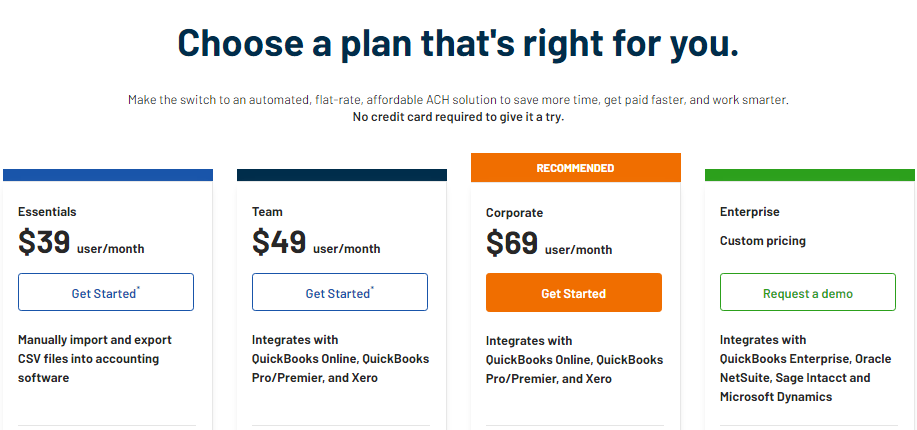
- Distinct Tiers: The “Essentials,” “Team,” “Corporate,” and “Enterprise” tiers are clearly labeled and visually separated.
- “RECOMMENDED” Highlight: The “Corporate” tier is clearly marked as “RECOMMENDED,” drawing attention and guiding user choice.
- Consistent Layout: Each tier follows a consistent layout with pricing (where applicable), descriptions, features, and call-to-action buttons.
- Visual Cues: The use of checkmarks and clear headings enhances readability.
- Clear Headings: The headings clearly indicate the purpose and target audience of each tier.
- Pricing Clarity: The monthly “user/month” prices are clearly displayed for the “Essentials,” “Team,” and “Corporate” tiers.
- Call to Action Buttons: The “Get Started” and “Request a demo” buttons are visually distinct and consistently labeled.
- Color Coding: The use of distinct colors for each tier enhances visual separation.
- Informative Headline: The headline “Choose a plan that’s right for you” and the sub-headline clearly state the value proposition and target audience.
2. Value-Based Differentiation:
- Targeted Descriptions: Each tier has a concise description that clearly identifies the target customer and their needs.
- Feature Progression: The feature lists show a clear progression, with increasing capabilities and integrations in higher tiers.
- Specific Feature Differentiation: Features like “Custom approval policies,” “Custom user roles,” and integrations with various accounting software differentiate the higher tiers.
- Quantitative Differentiation: The differences in monthly prices provide clear quantitative differences for the first three tiers.
- Free Trial Message: The “No credit card required to give it a try” message lowers the barrier to entry.
- Product Differentiation: The “Get one product” (Payables/Receivables) vs. “Get both products” options clearly differentiate the tiers.
3. Transparent Pricing:
- Clear Pricing Information: The monthly “user/month” prices are clearly stated for the “Essentials,” “Team,” and “Corporate” tiers.
- Custom Pricing: The “Enterprise” tier uses “Custom pricing” and “Request a demo,” indicating a tailored solution for larger clients.
4. Addressing Different User Needs:
- Basic Needs: The “Essentials” tier caters to users with basic needs for manual CSV imports/exports.
- Growing Businesses: The “Team” tier is designed for businesses needing integrations with popular accounting software.
- Advanced Needs: The “Corporate” tier caters to businesses needing advanced features like custom approvals and user roles.
- Enterprise Needs: The “Enterprise” tier caters to organizations needing integrations with enterprise-level accounting software.
5. Strategic Use of Information:
- Benefit-Oriented Descriptions: The descriptions focus on the key benefits of each tier.
- Clear Call to Action: The call-to-action buttons provide clear paths for action.
- Feature Lists: The feature lists clearly show the differences between the tiers.
- Concise Descriptions: The descriptions are brief and to the point, making it easy to understand the purpose of each tier.
- “RECOMMENDED” Highlight: The “RECOMMENDED” label on the “Corporate” tier influences user choice.