

beehiiv
beehiiv’s pricing page frames every plan as built for growth and lets readers switch between subscriber counts to see how the price scales with list size.
beehiiv Pricing Page Design
$50 - $149 4 Plans
Launch Website
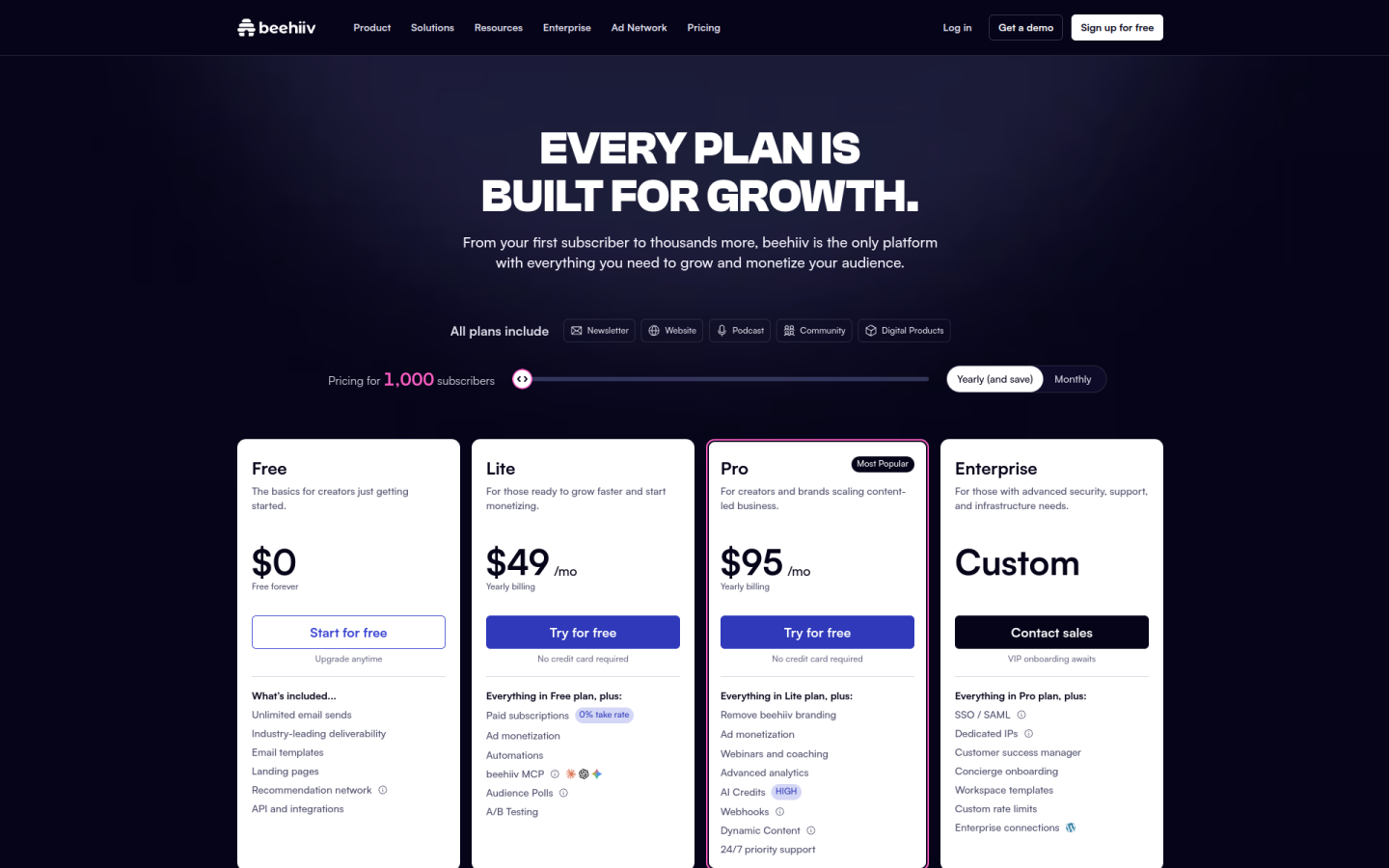
The beehiiv pricing page is built around a free-forever plan and subscriber-based paid tiers, with growth and monetization tools that unlock clearly from one plan to the next:
1. Clear Hierarchy and Visual Appeal:
- Growth-Focused Headline: The page opens with “Every plan is built for growth,” which frames every tier, including the free one, as a way to build an audience.
- Four Plans in a Row: Free, Lite, Pro and Enterprise sit side by side, each with a short pitch, such as “For creators and brands scaling content-led business” on Pro.
- Clear Calls to Action: Free uses “Start for free,” Lite and Pro use “Try for free” with “No credit card required,” and Enterprise uses “Contact sales.”
- Detailed Comparison Table: A table below the cards compares subscribers, team seats, guest authors, publications, analytics lookback and onboarding across all four plans.
2. Value-Based Differentiation:
- Free: Gives unlimited email sends, email templates, landing pages, the recommendation network and API access for up to 2,500 subscribers.
- Lite: Adds paid subscriptions with a 0% take rate, ad monetization, automations, the beehiiv MCP, audience polls and A/B testing.
- Pro: Adds removal of beehiiv branding, webinars and coaching, advanced analytics, a high level of AI credits, webhooks, dynamic content and 24/7 priority support.
- Enterprise: Adds SSO/SAML, dedicated IPs, a customer success manager, concierge onboarding, workspace templates and custom rate limits.
3. Transparent Pricing:
- Annual Prices: At 1,000 subscribers on yearly billing, Lite costs $49 a month and Pro costs $95 a month.
- Monthly Prices: On month-to-month billing, Lite costs $59 a month and Pro costs $109 a month at the same subscriber count.
- Billing Toggle: A “Yearly (and save)” and “Monthly” switch sits above the plans, and the FAQ explains that yearly billing saves up to 20%.
- Subscriber Selector: Buyers can switch between “Pricing for 1,000 subscribers” and “Pricing for 250,000+ subscribers” to see how cost scales with list size.
- Custom Enterprise Pricing: Enterprise shows “Custom” instead of a price, and buyers contact sales for a quote.
4. Addressing Different User Needs:
- New Creators: Free is described as “The basics for creators just getting started” and is “Free forever” for one publication and one team seat.
- Monetizing Creators: Lite is pitched “For those ready to grow faster and start monetizing,” with up to 100,000 subscribers, 2 team seats and 3 publications.
- Media Brands and Teams: Pro supports up to 250,000 subscribers, 10 team seats, 10 publications and unlimited guest authors.
- Large Organizations: Enterprise is aimed at teams with “advanced security, support, and infrastructure needs,” with unlimited seats and custom subscriber volume.
- Every Product on Every Plan: The FAQ states that website, podcast, community and digital products are on all plans, and higher tiers change limits and support.
5. Strategic Use of Limitations and Social Proof:
- Limits as Upgrade Triggers: Analytics lookback rises from 30 days on Free to 12 months on Lite and unlimited on Pro, which gives growing newsletters a clear reason to move up.
- Most Popular Badge: A “Most Popular” label on Pro steers buyers toward the higher self-serve plan.
- Revenue-Friendly Fees: The page highlights a 0% take rate on paid subscriptions and digital products, with only standard Stripe fees applied.
- Risk-Free Trials: Lite and Pro come with a free trial and no credit card required, and Enterprise promises “VIP onboarding awaits.”
- Creator and Brand Logos: Under “Trusted by top creators and brands,” logos such as TIME, Pinterest, Adobe, Ramp, Brex, TechCrunch and Newsweek appear, along with case studies from TIME and Morning Brew.