

Webex
Webex by Cisco is the leading enterprise solution for video conferencing, online meetings, screen share, and webinars.
Webex Pricing Page Design
$500+ 4 Plans
Launch Website
Web conferencing, cloud calling, and equipment.
The Webex pricing section is effective for several reasons:
- Clear Tiered Structure and Targeting:
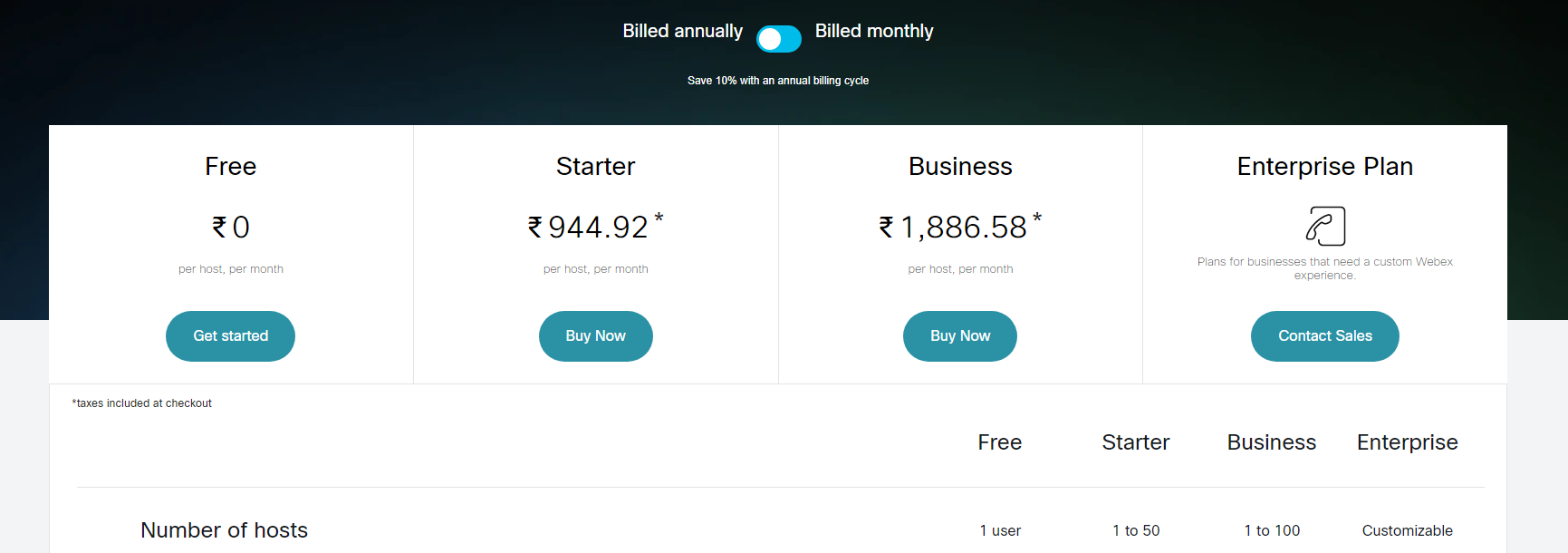
- Distinct Tiers: The “Free,” “Starter,” “Business,” and “Enterprise Plan” tiers are clearly defined and visually separated, making it easy to compare options.
- Target Audience Descriptions (Implied): The tier names themselves suggest different levels of service and commitment, catering to different user needs (e.g., “Free” for basic use, “Business” for larger teams).
- Transparent Pricing:
- Clear Price Points: The prices are prominently displayed for each paid tier, with the “Free” tier clearly marked as ₹0.
- Annual Billing: The “Billed annually” toggle is clearly visible, allowing users to see the pricing for annual subscriptions.
- “Contact Sales” for Enterprise: The “Contact Sales” designation for the “Enterprise Plan” suggests custom pricing, which is common for larger organizations.
- Emphasis on Feature Differentiation:
- Feature Lists: Detailed feature lists for each tier allow users to easily compare functionalities and understand the added value of higher-tier plans.
- Checkmarks: Checkmarks are used effectively to indicate included features.
- Clear Feature Grouping: The features are grouped into categories like “Meetings & Video conferencing,” making it easier to navigate.
- Strategic Use of Calls to Action:
- “Get started,” “Buy Now,” and “Contact Sales” Buttons: Clear and prominent buttons encourage users to take action.
- Visual Clarity and Organization:
- Clean Layout: The layout is clean and organized, making it easy to read and understand the information.
- Consistent Formatting: Consistent formatting across tiers enhances readability and makes comparisons easier.
- Focus on Core Value:
- Meetings & Video Conferencing: The emphasis on features related to meetings and video conferencing highlights the core value proposition of the platform.
- Clear Indication of Limitations:
- Meeting Length and Participant Limits: The clear indication of meeting length and participant limits for each tier helps users choose the right plan based on their needs.
- Cloud Recording Storage Limits: The cloud recording storage limits are clearly displayed.
- Additional Information:
- Asterisks: Asterisks are used to indicate that there may be additional information or details available about specific features.