

Skuid
Skuid is a UI/UX toolkit for Salesforce that helps businesses build apps faster with less code.
Skuid Pricing Page Design
$500+ 4 Plans
Launch Website
Put Salesforce data in one UI and only show users the data they need.
The Skuid pricing section is effective for several reasons:
-
Clear Hierarchy and Visual Appeal:
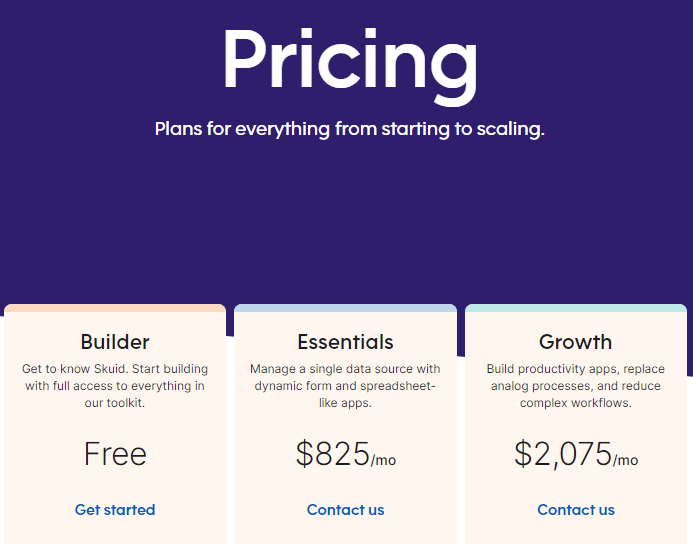
- Headline Focus: “Pricing” is clear and concise. The tagline “Plans for everything from starting to scaling” is relevant.
- Tiered Structure: Four distinct tiers (Builder, Essentials, Growth, Enterprise) are clearly displayed.
- Visual Cues: “Get started” and “Contact us” buttons are clearly visible. The layout is organized and easy to navigate.
-
Value-Based Differentiation:
- Target Audience: Each tier description highlights the target user and their needs (e.g., “Start building,” “Manage a single data source,” “Build productivity apps,” “Connect multiple data sources”).
- Feature List: The features are presented in categories (Users, Configuration, Success), allowing for easy comparison of what’s included in each tier. The limits for each tier are clearly stated.
-
Transparent Pricing:
- Clear Pricing: Prices are clearly displayed for the Essentials and Growth tiers.
- Custom Pricing: The Enterprise tier uses “Let’s talk,” indicating custom pricing for larger organizations.
- Additional User Pricing: The pricing for additional users is clearly stated for the Essentials and Growth tiers.
-
Addressing Different User Needs:
- Tier Names: The names suggest different levels of service and functionality.
- Target Audience Descriptions: The descriptions explicitly target different customer segments.
-
Strategic Use of Information:
- Call to Action: “Get started” and “Contact us” buttons are strategically placed.
- Categorized Feature List: The features are grouped into logical categories, making it easy to see the differences between tiers.
- Unlimited Options: The use of “Unlimited” for certain features in the higher tiers is attractive to users.
- Training and Enablement: The inclusion of training and enablement hours in the Success category highlights the level of support provided.
- Support Cases: The number of support cases included in each tier is clearly stated.
- User Limits: User limits are clearly defined for each tier.
- Connections: The number of connections allowed in each tier is specified.
- Code Extensibility: The availability of code extensibility in the Enterprise tier is highlighted.