

Livestorm
Experience the all-in-one video engagement platform to create and manage your online meetings, video conferencing, webinars, virtual events, and screen sharing.
Livestorm Pricing Page Design
$50 - $149 3 Plans
Launch Website
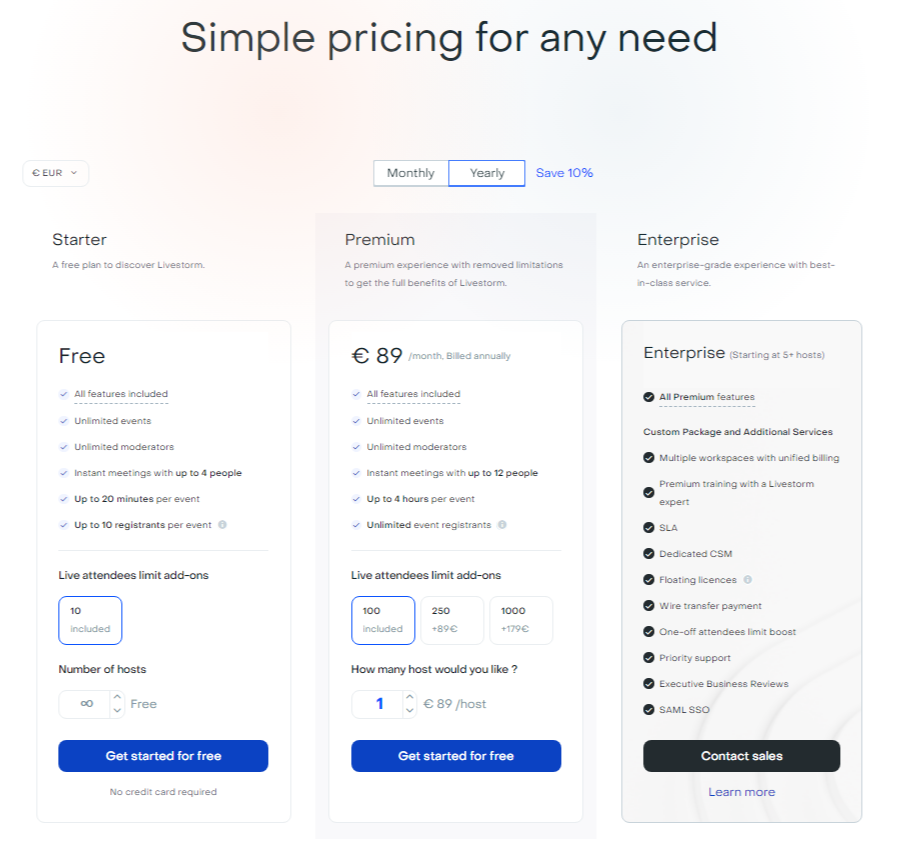
This Livestorm pricing section is effective for several reasons:
1. Clear Hierarchy and Visual Appeal:
- Distinct Tiers: The “Starter,” “Premium,” and “Enterprise” tiers are clearly labeled and visually separated.
- Consistent Layout: Each tier follows a consistent layout with descriptions, features, and call-to-action buttons.
- Visual Cues: Checkmarks are used to indicate included features, enhancing readability.
- Clear Headings: The headings clearly indicate the purpose and target audience of each tier.
- Pricing Clarity: The monthly prices are prominently displayed for the “Starter” and “Premium” tiers.
- Call to Action Buttons: The “Get started for free” and “Contact sales” buttons are visually distinct and clearly labeled.
- Billing Options: The “Monthly” and “Yearly” toggle allows users to easily compare billing options, with a “Save 10%” incentive for annual billing.
- Currency Options: The “€ EUR” dropdown allows users to change the currency.
2. Value-Based Differentiation:
- Targeted Descriptions: Each tier has a concise description that clearly identifies the target customer and their needs.
- Feature Progression: The feature lists clearly show the increasing capabilities of each tier.
- Specific Feature Differentiation: Features like “Premium training with a Livestorm expert,” “SLA,” “Dedicated CSM,” and “SAML SSO” differentiate the “Enterprise” tier.
- Quantitative Differentiation: The differences in event duration, attendee limits, and instant meeting participant limits provide clear quantitative differences.
- Free Option: The “Starter” tier offers a free option, lowering the barrier to entry.
- Add-on Options: The “Live attendees limit add-ons” and “How many hosts would you like?” sections provide clear options for scaling up.
3. Transparent Pricing:
- Clear Pricing Information: The monthly prices are clearly stated for the “Starter” and “Premium” tiers.
- Contact for Pricing: The “Enterprise” tier uses “Contact sales,” indicating a tailored solution for larger clients.
- Add-on Pricing: The pricing for add-on features is clearly stated.
4. Addressing Different User Needs:
- Discovery: The “Starter” tier caters to users looking to discover the platform.
- Premium Experience: The “Premium” tier is designed for users needing a full-featured experience.
- Enterprise-Grade: The “Enterprise” tier caters to organizations needing advanced features and support.
5. Strategic Use of Information:
- Benefit-Oriented Descriptions: The descriptions focus on the key benefits of each tier.
- Clear Call to Action: The call-to-action buttons provide clear paths for action.
- Feature Lists: The feature lists clearly show the differences between the tiers.
- Concise Descriptions: The descriptions are brief and to the point, making it easy to understand the purpose of each tier.
- Free Trial Incentive: The “Get started for free” option incentivizes users to try the product.
- Billing Toggle: The monthly/annual toggle lets users see the difference in costs.