

Github
GitHub is where over 65 million developers shape the future of software, together.
Github Pricing Page Design
$0 - $49 3 Plans
Launch Website
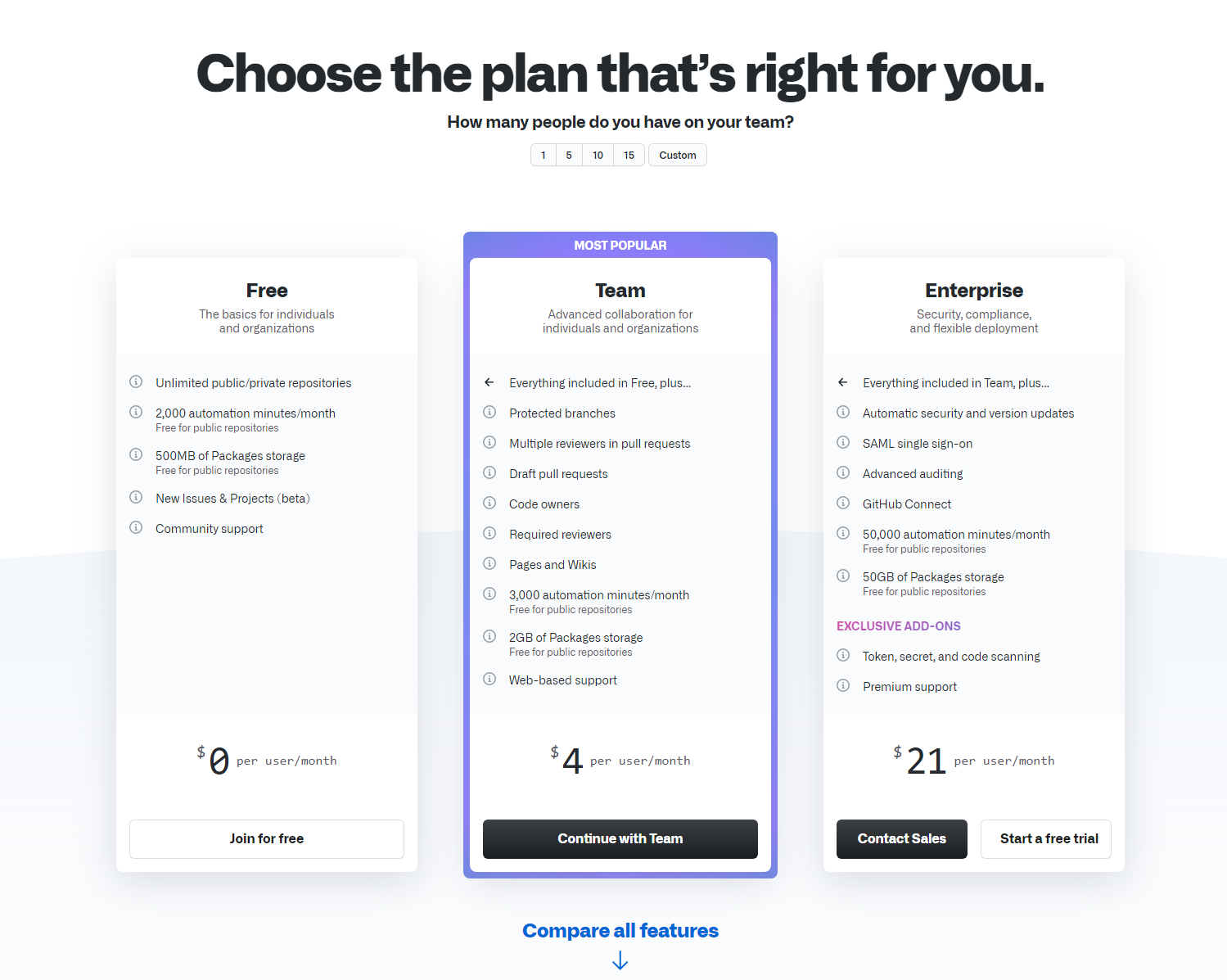
Contribute to the open source community, manage your Git repositories, review code like a pro, track bugs and features, power your CI/CD and DevOps workflows, and secure code before you commit it.
The GitHub pricing section is effective for several reasons:
-
Clear Hierarchy and Visual Appeal:
- Headline Focus: “Choose the plan that’s right for you.” is a clear and direct headline.
- User Input: The “How many people do you have on your team?” input allows for immediate personalization and filtering.
- Tiered Structure: Three distinct tiers (Free, Team, Enterprise) are clearly displayed with visual separation.
- Visual Cues: The “MOST POPULAR” banner highlights a recommended option. Pricing is prominently displayed. CTAs are clearly visible.
- Layout: The layout is organized and easy to navigate, presenting key information concisely.
-
Value-Based Differentiation:
- Target Audience: Each tier description clearly defines the target customer profile (e.g., “individuals,” “individuals and organizations,” “security, compliance, and flexible deployment”).
- Feature List: The feature list shows increasing functionality and value across tiers, with each tier building upon the previous one.
-
Transparent Pricing:
- Clear Pricing: Prices are clearly displayed for each tier, along with the per-user/month unit.
-
Addressing Different User Needs:
- Tier Names: The names (Free, Team, Enterprise) suggest different levels of service and functionality.
- Target Audience Descriptions: The descriptions explicitly target different customer segments based on their size and needs.
-
Strategic Use of Information:
- Free Trial CTAs: “Start a free trial” CTA is present for the Enterprise tier.
- “Join for free” CTA: A clear CTA is provided for the Free tier.
- “Continue with Team” CTA: A prominent CTA is present for the Team tier.
- “Contact Sales” CTA: A clear CTA is included for the Enterprise tier, encouraging direct contact for more information.
- Feature List: The detailed feature list allows for easy comparison.
- “Compare all features” Link: This provides an easy way for users to see a comprehensive comparison.
- “EXCLUSIVE ADD-ONS” Section: This highlights additional features that can be added to the Enterprise plan.
- “Free for public repositories” Note: This clarifies the pricing model for public repositories.